

Overview
VeridiumID supports Hybrid Identity integration by combining:
-
On-prem Active Directory (LDAP)
-
Microsoft Entra ID
into a unified identity model.
In Hybrid mode:
-
LDAP remains the authoritative source
-
Entra enriches cloud identity data
-
Users merge into a single platform identity
Hybrid Identity Architecture
Unified Hybrid User Model
When a user exists in both:
-
Active Directory
-
Entra ID
VeridiumID merges both records into a single identity object.
Conflict Resolution Strategy
LDAP acts as the authoritative source for:
-
Core identity data
-
Password management
-
Enrollment validation
Entra ID contributes:
-
Cloud metadata
-
Extended attributes
-
Cloud identifiers
Source Attribution
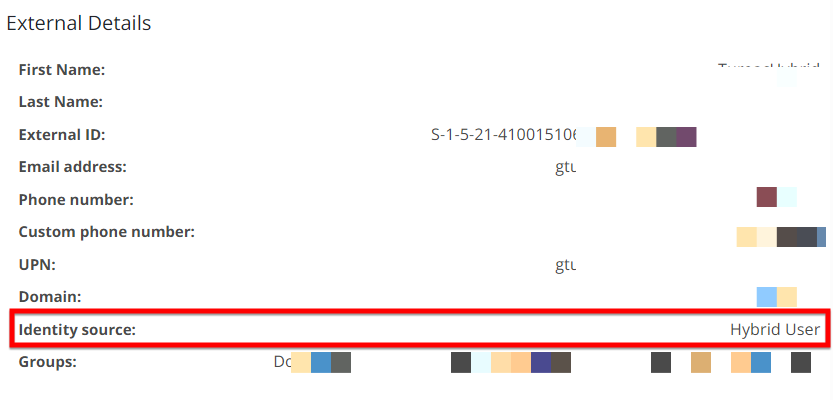
Hybrid users are explicitly tagged as:
Hybrid User
This enables:
-
Policy targeting
-
Authentication troubleshooting
-
Security auditing
Prerequisites
Before enabling Hybrid mode:
-
Configure the Entra connector
-
Validate Microsoft Graph permissions
-
Configure LDAP connectivity
-
Verify user synchronization
See Entra ID Connector Configuration Steps and Requirements for complete Entra configuration details.
Hybrid Directory Sync Configuration
Navigate to:
Admin Manager > Settings > Directory Services > LDAP
and create or edit an existing ldap connection.
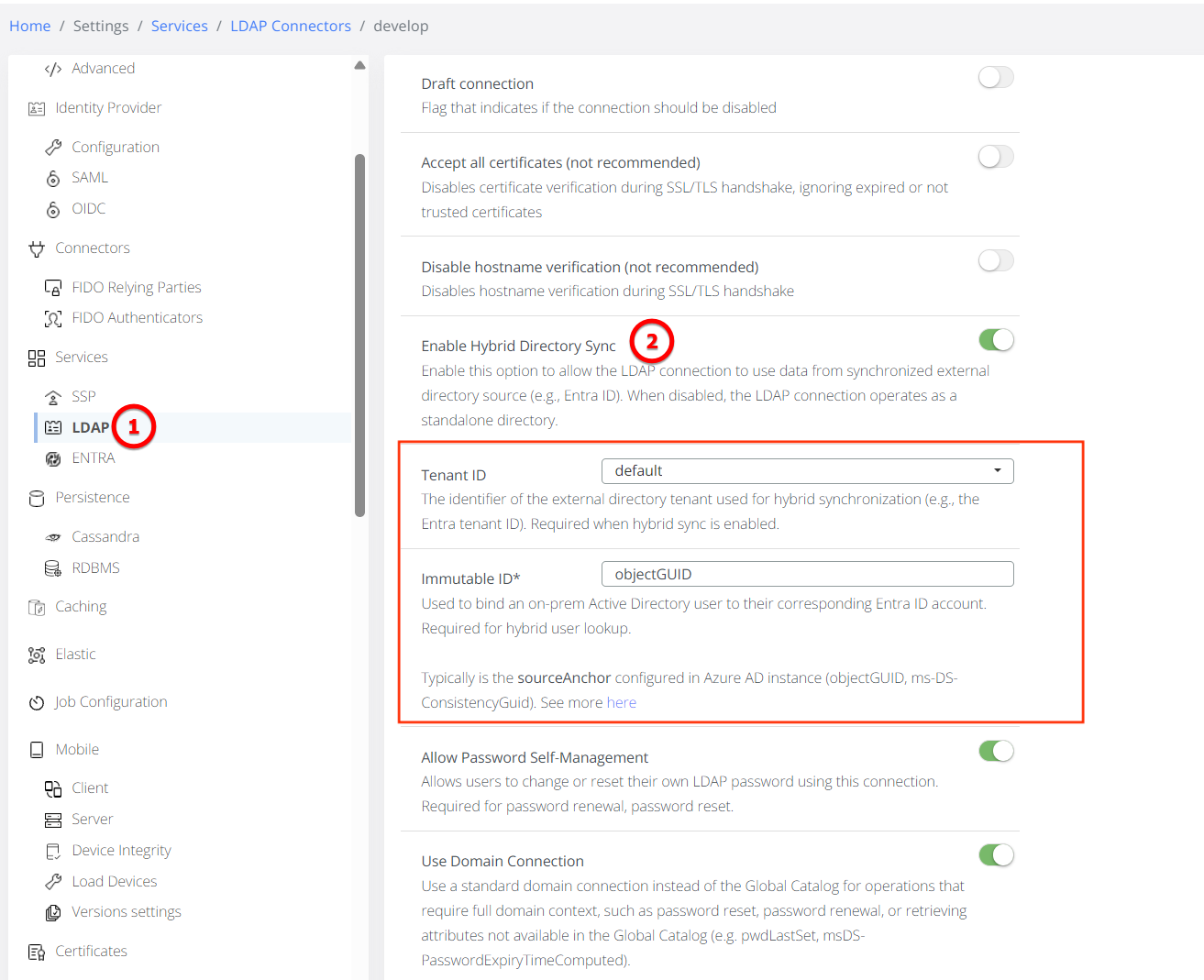
Enable Hybrid Directory Sync
Enable:
Enable Hybrid Directory Sync
Select Entra Tenant
Choose the corresponding configured:
Tenant ID
from the available Entra connectors.
Configure Immutable ID Mapping
Use:
objectGUID
to bind the LDAP identity to the Entra identity.
This ensures stable identity matching even when:
-
Email addresses change
-
Names change
-
UPNs change
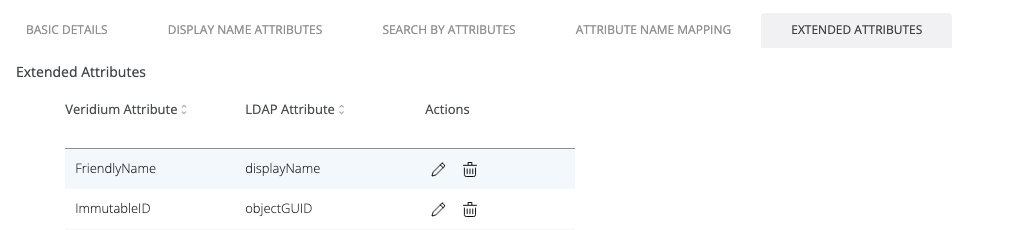
Additionally, ensure that ImmutableID is configured in the LDAP Extended Attributes, mapped to objectGUID, and matches the Immutable ID Mapping defined in the Hybrid Configuration.
Hybrid Authentication Behavior
Enrollment Requirements
|
Operation |
Requires LDAP |
Requires Entra API |
|---|---|---|
|
Hybrid Enrollment |
Yes |
Yes |
|
Hybrid Re-enrollment |
Yes |
Yes |
Authentication Requirements
|
Operation |
Requires LDAP |
Requires Entra API |
|---|---|---|
|
Hybrid Authentication |
Yes |
No |
|
Password Change |
Yes |
No |
LDAP remains the authoritative password source.
Hybrid Operational Scenarios
|
Scenario |
LDAP Status |
Entra Status |
Result |
|---|---|---|---|
|
Hybrid Enrollment |
Up |
Up |
Success: Merges data from both sources. |
|
Hybrid Re-enrollment |
Down |
Up |
Failure: "No LDAP connection for hybrid user found". |
|
Hybrid Authentication |
Up |
Down |
Partial Success: Authenticates via LDAP; cloud-specific extended attributes may be missing. |
LDAP Dependency
Hybrid identities depend heavily on LDAP availability.
If LDAP connectivity is unavailable:
-
Enrollment fails
-
Password operations fail
-
Hybrid identity verification fails
Typical failure message:
No LDAP connection for hybrid user found
Hybrid User Capabilities
Supported Features
✅ Active Directory password authentication
✅ Self-service password reset
✅ Password change operations
✅ Unified identity visibility
Limitations
⚠️ Entra password is not used for authentication
⚠️ LDAP outages impact enrollment and password workflows
⚠️ Cloud-only attributes may become unavailable if Entra APIs fail
Security Considerations
Hybrid identity merging prevents:
-
Duplicate user identities
-
Fragmented security policies
-
Inconsistent authorization behavior
Unified identities allow:
-
Consistent policy enforcement
-
Centralized auditing
-
Improved authentication tracking