

1. Introduction
The VeridiumID platform delivers a flexible, enterprise-grade identity and authentication solution supporting biometric, multi-factor and password-less workflows. The platform is designed for highly available, scalable deployment — whether on-premises, hybrid, or in containerized environments.
This document provides a high-level overview of the core concepts, deployment architecture, major system components — including the RA/EP and CP modules — and how they integrate within the overall system.
2. Core Components
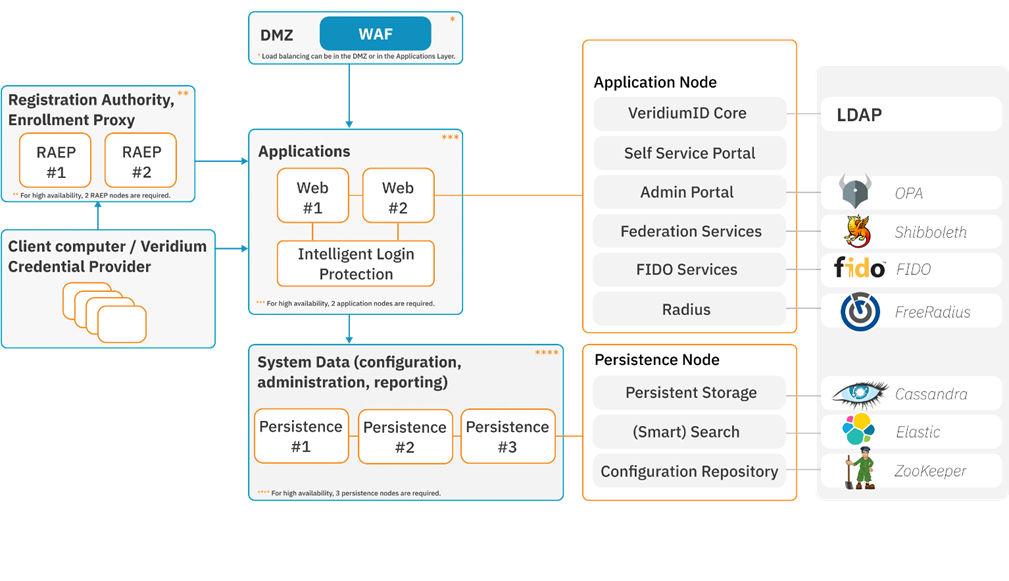
2.1 VeridiumID server (core platform) - Identity & Authentication
VeridiumID Server is the central authentication and orchestration platform. It exposes REST APIs and web applications that handle:
-
Enrollment and lifecycle of user identities and devices
-
Policy, authenticators, and orchestration flows (PIN, biometrics, OTP, FIDO, passkeys, etc.)
-
Integration with enterprise systems (SAML, OIDC, RADIUS, AD/LDAP, ADFS, Windows login, etc.)
Typical on-prem architecture (non-containerized):
-
Web/App layer (“webapp” nodes)
-
Runs Tomcat-based components (websec, websecadmin, SSP, Admin UI, APIs).
-
Handles HTTP(S) traffic from browsers, mobile apps, Windows components, and other relying parties.
-
-
Persistence layer (“persistence” nodes)
-
Cassandra – primary operational datastore for identities, sessions, configuration, etc.
-
Elasticsearch – search, reporting, dashboards, ILP analytics back end.
-
Zookeeper – coordination/configuration for the platform and some clustered components.
-
Kafka (in newer ILP deployments) – event streaming for ILP data pipelines.
-
Different topologies (PoC, unified 3-node, layered 2+3, etc.) simply combine these roles in different ways for scalability and HA.
2.2 Windows integration components
The Windows integration provides passwordless domain logon for Windows clients using VeridiumID. Main components:
-
Windows Credential Provider (CP)
-
Installed on domain-joined Windows clients.
-
Replaces or augments the standard logon UI.
-
Interacts with VeridiumID Server over MTLS-protected REST APIs to validate Veridium tokens and complete logon.
-
-
Enrollment Proxy (EP)
-
Must run on a Windows server with IIS installed, that is a member of the same domain as, or a domain that trusts, the domain of the Windows clients running the Credential Provider.
-
Authenticates that the Windows machine running CP is a valid domain member and enrolls that machine with a certificate from the embedded VeridiumID CA
-
Once a machine running the CP is enrolled with a valid certificate from the embedded VerdiumID CA it no longer needs to contact the EP
-
The enrolled machine certificate is used to establish an mTLS session to the VeridiumID server to initiate user authentication
-
-
Registration Authority (RA)
-
May run on any Windows server with IIS installed as long as:
-
That server can successfully enroll with a “BopsRSA” certificate from the ADCS trusted by the domain of machines running the CP.
-
That server is able to communicate with the trusted ADCS over Microsoft DCOM/RPC.
-
Typically easiest if the Windows server hosting the RA meets the same domain membership requirements as the EP
-
-
Enrolls users with certificates from ADCS upon successful VeridiumID user authentication.
-
These user certificates complete the authentication process and establish the user identity/context to the Windows OS without using any password
-
The VeridiumID orchestrator may be configured to require AD passwords during login and remove the necessity for user certificates and the RA entirely
-
-
AD PKI / Microsoft CA
-
Standard AD CS deployment used as the trust anchor for Windows smartcard-style logon and machine certificates.
-
The RA may optionally be configured to enroll certificates from an EJBCA provided that CA is the trusted PKI for user certificates for the domain containing the machines running the CP
-
The high-level flow:
-
If the machine running CP does not have an enrolled machine certificate it contacts the EP to obtain one. The default lifetime for these machine certificates is 10 years and generally won’t ever need to be re-enrolled barring special circumstances.
-
The CP establishes an mTLS connection with the VeridiumID server using the machine certificate enrolled by the EP.
-
The VeridiumID server evaluates the Orchestrator Policy and returns a payload containing the user engagement options (i.e. QR Code, ID Input field, Passkey, WBF), if this is an unlock event the payload will also contain all credential options allowed for the unlocking user.
-
CP renders the UI, collects the user’s Veridium credential (via mobile, passkey, etc.), and passes the credential to the VeridiumID server for validation. This may be a multi-step process depending on the Orchestrator policy configuration.
-
Upon successful authentication the VeridiumID server issues a session token to the CP, if the machine running the CP has a cached and locked user certificate the token will unlock that certificate and complete the login using the unlocked cached PKI credentials
-
If there is no cached and locked user certificate on the machine running the CP, the token is submitted to the RA which verifies the token against the VeridiumID server and, upon successful verification, either:
-
If certificate caching is configured on the RA it provides a previously enrolled user certificate for that user if one exists.
-
Enrolls the user with a certificate from the integrated PKI (typically ADCS), and delivers the newly enrolled certificate to the CP to complete the login.
-
2.3 Intelligent Login Protection
Intelligent Login Protection (ILP) is is an add-on analytics platform focused on context and motion–based risk scoring:
-
Context pipeline – evaluates device, network, and behavioral context for sign-ins.
-
Motion pipeline – evaluates motion / sensor patterns during authentications (e.g., how the device is held or moved).
Key points from the ILP “General architecture and design” doc:
-
Deployed on 1–2 additional ILP webapp nodes (same OS baseline as VeridiumID Server).
-
Reuses Veridium persistence: Cassandra, Zookeeper, Elasticsearch, Kafka.
-
Runs multiple microservices (Java and Python) for ingestion, modeling, inference, and training.
-
Exposes GRPC/HTTPS services behind HAProxy using DNS names like
ingestion.<domain>,models.<domain>,tenant.<domain>, etc. -
Integrates back into VeridiumID Server, which sends events to ILP and consumes risk scores for policy decisions (e.g., challenge, deny, step-up).
Detailed Service description / implementation behind o proxy.
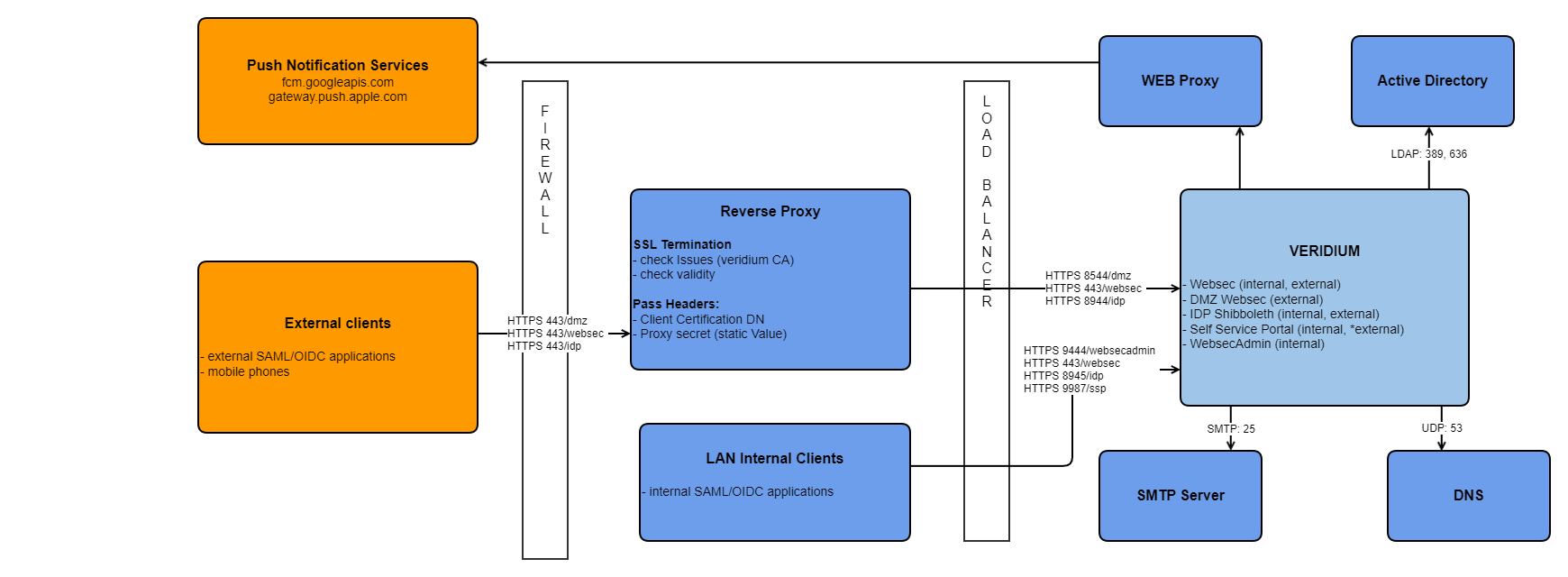
VeridiumID WEBAPP service:
Veridium has 5 services, some of them should be exposed on internet some on intranet.
|
service |
short description |
Requires certificate Auth |
Exposed Internally |
Exposed Externally |
PATH |
Sticky session |
If port implementation |
If FQDN implementation |
|---|---|---|---|---|---|---|---|---|
|
WEBSEC |
Used for authentication |
Y |
Y |
Y |
/websec |
N |
HOST.DOMAIN.INTERNAL:443 HOST.DOMAIN.EXTERNAL:443 |
HOST.DOMAIN.INTERNAL:443 HOST.DOMAIN.EXTERNAL:443 |
|
DMZWEBSEC |
Used for registration |
N |
N (if not extern, then must be internal) |
Y |
/dmzwebsec |
N |
HOST.DOMAIN.EXTERNAL:8544 |
dmz-HOST.DOMAIN.EXTERNAL:443 |
|
SHIBBOLETH |
Identity provider |
N |
Y |
Y |
/idp |
Y |
HOST.DOMAIN.INTERNAL:8945 HOST.DOMAIN.EXTERNAL:8944 |
shib-HOST.DOMAIN.INTERNAL:443 shib-HOST.DOMAIN.EXTERNAL:443 |
|
WEBSECADMIN |
Veridium configuration manager |
Y |
Y |
N |
|
N |
HOST.DOMAIN.INTERNAL:9444 |
admin-HOST.DOMAIN.INTERNAL:443 |
|
SSP |
Veridium Self service portal |
N |
Y |
Y (only registration) |
/ssp
|
N |
HOST.DOMAIN.INTERNAL:9987 HOST.DOMAIN.EXTERNAL:9987 |
ssp-HOST.DOMAIN.INTERNAL:443 ssp-HOST.DOMAIN.EXTERNAL:443 |
*Of course, In Reverse proxy, can be changed the implementation to receive all the traffic on 443, but send the traffic to different application, based on PATH.
ILP WEBAPP service:
Veridium has 5 services, some of them should be exposed on internet some on intranet.
|
service |
short description |
Requires certificate Auth |
Exposed Internally |
Exposed Externally |
PATH |
Sticky session |
FQDN |
|
|---|---|---|---|---|---|---|---|---|
|
TENANT |
Used for ILP tenant list |
N |
Y |
N |
N/A |
N |
TENANT.ILP.DOMAIN.INTERNAL:443 |
|
|
INGESTION |
Used for getting scores |
N |
Y |
N |
N/A |
N |
INGESTION.ILP.DOMAIN.INTERNAL:443 |
|
|
USERS |
Used for ILP users |
N |
Y |
N |
N/A |
N |
USERS.ILP.DOMAIN.INTERNAL:443 |
|
RA/EP service:
Veridium has 5 services, some of them should be exposed on internet some on intranet.
|
service |
short description |
Requires certificate Auth |
Exposed Internally |
Exposed Externally |
PATH |
Sticky session |
FQDN |
|
|---|---|---|---|---|---|---|---|---|
|
RA/EP |
Used for Register Authority/Enrollment Proxy |
N |
Y |
N |
N/A |
N |
RAEPSERVICE.DOMAIN.INTERNAL |
|
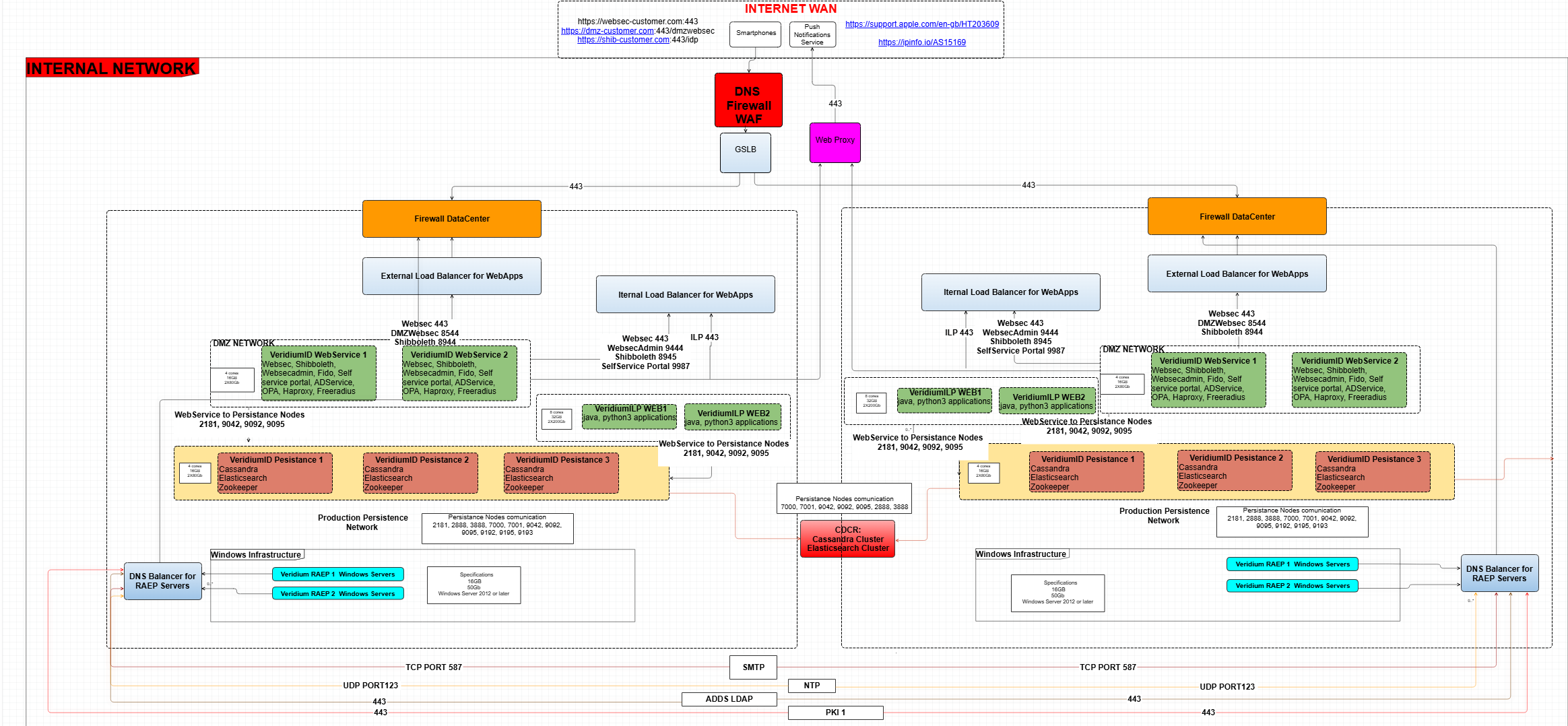
3. Architecture example with 2 Datacenters with Cross DataCenter Replication with 2 Veridium Webservers, 2 ILP Webservers and 3 Persistance Nodes in each Datacenter.
This is an example of port deployment in CDCR - more details in upcoming chapters.
4. Concepts & Capabilities
-
VeridiumID supports multiple deployment types: from small single-node proof-of-concept (PoC) setups to large enterprise, layered, high-availability installations.
-
The architecture separates Application Layer (webapps, APIs) and Persistence Layer (databases, configuration stores) for large installations.
-
Cross-data-center replication (CDCR) is supported for global/high-availability use-cases.
-
Deployment can be done onPrem Servers as well as Micro-services & Modern infrastructure (e.g., Kubernetes/OpenShift)
-
When publishing Veridium Services to the internet for mobile authenticator communication you need to consider mTLS (Client Certificate Authentication), and proper configuration of any WAF with SSL termination to pass the client certificate back to VeridiumID