

-
ISSUE 1: Do not display placeholder strings to the user if he/she uses unsupported language on mobile device
🔥 Hotfix Details
This hotfix updates the auto-translation mechanism. We migrate from hardcoded English strings for the enrolment process to a key-value approach via i18n. If the mobile app requests a translation for a language not in the i18n keys, the key is returned. The fix returns the default English translation instead.
-
ISSUE 2: SSP Access Not Enforced Based on Role Permissions
Issue Summary
This hotfix addresses an issue where users were able to access the SSP (Self-Service Portal) even when their assigned roles did not grant SSP access.
Even after removing the SSP permission from the assigned role—or explicitly setting SSP access as a negative permission—the restriction was not enforced during authentication.
As a result, users were still able to successfully authenticate and access SSP, bypassing the intended role-based access control.
Resolution
The access control logic has been corrected to properly enforce SSP permissions defined at the role level.
Users without explicit SSP access—or with explicitly denied access—are now correctly blocked from accessing SSP.
Access Control Behavior
-
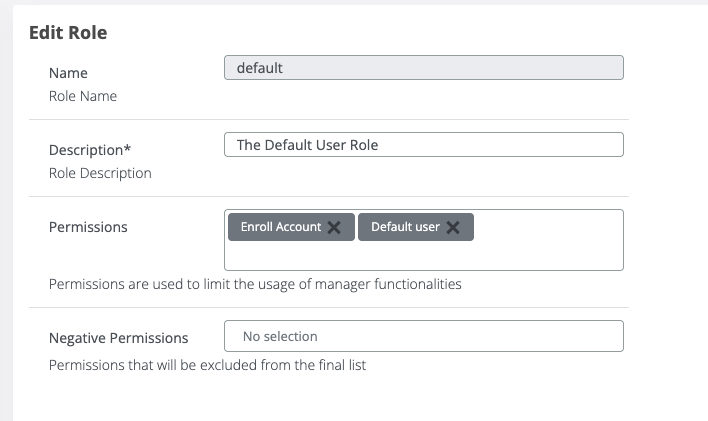
If SSP Access is not included in the assigned role permissions, the user’s access to SSP will be restricted.
-
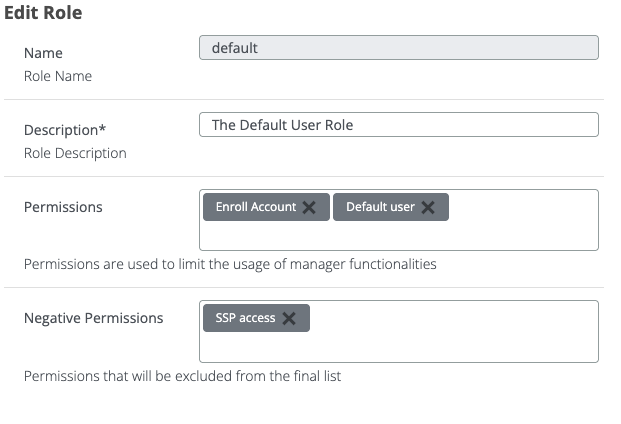
If SSP Access is explicitly configured as a negative permission, the user’s access to SSP will also be restricted.
-
ISSUE 3: Details Action Button Not Working in Internal Certificate Authority Tab
Description
This hotfix resolves an issue where the “Details” action button in the Certificate Authority section was not functioning.
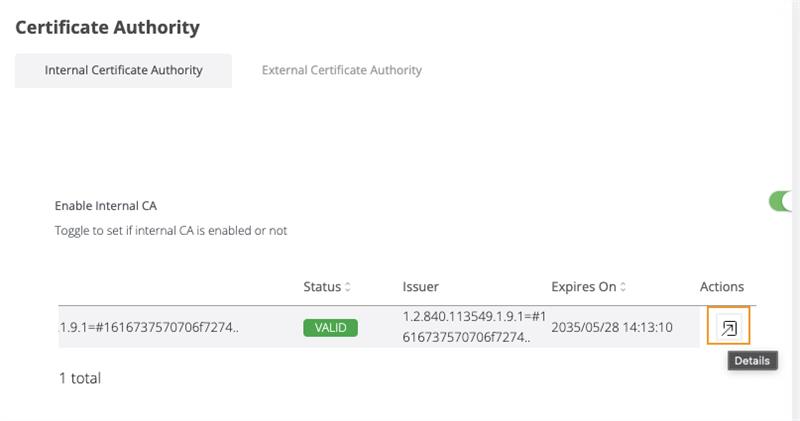
Previously, clicking the Details button did not trigger any action or display the expected information. The issue has now been fixed, and the button correctly opens the corresponding certificate details.
The Details button is now fully functional and allows users to view certificate information as expected.
-
ISSUE 4: Websec Client Hotfix – Jakarta Removal
Issue Summary
Some environments were experiencing classpath conflicts due to the coexistence of javax.* and jakarta.* packages in the WebSec Client JAR. This caused:
-
Runtime ClassNotFoundException / JsonProviderImpl not found errors.
-
Incompatibilities between Tomcat 8.5 (javax) and Tomcat 10+ (jakarta).
-
Potential JSON serialization failures and servlet rendering issues in legacy environments.
Resolution
-
Removed all jakarta.* imports from the Websec Client library.
-
Ensured JSON handling uses veridium Json util class instead of jakarta.json
-
Replaced JsonObject / Json.createObjectBuilder() usage with ObjectNode.
-
-
Client API remains unchanged
-
No breaking changes for consumers on Tomcat 8.5 or Spring Boot ≤2.7.
-
-
ISSUE 5: The PIN synchronization fails due to an inconsistent Base64 signing key. Users are unable to synchronize their PINs effectively.
The issue appears for Android clients that have enrolled in system with mobile versions older than 3.7. The public_key from veridium.authentication_key contains an “\n” at the end of it. Error in bops.log: “java.lang.IllegalArgumentException: Illegal base64 character a”. This problem appears at every login.
The fix is to properly parse the signing key in websec.
The users would have been impacted in case of Entra login or Offline login.
-
ISSUE 6: Entra Group Retrieval Pagination & Filtering Improvements
Issue Summary
Users belonging to more than 20 Entra groups were not fully processed during group retrieval operations.
By default, Microsoft Graph search requests without pagination return only the first 20 directory objects. In the affected scenarios, the returned results could include a mix of:
-
Security Groups
-
Directory Roles
-
Microsoft 365 Groups
-
Distribution Lists
-
Other directory objects
This caused:
-
Incomplete authorization/group mapping for users with large memberships.
-
Missing groups during authentication and provisioning flows.
Resolution
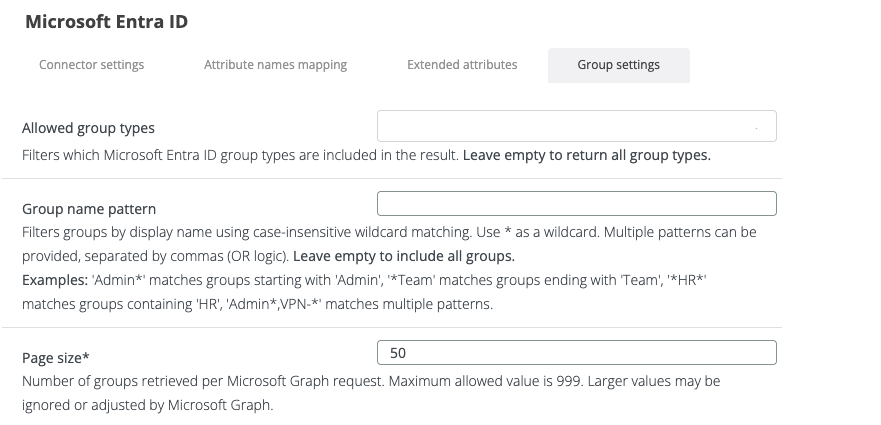
Implemented pagination support for Entra group retrieval to ensure all user memberships are processed beyond the default 20-result limit.
Added filtering capabilities for directory object types and group categories, including:
-
Security Groups
-
Distribution Lists
-
Mail-enabled Security Groups
-
Microsoft 365 (Unified) Groups
-
Dynamic Groups
Introduced optional group name filtering using regex pattern matching in Zookeeper configuration.
Client API remains unchanged.
No breaking changes for existing integrations or authentication flows.
-
ISSUE 7: LDAP Deprovisioning Safety Check – Prevent Mass User Restriction During LDAP Outages
Issue Summary
In environments using LDAP-based deprovisioning, users were incorrectly marked as RESTRICTED and subsequently removed when the deprovisioning job executed while the LDAP connection was unavailable.
This created a critical risk where a temporary LDAP outage could result in the unintended restriction and deprovisioning of all synchronized users.
The issue appears to have been introduced during a previous refactoring, as the expected behavior was functioning correctly in earlier releases.
Resolution
-
Added validation to distinguish between LDAP search failures and legitimate user-not-found scenarios.
-
Prevented user restriction and deprovisioning when LDAP searches fail due to connectivity or LDAP service availability issues.
-
Ensured users are only marked as RESTRICTED when a successful LDAP search confirms they are no longer present in the directory.
-
Added defensive handling for LDAP connection failures to avoid mass user restriction events during temporary outages.
-
HOTFIX 8: LDAP / Entra Connector Compatibility and Enrollment Improvements
Issue Summary
Several edge cases were identified in environments using Microsoft Entra ID and LDAP connectors.
The implementation assumed the presence of an LDAP connector in multiple authentication, enrollment, and licensing flows. As a result, environments configured with only an Entra connector, or environments where LDAP connectivity became unavailable, could experience:
-
Enrollment failures caused by
NullPointerExceptionerrors. -
Authentication errors for Entra-only users after LDAP connector removal.
-
Unintended user modifications during authentication.
-
Licensing and group membership processing inconsistencies due to assumptions around LDAP group formats.
-
Inability to enroll additional users in certain connector configurations.
Resolution
-
Updated Entra group mapping behavior for Entra-only connector configurations.
-
Previously, Microsoft Entra groups were hardcoded to
entraGroups. -
This prevented environments from mapping Entra group membership to a custom Veridium attribute.
-
The hardcoded
entraGroupsmapping was removed. -
Entra
memberOfvalues can now be mapped through the connector extended attributes by configuring the EntramemberOfattribute to the desired Veridium attribute.
-
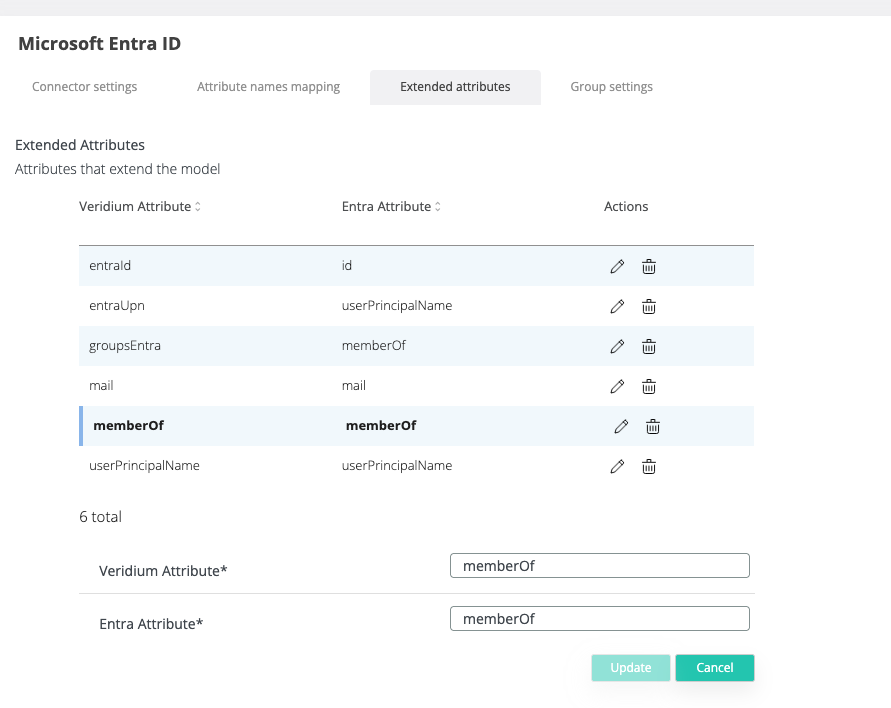
The Entra memberOf attribute may also be mapped to other Veridium attributes if required. However, it is essential that the original Entra attribute remains as memberOf, as this is critical for the successful execution of group mapping
-
Improved AD service creation logic when LDAP connectors are disabled or deleted.
-
Previously, AD service creation only considered LDAP connector state.
-
If the LDAP connection was mocked, the entire AD service could become mocked.
-
This caused Entra users to be altered with mocked LDAP data when the LDAP connector was disabled or deleted.
-
AD service creation now also takes Graph connectors into consideration.
-
Entra users are no longer altered with mocked LDAP data when LDAP is unavailable but a valid Graph connector exists.
-
-
Fixed enrollment failure for Entra-only connector environments.
-
Previously, enrollment only checked for LDAP connections and did not consider Graph connectors.
-
When no LDAP connection existed, the AD service returned
null. -
This caused a
NullPointerExceptionduring enrollment for Entra-only users. -
The AD service now also checks for available Graph connectors.
-
Entra-only environments can now enroll users without requiring an LDAP connector.
-
-
ISSUE 9: Delegated FIDO Authentication Support
Issue Summary
For delegated authentication, when the user reaches the Choose Authentication session status and the FIDO command is available, Veridium Server should allow non-user-bound FIDO authentication, using passkeys. This way, the delegated users should be able to authenticate the shared accounts using FIDO.
Resolution
Veridium Server now supports delegated FIDO authentication for shared-account scenarios. When a delegated authentication session reaches Choose Authentication and FIDO is available as an authentication method, delegated users can authenticate the shared account using a passkey.
This enhancement allows Veridium Server to generate and validate FIDO challenges that are not restricted to the initiating user’s own registered passkey. As a result, organizations can use passkey-based authentication in delegated access flows while preserving the existing Veridium FIDO authentication model.
-
HOTFIX 10: Suppress renew password or PIN on delegate flow
Issue Summary
In delegated authentication flows, a shared user could initiate an authentication session and a delegated user could successfully authenticate it. However, if the shared user was required to renew their LDAP password or PIN, the delegated user was presented with the renewal form.
Because delegated users cannot change the shared user’s password or PIN, the authentication workflow could not continue until the shared user completed the renewal action.
Resolution
Veridium Server now suppresses LDAP password and PIN renewal prompts during delegated authentication flows. Delegated users can complete authentication for shared accounts without being blocked by credential renewal actions that must be performed by the shared user.
-
ISSUE 10: support for ${enrollmentCodeInfo.policy}.
Issue: in the invitation, can be used also ${enrollmentCodeInfo.policy} parameter.
-
ISSUE 11: Shared Account Profile Retrieval for ADFS (Delegated Authentication)
Issue Summary
In ADFS integrations, the Veridium ADFS plugin retrieves the user’s profile through the friend API endpoint GetStaticProfile.
When a user authenticated through ADFS with a shared account that did not yet exist in Veridium (no profile created), the endpoint returned ERR_IDENTITY_InvalidIdentity (“Identity no longer found for principal”). As a result, ADFS could not continue the authentication flow for that shared account.
Resolution
GetStaticProfile now handles shared accounts that have no Veridium profile:
-
If a profile exists in the database, the behavior is unchanged and the stored profile is returned.
-
If no profile exists, the server checks the user’s directory group membership. If the user belongs to a shared account (delegated) group, the account is returned directly to ADFS, built from directory data, without requiring the profile to be created in Veridium first:
-
Profile external ID: the normalized external ID of the user
-
Display name: the user’s UPN
-
External attributes: the values returned by the directory
-
Permissions: derived from the user’s directory groups
-
Status: derived from the directory account state
-
Account locked out →
BLOCKED -
Account expired or disabled →
DISABLED -
Otherwise →
ACTIVE
-
-
-
If no profile exists and the user does not belong to a delegated group, the previous behavior is kept and
ERR_IDENTITY_InvalidIdentityis returned.
Client API remains unchanged. No breaking changes for existing integrations.
SDK (for Hotfix 4 - for specific clients):
|
URL |
SHA1/MD5 |
|---|---|
|
6c449ccfb33d14b267e3f6b403e55006b336908a 6f72df8f66d04eb1f28e0b2192a5bed5 |
Update procedure:
|
RHEL Version |
RPM |
SHA1/MD5 |
|---|---|---|
|
8 |
c4fa937a42d1142dc716d104a90af89ae909f557 7cccc3655dc6316582d55528d2128314 |
|
|
8 |
10d5f3466f73961ee6f759392b2677d0a7dc07da 7b2e44f4cd7e759f06dd642eba66f299 |
|
|
8 |
be14a90e258aa82ca6384ab49c4869ffaf1d269e ebe45b68f81b758b51693785289d6d1d |
|
|
8 |
489f7d5ca9b15a5f1bc0102a4d28282089ed576d 5f0f2c7fa7ed7bc7683c262f64e0116d |
|
|
8 |
9dd736a8b3cc099273cf4a6b9ae60132a0c33bf6 a3f41f585efe114ebf9bd99bcd390831 |
|
|
9 |
5b615e96c578cbb171130dd593a40700a31d9ed6 397732e8137c3c1998ccf3095989ec6f |
|
|
9 |
31f068e5823944bfb0c2ece45430d25f1b1da02c 380b167d1ccc9458dae8afd0fd0487fb |
|
|
9 |
5ddce6577aac9853d3238d2b3cab9afa1e02fca4 644a47e29f447664669cdada816c03f2 |
|
|
9 |
57f9a8e59516594636c56f61e46bc8a14f77b350 fbb162b74a62f560113617d86eb3d41c |
|
|
9 |
2d3f64f3120cc1393e5f718aa53ff7b939ed1c09 5386a10be904fbb4c429c1d4732496b9 |
## download the packages on each server; the below command can be used. Please fill in the proxy IP and username and password provided by Veridium.
## it is recommanded to execute these commands with the user that is going to do the update and has root permissions.
## based on OS version, you have download the necessary package:
## check OS version, by running
cat /etc/redhat-release
## RHEL8, Rocky8
export https_proxy=PROXY_IP:PROXY_PORT
wget --user NEXUS_USER --password NEXUS_PASSWORD https://veridium-repo.veridium-dev.com/repository/VeridiumUtils/Veridium_3.8.4/Hotfix/RHEL8/veridiumid_selfservice-12.4.73-20260331.x86_64.rpm
wget --user NEXUS_USER --password NEXUS_PASSWORD https://veridium-repo.veridium-dev.com/repository/VeridiumUtils/Veridium_3.8.4/Hotfix/RHEL8/veridiumid_websec-12.4.86-20260715.x86_64.rpm
wget --user NEXUS_USER --password NEXUS_PASSWORD https://veridium-repo.veridium-dev.com/repository/VeridiumUtils/Veridium_3.8.4/Hotfix/RHEL8/veridiumid_shibboleth-idp-12.4.84-20260702.x86_64.rpm
wget --user NEXUS_USER --password NEXUS_PASSWORD https://veridium-repo.veridium-dev.com/repository/VeridiumUtils/Veridium_3.8.4/Hotfix/RHEL8/veridiumid_websecadmin-12.4.91-20261020.x86_64.rpm
wget --user NEXUS_USER --password NEXUS_PASSWORD https://veridium-repo.veridium-dev.com/repository/VeridiumUtils/Veridium_3.8.4/Hotfix/RHEL8/veridiumid_ADS-12.4.82-20260612.x86_64.rpm
## RHEL9, Rocky9
export https_proxy=PROXY_IP:PROXY_PORT
wget --user NEXUS_USER --password NEXUS_PASSWORD https://veridium-repo.veridium-dev.com/repository/VeridiumUtils/Veridium_3.8.4/Hotfix/RHEL9/veridiumid_selfservice-12.4.73-20260331.x86_64.rpm
wget --user NEXUS_USER --password NEXUS_PASSWORD https://veridium-repo.veridium-dev.com/repository/VeridiumUtils/Veridium_3.8.4/Hotfix/RHEL9/veridiumid_websec-12.4.86-20260715.x86_64.rpm
wget --user NEXUS_USER --password NEXUS_PASSWORD https://veridium-repo.veridium-dev.com/repository/VeridiumUtils/Veridium_3.8.4/Hotfix/RHEL9/veridiumid_shibboleth-idp-12.4.84-20260702.x86_64.rpm
wget --user NEXUS_USER --password NEXUS_PASSWORD https://veridium-repo.veridium-dev.com/repository/VeridiumUtils/Veridium_3.8.4/Hotfix/RHEL9/veridiumid_websecadmin-12.4.91-20261020.x86_64.rpm
wget --user NEXUS_USER --password NEXUS_PASSWORD https://veridium-repo.veridium-dev.com/repository/VeridiumUtils/Veridium_3.8.4/Hotfix/RHEL9/veridiumid_ADS-12.4.82-20260612.x86_64.rpm
The following commands will be executed as root user on ALL WEBAPP nodes:
# Stop services
systemctl stop ver_websecadmin
systemctl stop ver_tomcat
systemctl stop ver_selfservice
# Update packages
yum localinstall veridiumid_websec-12.4.86-20260715.x86_64.rpm -y
yum localinstall veridiumid_shibboleth-idp-12.4.84-20260702.x86_64.rpm -y
yum localinstall veridiumid_websecadmin-12.4.91-20261020.x86_64.rpm -y
yum localinstall veridiumid_ADS-12.4.82-20260612.x86_64.rpm -y
yum localinstall veridiumid_selfservice-12.4.73-20260331.x86_64.rpm -y
# Reload services
systemctl daemon-reload
# Start services
systemctl start ver_websecadmin
systemctl start ver_tomcat
systemctl start ver_selfservice