

Overview
VeridiumID provides centralized Cross-Origin Resource Sharing (CORS) controls for requests handled by the Identity Provider (IdP).
VeridiumID performs this validation centrally through the IdP CORS filter. The filter determines whether the requesting origin is trusted, returns the appropriate Access-Control-Allow-Origin response header, handles browser CORS preflight requests, and applies the configured global HTTP response headers.
Functional impact
The enhanced CORS handling provides administrators with more granular control over which browser-based applications can interact with the VeridiumID IdP.
It supports several configuration levels:
-
application-specific origins for OIDC clients;
-
a global allow-list for origins shared across multiple applications or services;
-
automatically derived origins used by certificate authentication;
-
and an optional global
Access-Control-Allow-Originoverride for deployments that require a common policy.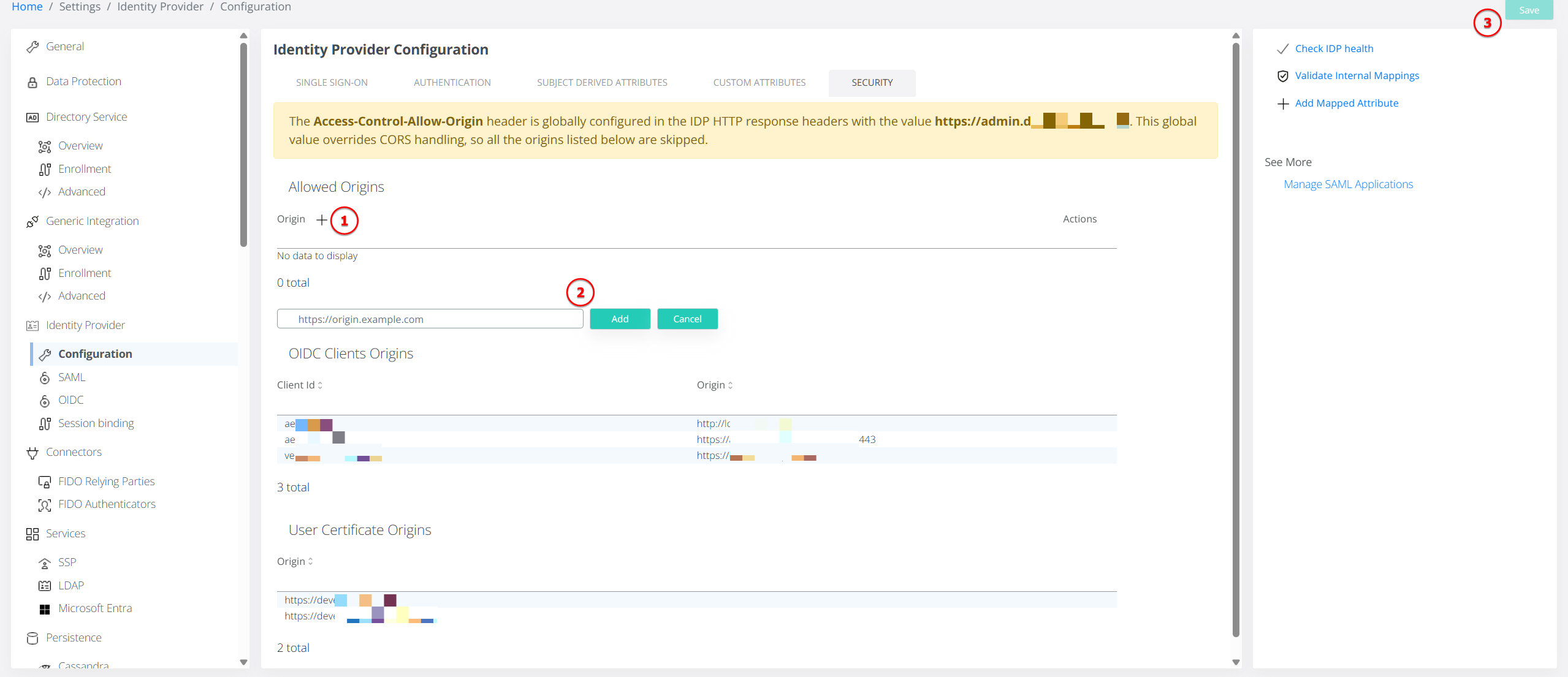
At the same time, browser navigation and authentication flows that cannot reliably provide an OIDC client_id, such as certain SAML flows, continue to operate without being incorrectly blocked by CORS validation.
This provides stronger browser-side access control while maintaining compatibility with the different authentication protocols and integration patterns supported by VeridiumID.
Configuration Recommendations
For most deployments, use the most specific configuration available:
-
Use OIDC application Web Origins for origins belonging to a specific browser-based application.
-
Use Allowed Origins (
corsFilter.allowedOrigins) for trusted origins that must be shared across several integrations or operational services. -
Allow the system to derive User Certificate Origins from the configured internal and external certificate-authentication service URLs.
-
Use the global Access-Control-Allow-Origin response-header override only when a deployment intentionally requires a single policy for every IdP response.
Wildcard (*) configurations should be used with caution because they permit requests from any browser origin wherever that configuration applies.
An empty-string Access-Control-Allow-Origin entry in the global response headers is treated as not configured. It does not disable the normal CORS processing logic and is not written to responses.
Header-name processing for Access-Control-Allow-Origin is case-insensitive, so differently cased forms of the same header name are treated equivalently.
Behavior Summary
|
Scenario |
Result |
|---|---|
|
Global Access-Control-Allow-Origin configured in |
Configured value is returned for every response; all other CORS configuration is bypassed |
|
Certificate-authentication endpoint accessed through a configured internal or external certificate URL |
Corresponding Veridium service origin is allowed |
|
Request contains no Origin header |
Request proceeds normally; no CORS headers are added |
|
SAML/browser POST contains Origin but no |
Request proceeds; matching global allow-list origin is echoed when available, otherwise no CORS header is added |
|
OIDC request has a matching |
Origin is allowed |
|
OIDC client has an empty origins list |
Any origin is allowed using |
|
OIDC client does not allow the origin, but |
Origin is allowed through the global fallback |
|
OIDC origin is allowed by neither client configuration nor global allow-list |
Request is rejected with HTTP 403 |
|
Preflight origin is configured on an OIDC client or in the global allow-list |
Preflight returns HTTP 200 with the appropriate CORS headers |
Managing Allowed Origins in Veridium Manager
CORS configuration and visibility are available under Setting / Identity Provider / Configuration / Security tab:
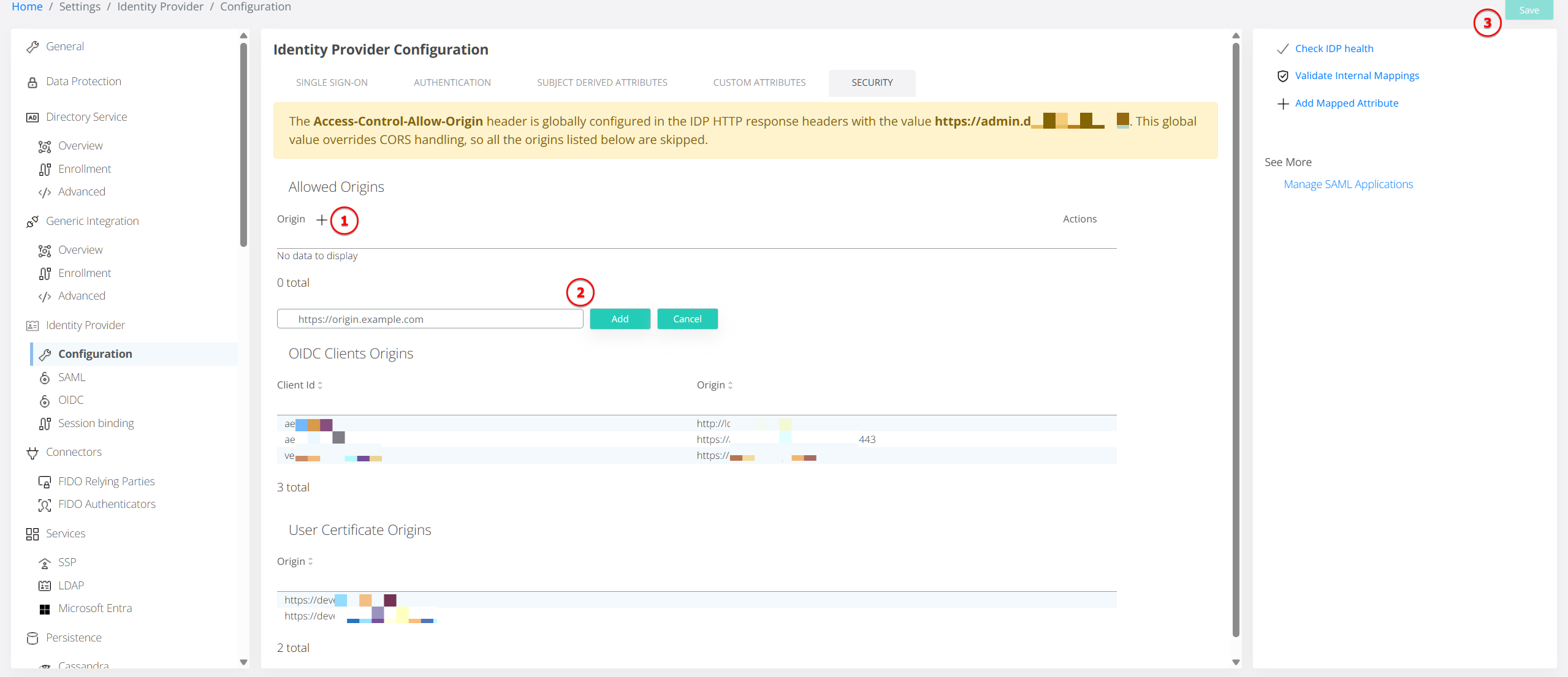
The page provides the following sections.
CORS Configuration Sources
CORS decisions can use configuration from both the general Veridium integration configuration and individual OIDC applications.
|
Configuration source |
Location |
Purpose |
|---|---|---|
|
Veridium integration configuration |
ZooKeeper: |
Provides global HTTP response headers, the global CORS allow-list, service URLs, and certificate-authentication URLs |
|
OIDC client configuration |
OIDC clients configuration in ZooKeeper |
Provides the allowed Web Origins configured for each individual OIDC application |
The relevant integration settings include:
-
httpResponseHeaders — global HTTP response headers, including an optional global
Access-Control-Allow-Originoverride; -
corsFilter.allowedOrigins — global CORS allow-list;
-
internalServiceUrl / externalServiceUrl — Veridium service URLs;
-
userCertificateAuthn.internalServiceUrl / externalServiceUrl — URLs used for certificate authentication;
-
OIDC client origins — the Web Origins configured for each OIDC application.
How VeridiumID Resolves an Allowed Origin
For each request, VeridiumID evaluates the CORS configuration in the following order. The first applicable rule determines the result.
1. Global override
If httpResponseHeaders contains a non-empty Access-Control-Allow-Origin value, it is applied to every response.
While this override is active, all other CORS mechanisms are bypassed, including:
-
corsFilter.allowedOrigins; -
certificate-authentication origins.
Use this option only when the same CORS policy must apply globally.
2. Certificate authentication
Requests to:
/idp/profile/veridiumid/certAuthn
are matched against the configured userCertificateAuthn.internalServiceUrl and userCertificateAuthn.externalServiceUrl.
When matched, VeridiumID derives the allowed origin from the corresponding top-level internalServiceUrl or externalServiceUrl.
Default ports are normalized, so for example:
https://example.com:443
and:
https://example.com
are treated as the same HTTPS authority.
This means certificate-authentication origins do not need to be maintained separately when the corresponding Veridium service URLs are already configured.
3. Requests without an Origin header
Requests without an Origin header are treated as normal navigation or same-origin requests.
They proceed normally without CORS-specific response headers.
4. Requests without an OIDC client
Some browser requests contain an Origin header but cannot be associated with an OIDC client_id, such as certain SAML SSO POST requests.
These requests are not rejected solely because of CORS:
-
if the origin matches
corsFilter.allowedOrigins, VeridiumID returnsAccess-Control-Allow-Origin; -
otherwise, the request continues without a CORS allow-origin header.
This prevents CORS enforcement from unintentionally blocking authentication flows that do not provide an OIDC client identifier.
5. OIDC and preflight validation
For requests containing client_id, VeridiumID checks the corresponding OIDC application's configured Web Origins.
-
Matching origin → allowed.
-
Empty origins list → any origin is allowed and
Access-Control-Allow-Origin: *is returned. -
No match → VeridiumID checks the global
corsFilter.allowedOriginslist.
For CORS preflight requests without client_id, the origin is accepted if it is configured for any OIDC client.
For production applications, explicitly configured Web Origins are recommended instead of an empty origins list.
6. Global allow-list fallback
If the OIDC configuration does not allow the origin, VeridiumID checks:
corsFilter.allowedOrigins
A matching origin is allowed. A configured * wildcard allows any origin wherever this fallback applies.
If neither the OIDC configuration nor the global allow-list permits the origin, VeridiumID returns:
HTTP 403 Forbidden
The request is not forwarded to the IdP.
CORS Response Behavior
When a specific origin is allowed, VeridiumID echoes the Origin value received in the request:
Access-Control-Allow-Origin: https://Portal.Example.com
Wildcard access returns:
Access-Control-Allow-Origin: *
Whenever Access-Control-Allow-Origin is returned, VeridiumID also adds:
Vary: Origin
This prevents shared caches or CDNs from reusing a response generated for one origin for requests from another origin.
Other headers configured through httpResponseHeaders continue to be applied globally. Access-Control-Allow-Origin is handled separately by the CORS logic so that a configured value does not overwrite the origin calculated for the request.
Preflight requests
A CORS preflight is identified by:
-
HTTP method OPTIONS;
-
an Origin header;
-
an Access-Control-Request-Method header.
If validation succeeds, VeridiumID responds directly with HTTP 200 and does not forward the request to the IdP authentication flow.
Rejected requests
When strict CORS validation applies and the origin is not authorized, VeridiumID returns HTTP 403 Forbidden without an Access-Control-Allow-Origin header.
The request is not forwarded to the IdP.