

VeridiumID 3.9 introduces enhanced traceability and centralized device log reporting to simplify troubleshooting across distributed authentication environments.
Administrators and support teams can more easily follow enrollment and authentication activity across VeridiumID services, correlate events associated with a specific identity, device, or session, and temporarily collect detailed logs from enrolled devices when further investigation is required.
These capabilities improve system observability, reduce the time required to diagnose authentication failures, and provide more complete context when investigating issues that span multiple VeridiumID components.
End-to-End Activity Correlation
VeridiumID now maintains correlation information throughout supported authentication and enrollment flows.
Activity can be associated across four contextual dimensions:
-
Identity, identifying the user involved in the operation
-
Device, identifying the enrolled mobile or desktop device
-
Session, grouping the operations that form a complete user journey
-
Request, tracing an individual service request as it moves through the platform
Correlation information is propagated between participating VeridiumID services and included in their logs. This allows administrators and support teams to follow an operation across components such as WebSec, the Identity Provider, Active Directory services, FIDO services, endpoint clients, and User Behavior Analytics.
For example, an authentication issue can be investigated using the associated session or device identifier instead of manually matching unrelated log entries from several services.
Consistent Context Across Platform Services
Traceability information is preserved as requests move between external endpoints, internal services, and behavioral analytics components.
Logs generated during the same user journey can therefore be connected even when the operation passes through multiple services or communication protocols.
This provides a more complete view of:
-
Enrollment and authentication journeys
-
Device activity
-
Identity-related operations
-
Individual service requests
-
User Behavior Analytics processing
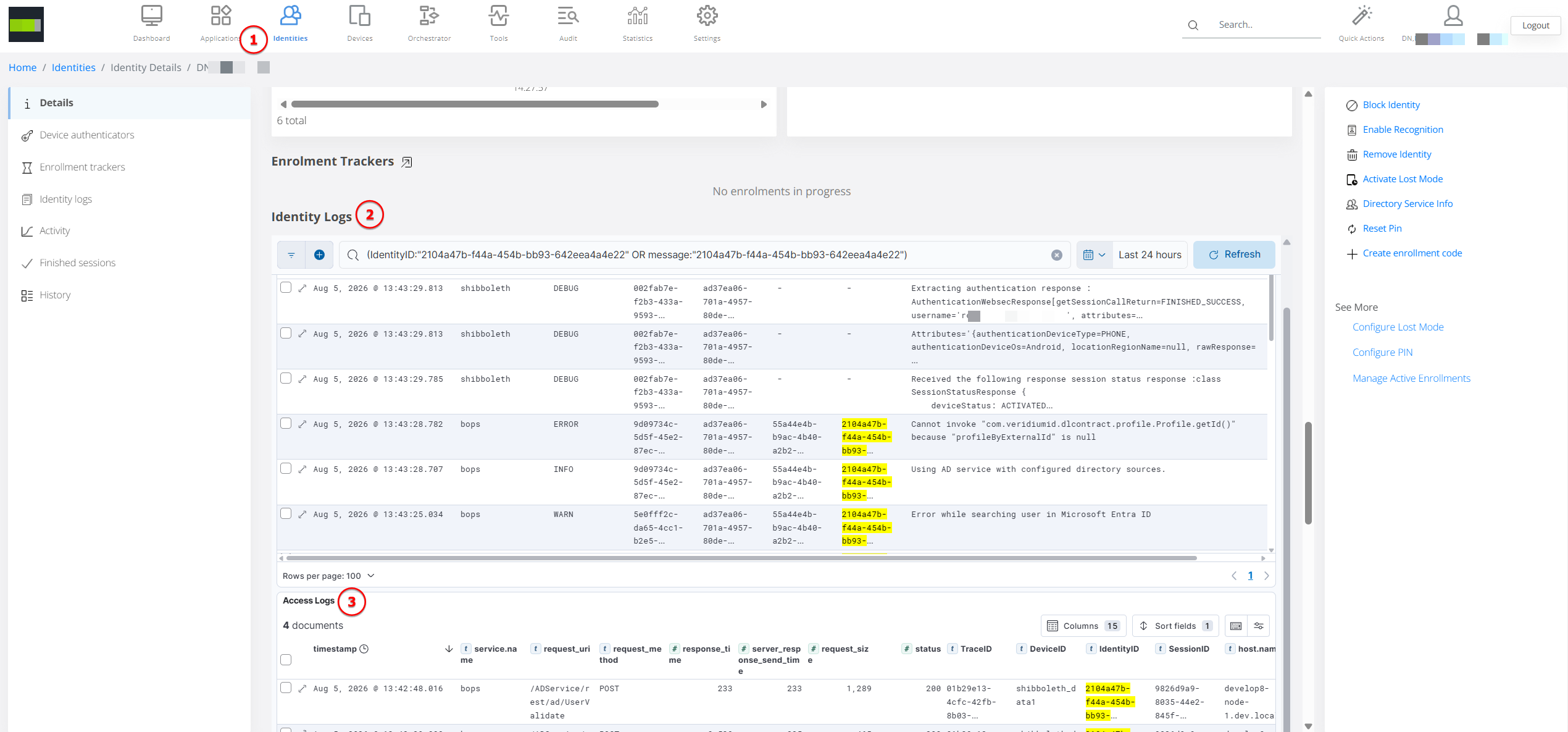
The standardized logging context also makes it easier to search and filter platform logs using the same identifiers across supported services.
Remote Device Debug Logging
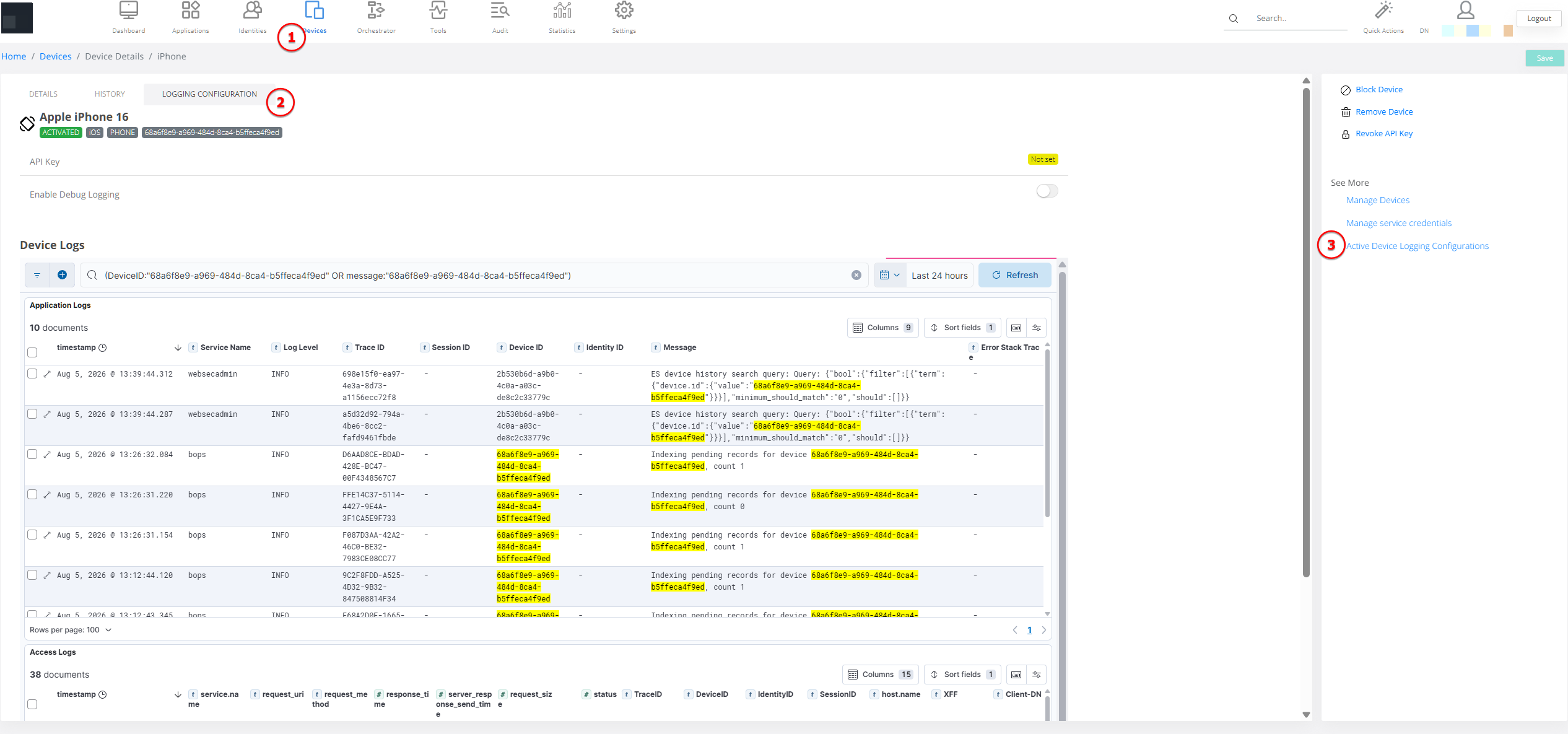
Administrators can temporarily enable additional logging on an enrolled mobile or desktop device directly from Veridium Manager.
A new Logging Configuration tab is available in the device details view. From this tab, administrators can:
-
Enable or disable remote logging
-
Select the required logging level
-
Define how long logging should remain active
-
Configure the log upload interval
-
Control the maximum accepted log-file size
-
Review the number and volume of files received
-
See when the most recent log file was uploaded
The configuration is retrieved by the selected device, which then collects and uploads logs for the configured period. This helps support teams investigate production issues without requiring the user to manually retrieve or transfer local log files.
Time-Limited and Administrator-Controlled Collection
Remote logging is fully controlled by administrators.
Each logging configuration has a defined duration and expires automatically. After expiration, the device stops collecting and uploading additional debug logs. Administrators can also disable the configuration earlier when the investigation is complete.
This limits the duration of detailed log collection and prevents debug logging from remaining enabled indefinitely.
A dedicated Active Logging Configurations page provides a centralized view of devices with configured logging sessions. Administrators can review their status and expiration time and navigate directly to the corresponding device configuration.
Centralized Log Analysis
Logs uploaded from devices are centrally processed and made available through the VeridiumID logging and reporting environment.
Device-specific application and access-log dashboards are available from the device’s Logging Configuration tab. Related dashboards are also available from authentication-session details, allowing administrators to review server and device activity associated with the same session.
This provides two complementary investigation paths:
-
Review all relevant logs associated with a particular device
-
Review all relevant activity associated with a particular authentication session
By combining distributed traceability with centralized device logs, VeridiumID 3.9 provides administrators with a more efficient way to diagnose complex enrollment and authentication issues across the platform.