

VeridiumID 3.9 simplifies SAML application onboarding by allowing administrators to generate Service Provider metadata directly from Veridium Manager.
This capability is particularly useful when a Service Provider does not supply a metadata file or metadata URL. Instead of manually creating the required SAML metadata XML, administrators can provide the relevant configuration values through a guided form and allow VeridiumID to generate the metadata.
Generate Metadata from Configuration
To generate metadata for a SAML Service Provider:
-
In Veridium Manager, navigate to Applications.
-
Open the relevant SAML application.
-
From the actions menu on the right side of the page, select Generate metadata from configuration.
-
Complete the required Service Provider configuration.
-
Generate the metadata.
The generated metadata can then be used as part of the SAML application configuration.
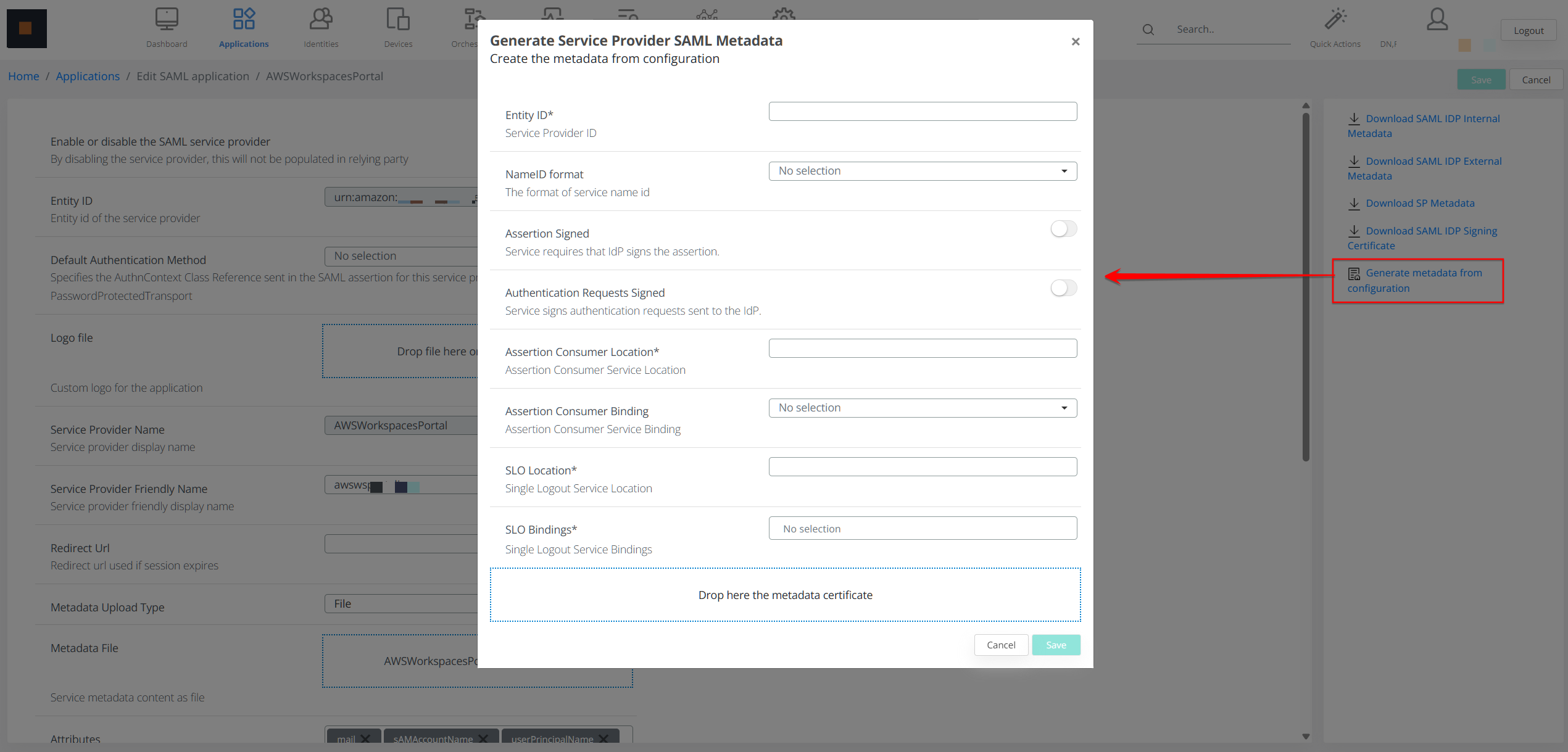
Configuration Fields
Entity ID
The Entity ID uniquely identifies the Service Provider within the SAML federation.
It is commonly represented as a URL, although it does not necessarily need to resolve to an accessible web page.
Example:
https://app.example.com/saml/metadata
VeridiumID uses this identifier to determine which Service Provider it is communicating with.
NameID Format
The NameID Format determines how the authenticated user is identified in the SAML assertion.
Supported configurations may include:
-
emailAddress — sends the user's email address as the NameID
-
persistent — sends an opaque identifier that remains stable across sessions
-
transient — sends a temporary identifier that can change between sessions
The selected format must match the format expected by the Service Provider.
Assertion Signed
The Assertion Signed option indicates whether the Service Provider requires the SAML assertion to be digitally signed by the Identity Provider.
When enabled, the generated metadata includes:
WantAssertionsSigned="true"
Signing assertions allows the Service Provider to verify that the assertion was issued by the trusted Identity Provider and was not modified after it was created.
Authentication Requests Signed
The Authentication Requests Signed option indicates whether the Service Provider signs the SAML authentication requests that it sends to VeridiumID.
When enabled, the generated metadata includes:
AuthnRequestsSigned="true"
VeridiumID can use the Service Provider certificate included in the metadata to verify the signature of incoming authentication requests.
Assertion Consumer Location
The Assertion Consumer Location specifies the Assertion Consumer Service endpoint, commonly referred to as the ACS URL.
After successful authentication, VeridiumID sends the SAML response to this location.
Example:
https://app.example.com/saml/SSO
The configured URL must match the endpoint exposed by the Service Provider.
Assertion Consumer Binding
The Assertion Consumer Binding determines how the SAML response is delivered to the Assertion Consumer Service endpoint.
Common bindings include:
-
HTTP-POST — the SAML response is submitted through the user's browser using an HTML form
-
HTTP-Redirect — the SAML response is encoded and transmitted through the URL
The selected binding must be supported by the Service Provider.
SLO Location
The SLO Location defines the Service Provider endpoint used during SAML Single Logout.
VeridiumID sends logout requests or responses to this location when a Single Logout flow is initiated.
Example:
https://app.example.com/saml/SingleLogout
This field should only be configured when the Service Provider supports SAML Single Logout.
SLO Bindings
The SLO Bindings field defines the HTTP bindings supported by the Service Provider for Single Logout.
Available bindings can include:
-
HTTP-POST
-
HTTP-Redirect
-
Both bindings
Configuring both bindings can improve compatibility when the Service Provider supports them.
Metadata Certificate
The Metadata Certificate contains the Service Provider's public certificate in PEM format.
The certificate can be used by VeridiumID to:
-
Verify authentication requests signed by the Service Provider
-
Support SAML configurations in which assertions are encrypted for the Service Provider
Only the public certificate is included in the metadata. The corresponding private key remains with the Service Provider and must not be provided to VeridiumID.
A PEM-formatted certificate typically uses the following structure:
-----BEGIN CERTIFICATE-----
...
-----END CERTIFICATE-----
Simplified SAML Application Onboarding
Generating metadata from configuration reduces the need for manual XML editing and makes it easier to onboard Service Providers that do not provide their own metadata export.
The guided workflow also helps administrators define signing, endpoint, binding, NameID, and certificate requirements consistently before completing the SAML application configuration.