

Overview
Administrator deprovisioning extends the existing deprovisioning functionality in Veridium Manager to automatically identify and remove administrator access from accounts that no longer meet the requirements for administrative access.
The purpose of this functionality is to ensure that administrator permissions remain aligned with the configured administrator authentication sources and that inactive or invalid administrator accounts are automatically detected and reviewed.
The functionality targets administrators authenticated through external identity providers.
Administrator Definition
An account is considered an administrator when it has administrative access to Veridium Manager through one or more of the following mechanisms:
-
An associated device with
type = admin -
Membership in one or more groups that grant administrator permissions
Configuration
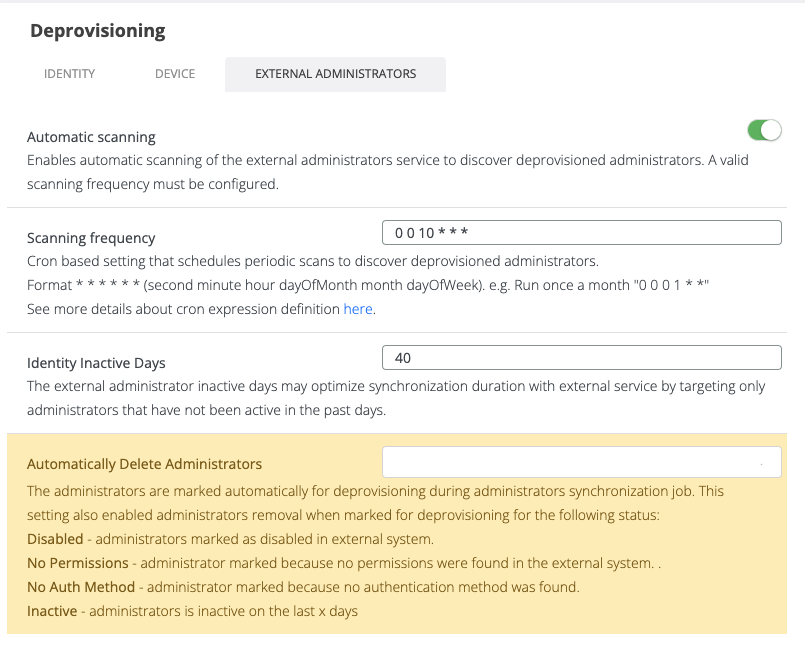
A new Administrators tab will be added under Settings → Deprovisioning → Administrator
The tab will contain the following configuration options.
Automatic Scanning
Enables or disables the Administrator Deprovisioning job.
When disabled, no automatic administrator deprovisioning checks are performed.
Default: Disabled
Scanning Frequency
Cron expression used to schedule the Administrator Deprovisioning job.
The job executes periodically and evaluates administrator accounts against the configured deprovisioning rules.
Example 0 0 * * * (run daily at midnight)
Identity Inactive Days
Number of days since the administrator last used Veridium Manager.
If an administrator has no activity during the configured period, the administrator may be marked as deprovisioned.
Special values:
|
Value |
Behavior |
|---|---|
|
<= 0 |
Inactivity check disabled |
|
> 0 |
Administrator activity evaluated |
Default: 90 days
Automatically Delete Administrators
When enabled, administrators identified during the Administrator Synchronization job as no longer eligible for administrative access are automatically removed from the system.
During synchronization, administrators are first marked for deprovisioning. If this setting is enabled, they are then automatically deprovisioned without requiring manual intervention.
Automatic deletion applies to administrators marked with one of the following statuses:
-
Disabled – The administrator account is disabled in the external identity provider.
-
Not Found – The administrator no longer exists in the external identity provider and could not be found during synchronization.
-
No Permissions – The administrator no longer belongs to any group that grants administrative permissions in the external system.
-
No Auth Method – The administrator no longer has a valid authentication method configured.
-
Inactive – The administrator has not been active for the configured number of days.If this setting is disabled, administrators are only marked for deprovisioning and must be reviewed and deprovisioned manually from the Administrators Deprovisioning page.
If this setting is disabled, administrators are only marked for deprovisioning and must be reviewed and deprovisioned manually from the Administrators Deprovisioning page.
Administrator Deprovisioning Job
The Administrator deprovisioning job periodically evaluates administrator accounts and determines whether they should be marked as deprovisioned.
The job does not immediately delete administrator accounts.
Instead, it marks them for review and places them in the Deprovisioned Administrators list.
Deprovisioning Conditions
Missing Administrator Permissions
The system verifies that external administrators are still members of the Active Directory groups mapped for administrator authentication.
Validation
For each external administrator:
-
Determine all groups configured for administrator authentication.
-
Verify that the administrator still belongs to at least one valid mapped group.
Result
If no valid administrator permissions are found the administrator is deprovisioned with reason No permissions found.
Missing Authentication Method
The system verifies that administrator accounts have an associated authentication method.
Validation
Check whether the account has at least one device of type admin.
Result
If no administrator authentication device exists the administrator is deprovisioned with reason No authentication method.
Inactive Administrator
The system verifies recent administrator activity.
Validation
Check the administrator’s last activity in Veridium Manager.
Result
if Current Date - Last Activity > Admin Inactive Days the administrator is considered inactive, and the administrator is deprovisioned with reason Inactive.
Deprovisioned Administrators
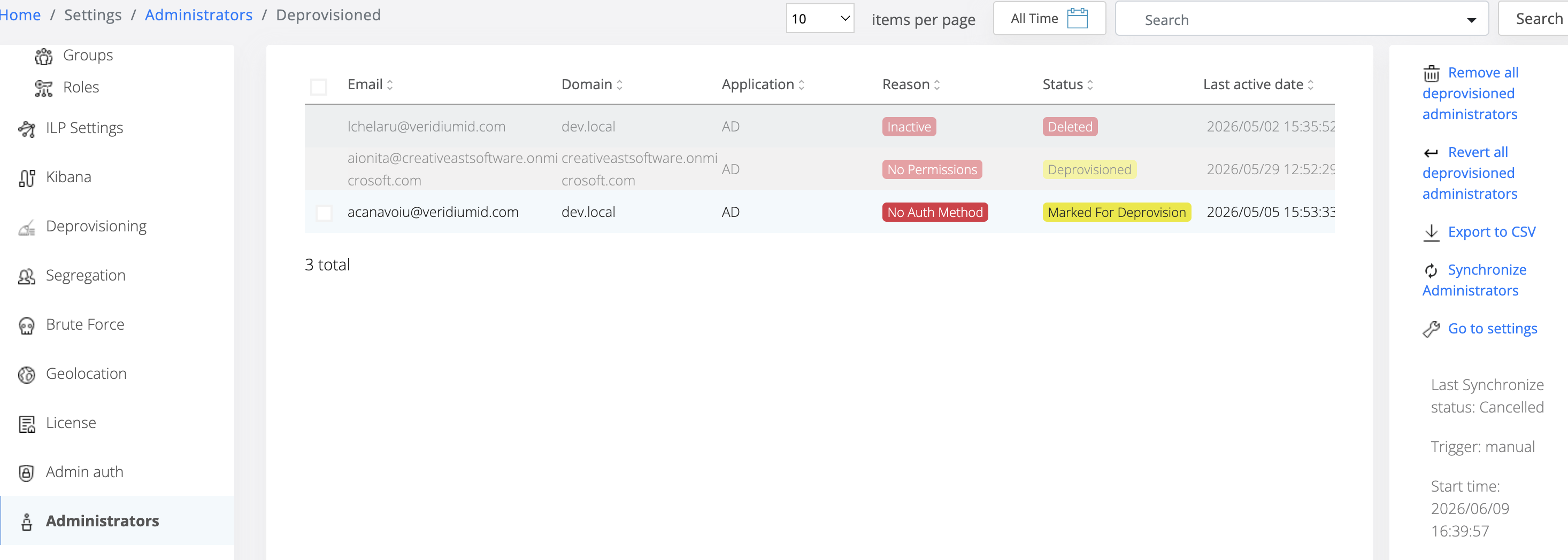
A new page will be added to display administrators marked for deprovisioning.
The page should follow the same principles and behavior as the existing Manage Deprovision Identities page.
Administrator Details Integration
Available Actions
Administrators should be able to:
-
Review deprovisioned administrators
-
Delete selected administrators
-
Delete all deprovisioned administrators
-
Search and filter results
-
Export results
Deprovisioned Status Indicator
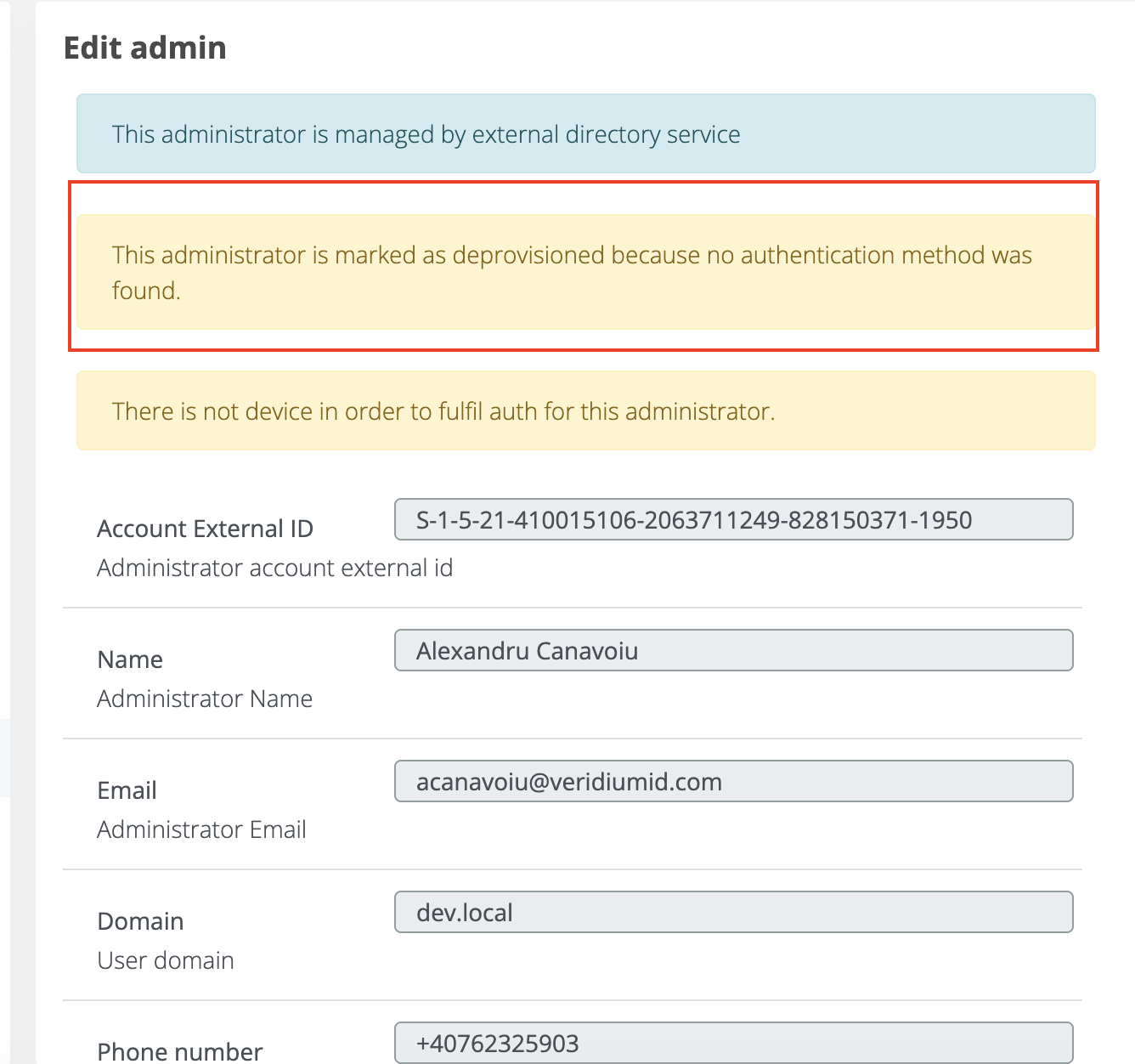
When viewing the Administrator Details page for a deprovisioned administrator, a visual indicator should be displayed to clearly communicate the current status of the account.
A badge should be displayed at the top of the page:
Administrator Removal
Deleting a deprovisioned administrator triggers cleanup actions depending on the deprovisioning reason.
General Rule
An account may be permanently deleted only if:
-
No identities are associated with the account
-
No devices are associated with the account
If either condition is not satisfied, the account remains in the system and only administrator-related resources are removed.
Reason: No Permissions Found
Actions
Remove:
-
All associated devices with type
admin
The account remains available if identities or other device types still exist.
Reason: No Authentication Method
Actions
Remove:
-
All administrator permission assignments granted through groups
TBD: Define exactly which groups should be removed and whether this applies to local groups, external groups, or both.
Reason: Inactive
Actions
Remove:
-
All associated devices with type
admin -
All administrator permission assignments
TBD: Define exact group removal behavior.

Final Account Removal
After the cleanup actions associated with the deprovisioning reason have been executed, the system must evaluate whether the administrator account can be permanently removed.
Validation
The account can be permanently deleted only if:
-
No identities are associated with the account.
-
No devices are associated with the account.
Account Deletion
If both conditions are met, the account shall be permanently removed from Veridium Manager.
Account Retention
If at least one identity or device remains associated with the account, the account shall not be deleted.
In this case:
-
The administrator access remains revoked.
-
The account remains available for identity-related or authentication-related functionality.
-
Only administrator-specific resources and permissions removed during the cleanup process remain deleted.

Auditing
All administrator deprovisioning actions should generate audit events.