

Purpose
This functionality controls the visibility of location information in:
-
Veridium Admin
-
SSP
-
Raw Session Data and Session History
Admin and SSP visibility are controlled independently.
The functionality applies to the location of users and the devices involved in their authentication. It does not target location information associated with the administrator performing administrative actions.
Protected location information
The following information is treated as user location data:
-
session IP address;
-
country, region, city and address;
-
geographic coordinates;
-
location accuracy;
-
location source and location errors;
-
authentication device IP address and location;
-
initiating device IP address and location;
-
location information stored in session history;
-
location information available through raw session data.
Hiding location information does not hide the session or other authentication details.
Veridium Admin behavior
VIEWLOCATION permission
User location visibility in Veridium Admin is controlled by the VIEWLOCATION permission.
When the permission is available, the administrator can see user location information in the relevant areas of Veridium Admin.
When VIEWLOCATION is configured as a negative permission:
-
user location information is not displayed
-
location columns and sections are hidden
-
maps are not displayed
-
location information is not available in raw data
-
location information is removed from session history responses
-
IP-based geolocation lookup is not allowed
A negative permission takes precedence even for a super-administrator.
Covered areas
The restriction applies to:
-
authentication sessions
-
passkey sessions
-
Identity Provider sessions
-
session history
-
device history
-
identity history
-
session details
-
raw session data
-
session maps
Admin map visibility
Display Map Admin controls only the map visibility.
The map is displayed only when:
-
the administrator has the
VIEWLOCATIONpermission -
Display Map Adminis enabled -
the session contains location information
|
VIEWLOCATION |
Display Map Admin |
Result |
|---|---|---|
|
Allowed |
Enabled |
Location details and map can be displayed |
|
Allowed |
Disabled |
Location details can be displayed without the map |
|
Negated |
Enabled |
Location details and map are hidden |
|
Negated |
Disabled |
Location details and map are hidden |
SSP behaviour
Display Location Details SSP
Display Location Details SSP controls whether users can see their location information in SSP.
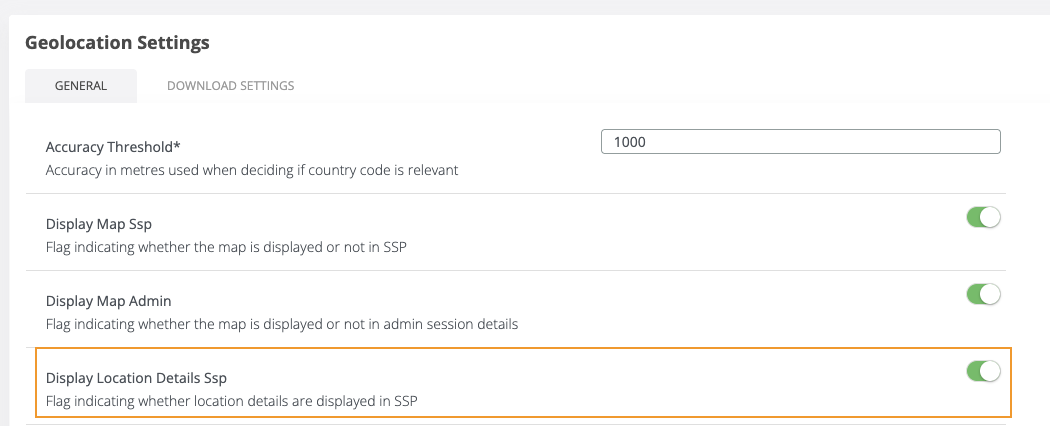
This option is independent of the VIEWLOCATION permission used in Veridium Admin.
When enabled
-
location information can be displayed in SSP
-
map visibility is controlled separately through
Display Map SSP -
sessions without location information remain visible without a location section
When disabled
-
location and IP information are not exposed in SSP
-
location sections are not displayed;
-
the map is not displayed
-
sessions and other authentication information remain visible
-
Display Map SSPis automatically disabled
Relationship with Display Map SSP
Display Map SSP controls only the map representation and depends on Display Location Details SSP.
|
Display Location Details SSP |
Display Map SSP |
Result |
|---|---|---|
|
Enabled |
Enabled |
Location details and map are displayed |
|
Enabled |
Disabled |
Location details are displayed without the map |
|
Disabled |
Disabled |
Location details and map are hidden |
|
Disabled |
Enabled |
This combination is not allowed; the map is automatically disabled |
Separation between Admin and SSP
The two visibility mechanisms operate independently:
-
VIEWLOCATIONcontrols location visibility in Veridium Admin -
Display Location Details SSPcontrols location visibility in SSP
|
Configuration |
Admin |
SSP |
|---|---|---|
|
VIEWLOCATION allowed, SSP enabled |
Location is visible |
Location is visible |
|
VIEWLOCATION negated, SSP enabled |
Location is hidden |
Location is visible |
|
VIEWLOCATION allowed, SSP disabled |
Location is visible |
Location is hidden |
|
VIEWLOCATION negated, SSP disabled |
Location is hidden |
Location is hidden |
Compatibility and default behaviour
To preserve the behaviour of existing versions, Display Location Details SSP is enabled by default.
After an upgrade:
-
location information continues to be available in SSP
-
administrators can explicitly disable its visibility
-
the existing map configuration is preserved
-
disabling SSP location details automatically disables the SSP map
Functional outcome
The functionality provides two independent controls:
-
An organization can prevent an administrator, including a super-administrator, from accessing user location information by configuring
VIEWLOCATIONas a negative permission. -
An organization can independently decide whether users can see their location information in SSP through
Display Location Details SSP.
In both cases, hiding location information does not affect the visibility of sessions or other authentication information.