

Veridium Authenticator 3.9 delivers the mobile side of the context-aware and risk-based authentication capabilities introduced in VeridiumID Server 3.9. It simplifies how users confirm sign-in requests, makes enrollment possible from a single device, gives users more control over location permissions, and extends contextual risk data to passkey authentication. The release also updates both apps for the latest iOS and Android platform requirements and includes a number of stability fixes across Android and iOS.
Several features in this release require VeridiumID Server 3.9 or above. Server requirements are noted next to each feature.
New Features
Unified Context Awareness Dialog
When an authentication journey includes Context Awareness, users now see a single, combined dialog instead of two consecutive prompts. The Context Awareness dialog includes all the authentication request details and actions, so users can review the sign-in context and approve or deny the request in one step. This builds on the Authentication Context Dialog introduced in Veridium Authenticator 3.8.3.
-
One dialog per request: The standard authentication dialog and the Context Awareness dialog are never shown one after the other for the same request.
-
Push with Presence support: Context Awareness now works with Push with Presence authentication.
-
Session-bound confirmation: The user's confirmation can be cryptographically bound to the current authentication session, providing additional protection against phishing, relay and replay attempts. This is enabled with the
requestSignatureoption of the Context Awareness command in the Veridium Orchestrator. -
No change for other journeys: Authentication requests without Context Awareness continue to display the standard authentication dialog.
Enrollment Links
Users can now enroll directly from the device where they receive their enrollment invitation. Instead of scanning a QR code with a second device, they can tap a secure enrollment link that opens the Veridium Authenticator and starts enrollment. Enrollment links use the platform-verified Android App Links and iOS Universal Links technologies.
To include the enrollment link in the invitation email, add the ${enrollmentCodeInfo.universalLinkCode} parameter to the email template. Updated servers can reset the template to the default version, or the parameter can be added manually.
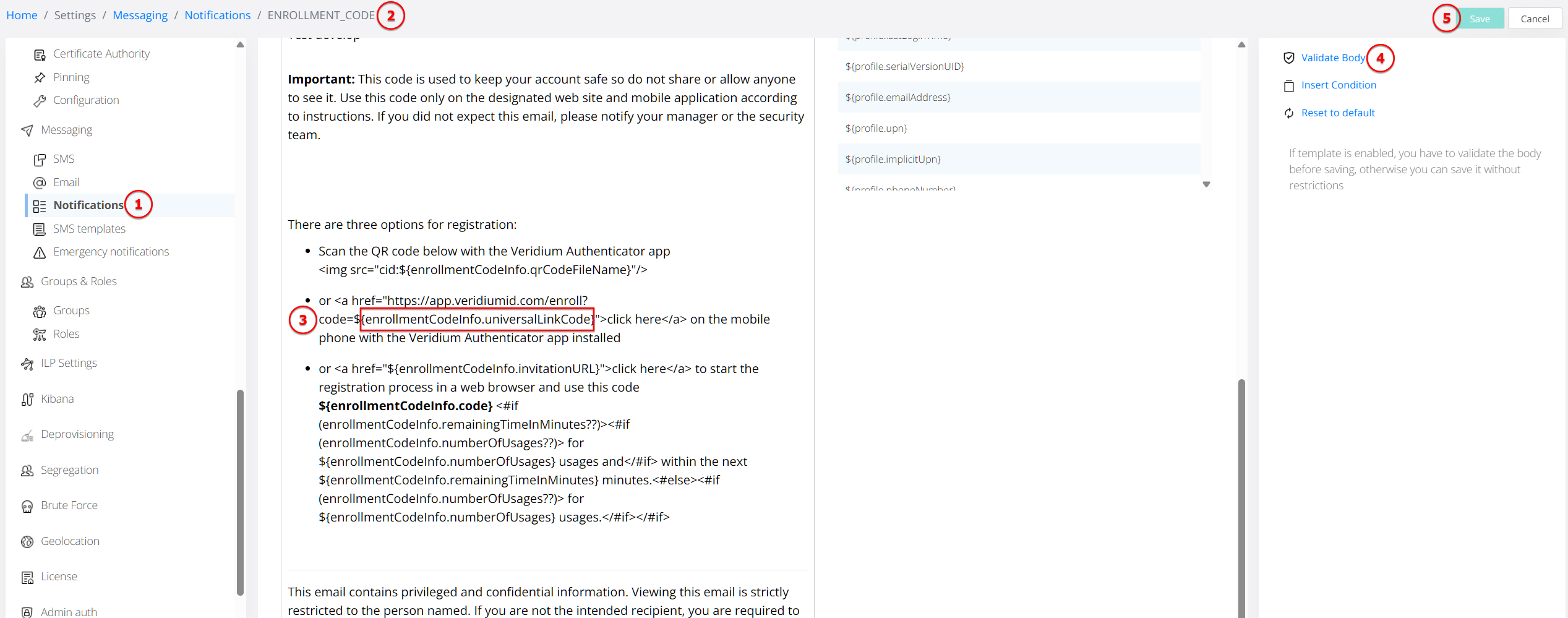
Including the enrollment link in invitation emails requires VeridiumID Server version 3.9.1 or above.
Email & SMS enrollment configuration with deep links video demos:
https://www.youtube.com/watch?v=Z63Y_oNmIeg
Scan QR Visual Indicator
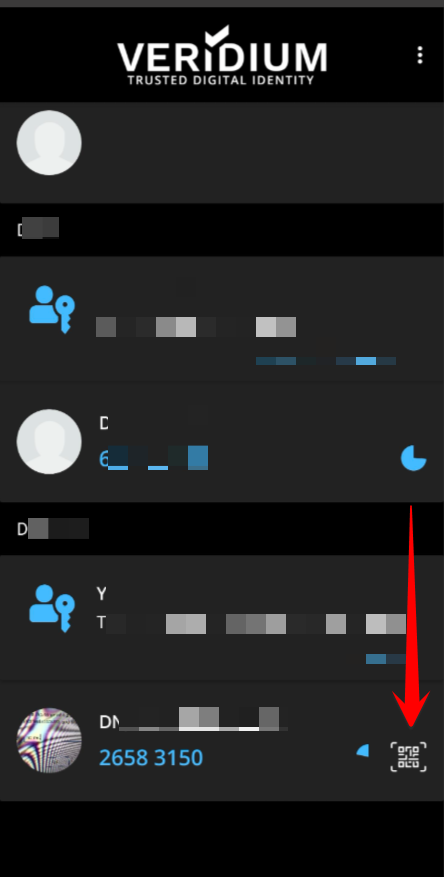
Administrators can display a visual hint on the profile tile to show users that tapping the profile starts the QR code scanner.
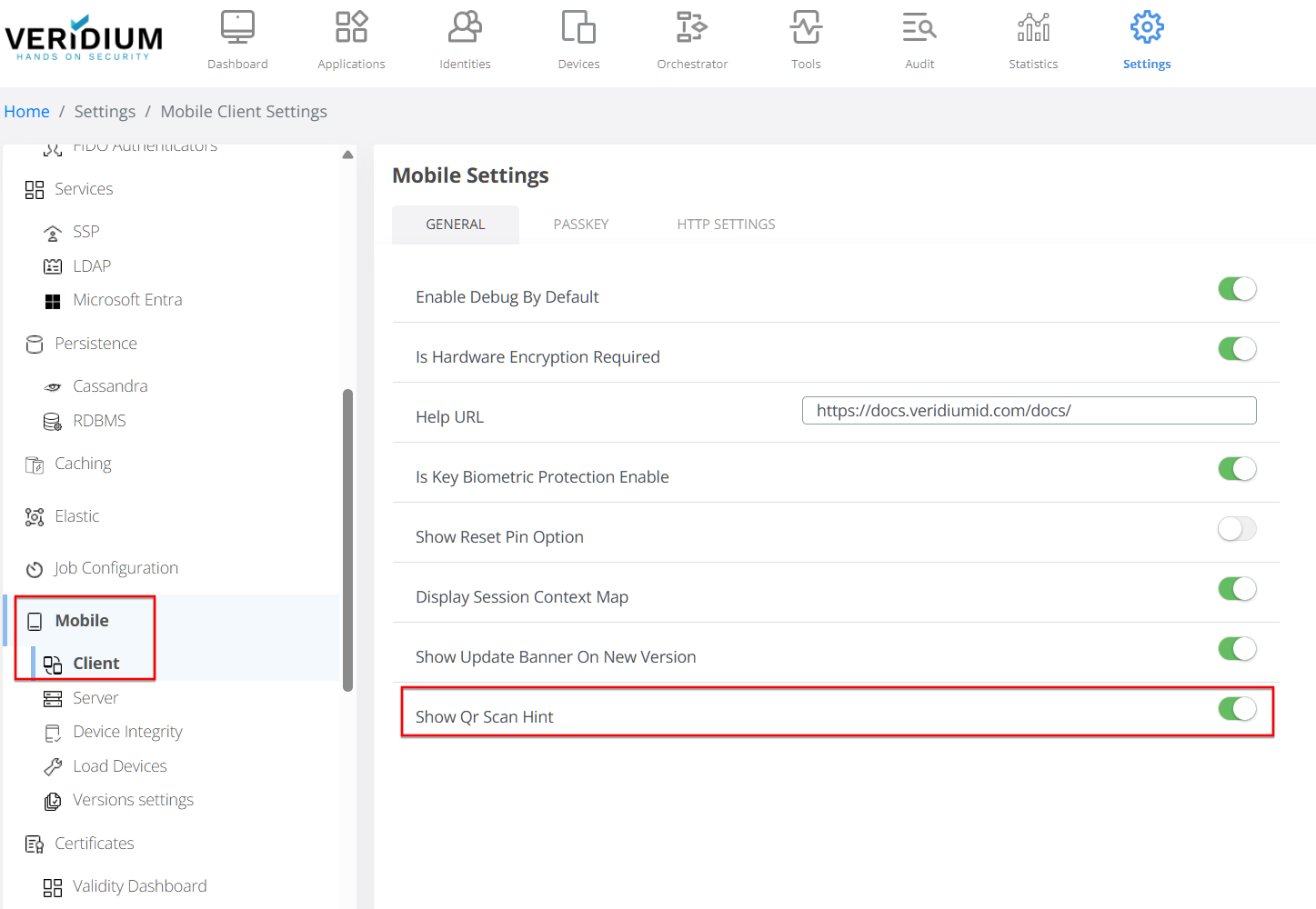
The hint is disabled by default. To enable it, turn on Show Qr Scan Hint in Veridium Manager → Settings → Mobile → Client, or set the equivalent show-qr-scan-hint entry to true in mobileSettings.json.
Passkey Authentication with Contextual and Behavioural Data
During server-managed passkey authentication, the Veridium Authenticator can now collect device, location and behavioural context and report it to VeridiumID for risk analysis by ILP. This applies to Veridium passkeys and Microsoft Entra passkeys managed by Veridium, over hybrid (QR), Bluetooth and NFC (Android only) transports.
-
Reliable delivery: If contextual data cannot be sent immediately, the app keeps it locally and retries later, including after network loss or an app restart.
-
Configurable reporting: Reporting is controlled by the Is Passkey Session Report Enabled, Is Passkey Reporting Async and Enforce Location Policies On Passkey policies.
Enhanced Traceability
The Veridium Authenticator now attaches correlation identifiers for the request, device, session and identity to its requests to VeridiumID. This lets administrators and support teams follow an enrollment or authentication journey end to end across VeridiumID services, which makes troubleshooting faster.
Android Build without Google Mobile Services
A dedicated Android build of the Veridium Authenticator is now available for devices and regions where Google Play and Google Mobile Services are not available. The build can be distributed directly as an APK, for example through MDM or other IT-managed channels.
-
Separate application ID: The build uses the
com.veridiumid.authenticator.nogmsapplication ID, so the server can identify it and apply dedicated policies. Your Veridium license must include this application ID. -
Supported flows: QR-based enrollment and authentication with PIN, biometrics and TOTP are fully supported. Local device integrity checks remain enabled.
-
Limitations: Features that depend on Google services are not available in this build, including push notifications, location services, in-app updates and Play Integrity checks. The app does not check for new versions automatically, so updates must be distributed through your own channels.
Improvements & Technical Enhancements
-
Location Permission on Demand: The app no longer asks for location permission at installation. It now requests location access during authentication and collects location on a best-effort basis. The Location Services Required and Precise Location Services Required settings determine whether missing location information blocks the authentication. (see also Control Location Data Collection )
-
Location Accuracy: When Precise Location Services Required is enabled on the server, the app now also asks the user to turn on the device's Location Accuracy setting. This prevents location timeouts during authentication on devices where Location Accuracy is turned off. (See also Control Location Data Collection )
-
Configurable Connection Parameters: Administrators can now adjust the app's connection, read and write timeouts from the server, to adapt to network and infrastructure conditions. On VeridiumID Server 3.9 and above, use the
httpSettingssystem setting:
"httpSettings": {
  "connectTimeout": 10000,
  "readTimeout": 5000,
  "writeTimeout": 5000
}
For server versions earlier than 3.9, the same values can be set in mobileSettings.json:
"httpSettingsConnectTimeout": "10000",
"httpSettingsReadTimeout": "5000",
"httpSettingsWriteTimeout": "5000"
-
Simpler Passkey QR Sign-In (iOS): When signing in with a passkey by scanning a QR code (hybrid transport), the app now goes straight to Face ID or Touch ID without an extra confirmation dialog. The confirmation dialog is kept for Bluetooth sign-ins, where the request is not started by an explicit user action.
-
Consistent Device Language Reporting: The app now reports the device language in a consistent language-country format (for example,
en-gborde-ch), improving how language information is displayed in Veridium Manager. -
Improved Passkey Diagnostics (Android): More detailed passkey logging helps support teams investigate passkey issues faster.
-
iOS Platform Update: The iOS app has been updated to Apple's scene-based app lifecycle, for compatibility with Xcode 27, iOS 27 and future iOS releases. The minimum supported iOS version is now iOS 15.
-
Android Platform Update: The Android app now targets Android API level 36, with updated build tools and dependencies.
Bug Fixes
Android
-
Offline QR Authentication with PIN: Resolved an issue where the PIN could be rejected during offline QR authentication, while online PIN authentication worked as expected.
-
Passkeys in Mobile Browsers: Fixed an issue where Veridium passkeys were not listed as an available authenticator when signing in from a mobile browser.
-
Passkey Registration: Fixed an app crash when a website requested passkey creation with registration hints, as some browsers do by default.
-
Passkey Retention after Enrollment: Fixed an issue where a newly created passkey could be removed from the profile if the user closed the Edit Profile screen with the Confirm button.
-
FIDO Transports: The app now correctly reports all supported FIDO transports, including Bluetooth and NFC, in addition to internal and hybrid.
-
Profile Wipe: Fixed a crash when wiping a profile after its access was revoked.
-
Enrollment Stability: Fixed an enrollment loop that could occur when Android closed the app screen in the background.
-
SDK Stability: Resolved a background exception related to secure storage creation reported on some devices.
iOS
-
QR Scanner Display: Fixed an issue where the QR scanning screen could appear blank, preventing QR codes from being detected.
-
Passkey Data after Re-Enrollment: Fixed an issue where locally cached passkey details were kept after an identity was deleted and enrolled again, so passkey sessions were not recorded in Veridium Manager.
-
FIDO Transports: The app now correctly reports all supported FIDO transports.
Known Issues
Android: error message after a successful passkey sign-in from a computer
When signing in on a computer by scanning the QR code with an Android phone, the phone may show “Something went wrong” or stay on “Connecting with another device” for about 30 seconds. The sign-in itself completes successfully, and the message can be dismissed. This is caused by a recent Google Play services update (starting with version 26.40.32) and affects all passkey managers, not only Veridium Authenticator. The issue has been reported to Google: issue 576723193.
SDKs:
Veridium Mobile SDK 5.21.2 for Android breaking changes are detailed in the expandable snippet below: