

VeridiumID 3.9.1 improves the FIDO and passkey authentication experience by using authenticator transport information to determine which sign-in options should be presented to the user.
Administrators can configure the transports accepted by each FIDO Relying Party and define their preferred order. When enabled, VeridiumID can also take into account the transports supported by each registered authenticator, helping the browser present authentication options that are more relevant to the user.
The supported transport options are:
hybrid, usb, internal, nfc, and ble
The hybrid transport is now available as part of the Relying Party transport configuration.
Configure authenticator transports
Open the applicable FIDO Relying Party configuration in Veridium Manager.
Two settings control transport behavior:
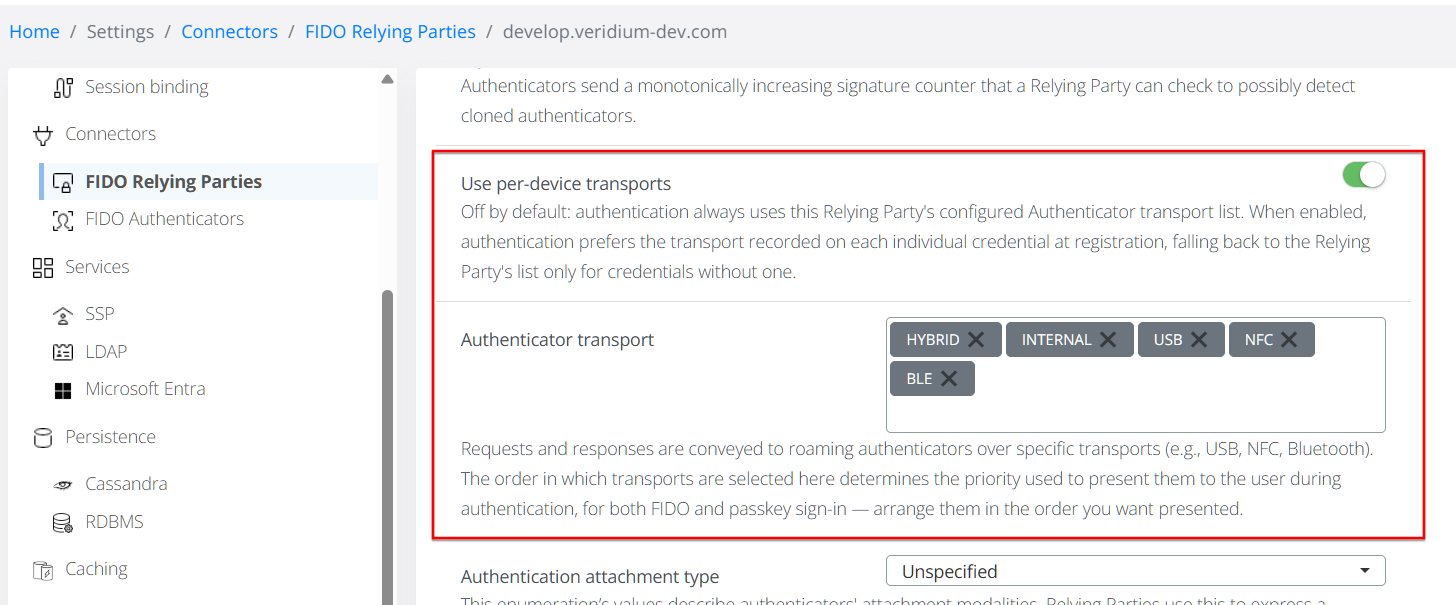
Authenticator transport
Select the transports that the Relying Party accepts.
The order of the configured transports is significant and is preserved when VeridiumID prepares the authentication request.
This allows an organization to prioritize the authentication experiences that are most appropriate for its environment.
Use per-device transports
Enable this to use registered device's transports when the authentication options should also take into account the transports supported by each registered authenticator.
This option is disabled by default.
When disabled, VeridiumID continues to provide the complete transport list configured for the Relying Party, preserving the behavior used before this enhancement, to ensure backwards compatibility.
When enabled, VeridiumID compares the Relying Party configuration with the known transports of each registered credential and uses the transports that both support.
Transport resolution
When Use per-device transports is enabled, VeridiumID evaluates transports separately for each registered credential and uses the common values (intersection).
For example:
|
Configuration |
Transports |
|---|---|
|
Relying Party allows |
|
|
Authenticator supports |
|
|
Transports used |
|
Transports that are not supported by both the Relying Party and the authenticator are removed, while the order configured by the administrator is preserved.
No matching transport
If there is no common transport between the Relying Party configuration and the registered authenticator, VeridiumID falls back to the transport list configured for the Relying Party.
This fallback prevents transport filtering from leaving the user without an authentication option.
Credentials without saved transport information
If transport information is not available for an existing credential, VeridiumID also uses the Relying Party transport list without filtering.
This provides backward compatibility for credentials where transport information cannot be determined.
Username + FIDO
When a user enters their username before selecting FIDO authentication, VeridiumID already knows which FIDO credentials are registered for that user.
With Use per-device transports enabled, each credential can therefore be evaluated individually against the transports configured for the Relying Party.
For example, if a user has both:
-
a security key supporting USB;
-
a passkey supporting hybrid authentication,
VeridiumID can provide transport information appropriate to each credential rather than applying the same complete transport list to both.
Sign in with passkey
The behavior is different when the user selects Sign in with passkey without first providing a username.
At this point, VeridiumID does not yet know which user's credential will be selected. The Relying Party transport configuration is therefore sent as configured, without credential-specific filtering.
The authenticator and platform then determine which available credential can be used.
This means that Use per-device transports affects credential-specific filtering when the user is already known, but does not restrict the usernameless Sign in with passkey flow.
Prioritizing recently used credentials
When multiple registered credentials are available during a username-based FIDO authentication, VeridiumID now prioritizes credentials according to their successful authentication history.
The most recently used credential is offered first, while credentials that have not previously been used for authentication are placed after credentials with recorded usage.
For example:
|
Priority |
Credential |
|---|---|
|
1 |
Security key used recently |
|
2 |
Phone passkey used earlier |
|
3 |
Other credential present, but not used yet |
This helps make frequently used authentication methods easier for users to reach.
Example scenarios
|
Scenario |
Result |
|---|---|
|
Relying Party allows |
All three transports remain available. |
|
Relying Party allows |
Only |
|
Relying Party allows |
No transports overlap, so VeridiumID falls back to |
|
The user selects Sign in with passkey without entering a username |
The complete Relying Party transport list is used because the credential is not yet known. |
These rules allow organizations to make FIDO authentication prompts more relevant without preventing authentication when transport information is incomplete or unavailable.
Upgrade considerations
The new credential-aware filtering behavior is opt-in.
After upgrading to VeridiumID 3.9.1:
-
existing Relying Party transport configuration continues to work;
-
Use per-device transports remains disabled by default;
-
enabling it activates credential-specific transport filtering for username-based FIDO authentication;
-
existing credentials without usable transport information continue to fall back to the Relying Party configuration.