

VeridiumID 3.9.1 introduces a global Collect Location Data setting that allows organizations to control whether geographic location information is collected, processed, and stored by VeridiumID.
This provides a single control for organizations that do not want location information to be retained as part of authentication sessions, audit information, or other system records.
The setting is available under: Veridium Manager → Settings → Geolocation
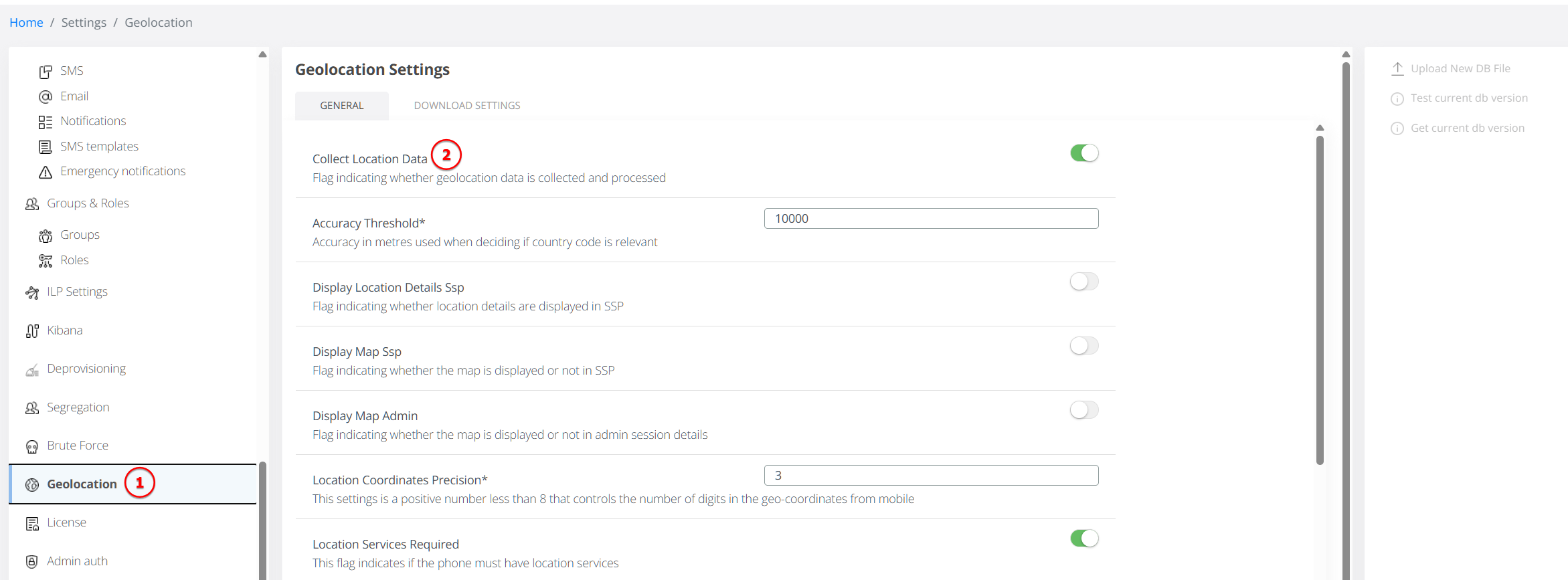
Collect Location Data
The Collect Location Data setting determines whether VeridiumID processes geographic information received from mobile clients or derived from IP addresses.
Enabled
When Collect Location Data is enabled, VeridiumID can:
-
process location information received from mobile clients;
-
determine geographic information from IP addresses using GeoIP;
-
apply the configured Location Attribute Filter;
-
apply Custom Geo IP Transformation Map rules;
-
store location information in sessions, history records, action logs, and event logs;
-
display location maps in Veridium Manager and the Self Service Portal, according to the respective map visibility settings.
Disabled
When Collect Location Data is disabled, VeridiumID stops processing and retaining geographic location information for newly processed data.
From that point:
-
location information received from clients is removed before storage;
-
IP addresses are no longer processed by the GeoIP service to determine a geographic location;
-
Location Attribute Filter and Custom Geo IP Transformation Map are no longer applied;
-
location information is not included in new sessions, tokens, history records, action logs, or event logs;
-
the
locationfield is not included in the raw representation of new sessions; -
Admin and SSP maps are not displayed when the session does not contain valid location data.
IP Address Collection
Disabling Collect Location Data does not disable IP address collection itself.
IP addresses can continue to be stored where they are required for auditing, security, or system operation. However, VeridiumID no longer uses those addresses to determine or store a geographic location while location collection is disabled.
This distinction is important for organizations that want to retain IP-based security and audit information without also retaining geographic location data.
Existing Location Data
Changing Collect Location Data affects newly processed information only.
Disabling the setting does not remove location information that was collected previously. Existing sessions, events, and other historical records retain the location information already stored with them.
If an organization requires previously collected location information to be removed, this must therefore be handled separately according to its data-retention requirements.
Interaction with Existing Geolocation Settings
When location collection is disabled, settings that process or transform geographic information are no longer applied, including:
-
Location Attribute Filter
-
Custom Geo IP Transformation Map
Existing controls such as Display Map Admin and Display Map SSP continue to control map visibility when valid location information exists. However, new sessions created while location collection is disabled do not contain location data to display.
The existing Geolocation configuration continues to provide more granular controls when location collection is enabled, including location precision, location-service requirements, attribute filtering, and map visibility.
Upgrade Behavior
For backward compatibility, Collect Location Data is enabled by default for existing configurations.
Upgrading to VeridiumID 3.9.1 therefore does not change the current geolocation behavior unless an administrator explicitly disables the setting.
Organizations that do not require geographic location information should review their Geolocation configuration after upgrading and disable Collect Location Data if appropriate for their security and privacy requirements.