

Geolocation
Overview
VeridiumID can use geographic location information as part of authentication context, risk analysis, session reporting, and troubleshooting.
Geolocation behavior can be configured from:
Veridium Manager → Settings → Geolocation
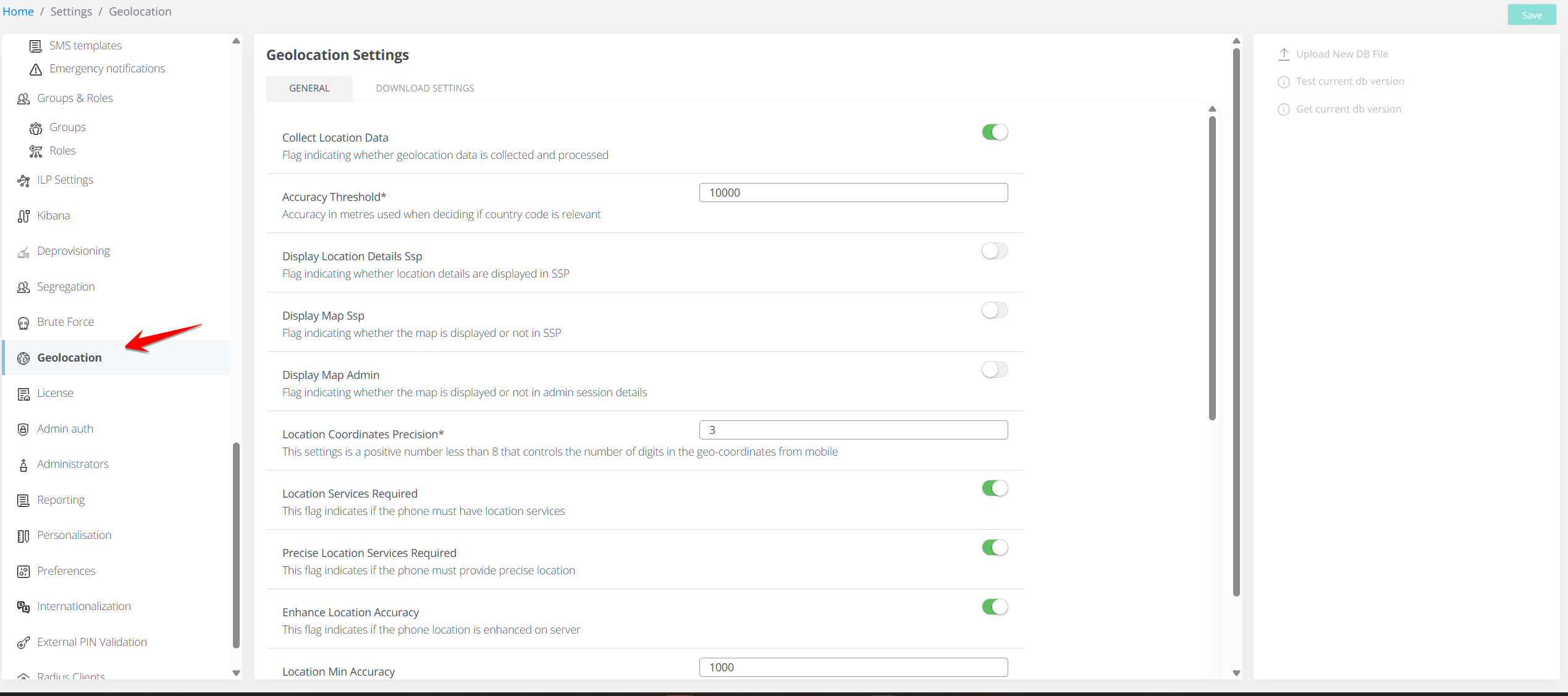
The configuration provides controls for:
-
collecting and storing location information;
-
resolving locations from IP addresses;
-
controlling the location attributes retained by VeridiumID;
-
defining location accuracy requirements;
-
displaying location maps in Veridium Manager and the Self Service Portal;
-
controlling administrator access to location information;
-
managing the GeoIP database used for location resolution.
The corresponding server-side settings are also available in location.json through Advanced Settings.
Geolocation Controls
Several settings affect different stages of location processing. They should not be considered interchangeable.
|
Control |
Purpose |
|---|---|
|
Collect Location Data |
Controls whether geographic location information is collected, processed, and stored at all. |
|
Location Attribute Filter |
Controls which attributes are retained in the location object when location collection is enabled. |
|
Display Map Admin |
Controls whether a location map is displayed in Veridium Manager when valid location information is available. |
|
Display Map SSP |
Controls whether a location map is displayed in the Self Service Portal when valid location information is available. |
|
View location administrator permission |
Controls whether an administrator can access location information in Veridium Manager. |
For example, disabling Display Map Admin hides the map but does not by itself disable collection of location information. To prevent new geographic location data from being collected and stored, disable Collect Location Data.
Collect Location Data
The global Collect Location Data setting (collectLocationData) determines whether VeridiumID collects, processes, and stores geographic location information.
When enabled
When Collect Location Data is enabled:
-
location information can be received from mobile clients;
-
IP addresses can be processed by the GeoIP service to determine geographic information;
-
Location Attribute Filter is applied to location data reported by mobile clients;
-
Custom Geo IP Transformation Map rules can be applied;
-
location information can be stored in sessions, history records, action logs, and event logs;
-
maps can be displayed in Veridium Manager and SSP according to their respective display settings.
When disabled
When Collect Location Data is disabled:
-
location information received from clients is removed before storage;
-
IP addresses are no longer processed by the GeoIP service to determine geographic location;
-
Location Attribute Filter is no longer applied;
-
Custom Geo IP Transformation Map rules are no longer applied;
-
location information is not included in newly created sessions, tokens, history records, action logs, or event logs;
-
the
locationfield is not included in the raw representation of new sessions; -
Admin and SSP maps are not displayed when no valid location information exists.
Existing location data
Disabling Collect Location Data does not remove location information that was collected previously.
Existing sessions, events, and other historical records retain the location information already stored with them. The setting applies only to information processed after the configuration is changed.
IP addresses
Disabling geographic location collection does not disable IP address collection itself.
IP addresses can continue to be stored where required for auditing, security, and system operation. However, VeridiumID no longer uses those addresses to determine or store a geographic location while Collect Location Data is disabled.
For existing configurations, location collection remains enabled after upgrade unless an administrator explicitly disables it.
General Settings
The following settings are available under Settings → Geolocation.
|
Setting |
Configuration key |
Default |
Description |
|---|---|---|---|
|
Collect Location Data |
|
Enabled for existing configurations |
Controls whether geographic location information is collected, processed, and stored. |
|
Accuracy Threshold |
|
|
Accuracy required for a location to be considered valid for country-code determination. Used together with Country Code Replacement. |
|
Display Map SSP |
|
ON |
Controls whether a map is displayed in the Self Service Portal when valid location information is available. |
|
Display Map Admin |
|
ON |
Controls whether a map is displayed in Veridium Manager session details when valid location information is available. |
|
Location Coordinates Precision |
|
|
Number of decimal digits retained for coordinates received from mobile devices. Higher values provide greater precision. |
|
Location Services Required |
|
ON |
Requires the mobile device to have location services enabled and authorized for the Veridium application. |
|
Precise Location Services Required |
|
OFF |
Determines whether precise-location permission is required from the mobile device. |
|
Enhance Location Accuracy |
|
OFF |
Enables server-defined minimum accuracy and maximum acquisition time requirements. |
|
Location Min Accuracy |
|
|
Minimum required location accuracy when enhanced accuracy processing is enabled. |
|
Location Max Wait Time |
|
|
Maximum time the mobile application should attempt to acquire a more accurate location. |
|
Location Attribute Filter |
|
N/A |
Defines which attributes are retained in the location object. |
|
Country Code Replacement |
|
|
Country code used when the available location does not meet the configured accuracy requirements. |
|
Custom Geo IP Transformation Map |
|
N/A |
Allows specific IP addresses or ranges to be mapped to configured geographic locations. |
Note:
customGeoIpTransationsis the configuration key used by the existing configuration, while Custom Geo IP Transformation Map is the descriptive setting name.
Location Attribute Filter
The Location Attribute Filter determines which fields can be retained in the location object.
Depending on the required level of detail, the filter can include information such as:
-
country code;
-
city;
-
district;
-
coordinates;
-
location permission state.
This allows organizations to limit retained location information to the level of detail required by their authentication, reporting, and privacy policies.
When Collect Location Data is disabled, the Location Attribute Filter is not applied because geographic location information is no longer retained.
Location Permission State
VeridiumID can record the location-permission status reported by a mobile device using the:
locationPermissionState
attribute.
This information is useful when troubleshooting authentication or geofencing behavior because it shows whether the application was permitted to obtain the required location information.
Possible values
|
Value |
Meaning |
|---|---|
|
|
No location permission has been granted. |
|
|
Permission state was not requested. This can occur when |
|
|
Coarse location permission has been granted. |
|
|
Precise location permission has been granted. |
Enable location permission state reporting
To retain this information:
-
Navigate to Settings → Geolocation.
-
Locate Location Attribute Filter.
-
Add or enable
locationPermissionState. -
Save the configuration.
Location permission-state information can also be reviewed from:
Statistics → Phone Sessions
This can help distinguish between situations where location resolution failed and situations where the mobile application did not have the required operating-system permission.
Location Visibility in Veridium Manager
Location information in Veridium Manager is also protected by administrator permissions.
The View location permission controls access to geographic location information associated with identities and authentication sessions.
For administrators without View location permission:
-
location information is not displayed in Identity Details;
-
the Location column is not displayed where applicable;
-
the Location column is not available in Audit → Authentication Sessions;
-
the location map is not displayed in Session Details;
-
location information is omitted from Identity and Session responses available to that administrator;
-
location information is not included in the raw session data exposed to that administrator.
This permission is separate from Display Map Admin.
Display Map Admin controls whether the map feature is enabled, while View location controls whether the logged-in administrator is authorized to access the underlying location information.
Location Visibility in the Self Service Portal
The Display Map SSP setting controls whether a location map is displayed in the Self Service Portal when valid location information is available for the applicable session.
If location collection is disabled, or the session does not contain valid location information, there is no location data available for the map to display.
GeoIP and Location Database Management
The Download Settings section under Geolocation manages the database used for IP-based geographic resolution.
Administrators can:
-
configure the database update frequency;
-
configure the download source;
-
manually upload a geolocation database;
-
test the currently installed database;
-
review the installed database version.
Keeping the database current helps maintain accurate IP-based geographic resolution.
Custom IP-to-location mappings can additionally be configured using Custom Geo IP Transformation Map when location collection is enabled.
Troubleshooting
Location resolution status
|
Error code |
Message |
Description |
|---|---|---|
|
|
Location was captured successfully |
Location information was obtained successfully. |
|
|
Failed to geocode the location |
Coordinates were received but could not be translated into a geographic location. |
|
|
Location services is unavailable |
The mobile application cannot communicate with the device location service. |
|
|
Location permission denied for app |
The operating system has not granted the required location permission to the Veridium application. |
|
|
Timeout getting location |
Location services are available, but acceptable location information was not obtained within the configured time. |
Location information is not displayed
If location information or the location map is not available, verify the following:
-
Collect Location Data is enabled.
-
The session contains valid location information.
-
Location Attribute Filter contains the required attributes.
-
The mobile device has the required location permissions.
-
Display Map Admin or Display Map SSP is enabled for the relevant interface.
-
The Veridium Manager administrator has the View location permission.
-
The GeoIP database is available and up to date when IP-based location resolution is being used.
When troubleshooting mobile location collection, also review locationPermissionState in Statistics → Phone Sessions to determine whether the application had access to coarse or precise location information.