

VeridiumID 3.9.1 extends the Certificate Validity Dashboard to include the cryptographic keys used by the Shibboleth Identity Provider for OIDC.
Administrators can now monitor the expiration of OIDC keys from the same dashboard used for other Identity Provider certificates, helping identify keys that require attention before their expiration can affect OIDC authentication.
OIDC Key Visibility
Navigate to: Veridium Manager → Certificates → Validity Dashboard → Shibboleth IDP Certificates
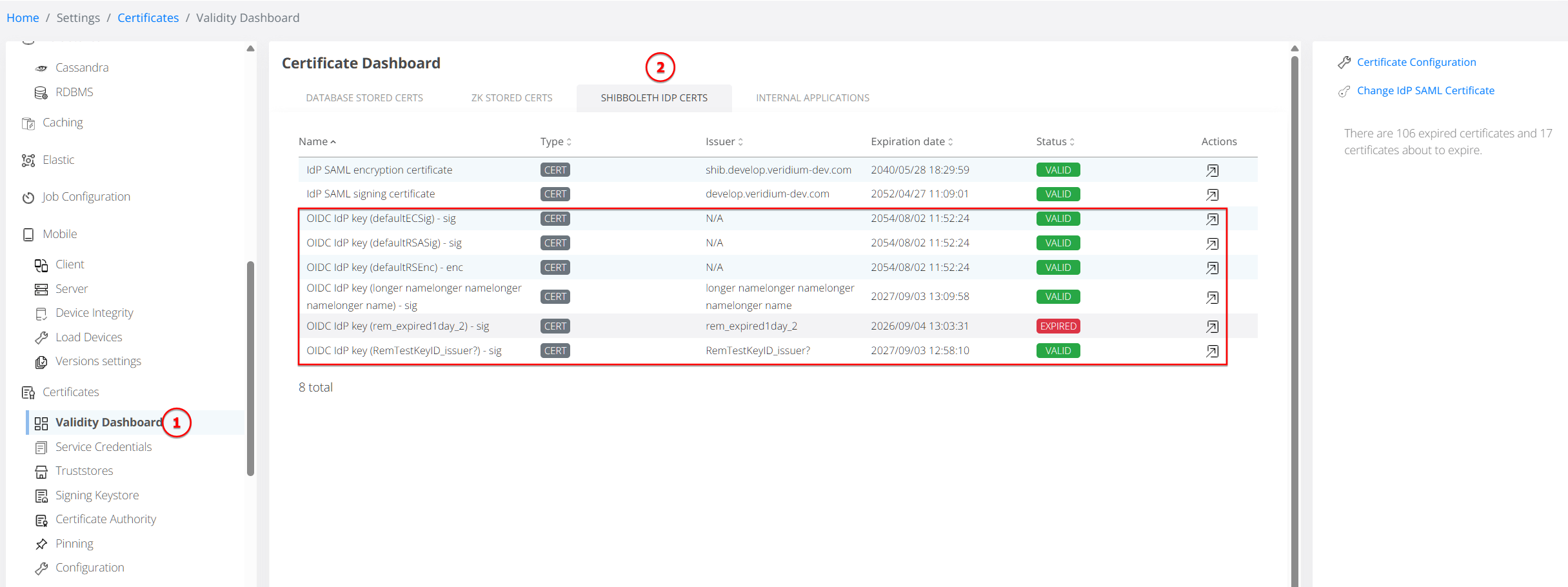
The Shibboleth IDP Certificates view now includes the OIDC keys configured for the Identity Provider alongside the existing SAML certificates.
OIDC entries are clearly identified in the list. For example:
OIDC IdP key (<key-id>) - sig
Managing an OIDC Key
Selecting an OIDC key from the Certificate Validity Dashboard takes the administrator directly to: Settings → IdP → OIDC → Security
This is the existing configuration area used to manage OIDC keys, including generating new keys and replacing or removing existing ones as part of the organization's key rotation process.
The Certificate Validity Dashboard itself remains a monitoring view. VeridiumID 3.9.1 does not change how OIDC keys are generated, used, or rotated.