

1. Introduction
VeridiumID can be deployed in multiple on-premises configurations depending on scale, performance, and availability requirements.
This document outlines the supported on-prem deployment types, their architectural structure, and the hardware, software, and network requirements for each.
It serves as a reference for infrastructure engineers, DevOps teams, and system administrators preparing VeridiumID installations in enterprise or datacenter environments.
2. Deployment Overview
The VeridiumID on-prem architecture consists of the following layers:
-
Veridium Application Layer (Web/Application Services) — provides the authentication, user registration, self-service, and administration interfaces.
-
Persistence Layer (Data Services) — provides database, configuration, and logging functionality through Cassandra, ZooKeeper, and Elasticsearch.
-
ILP Application Layer - add-on analytics platform focused on context and motion–based risk scoring
-
RA/EP (Registration Authority/Enrollment Proxy)
Each deployment type determines how these layers are distributed and scaled across servers or clusters.
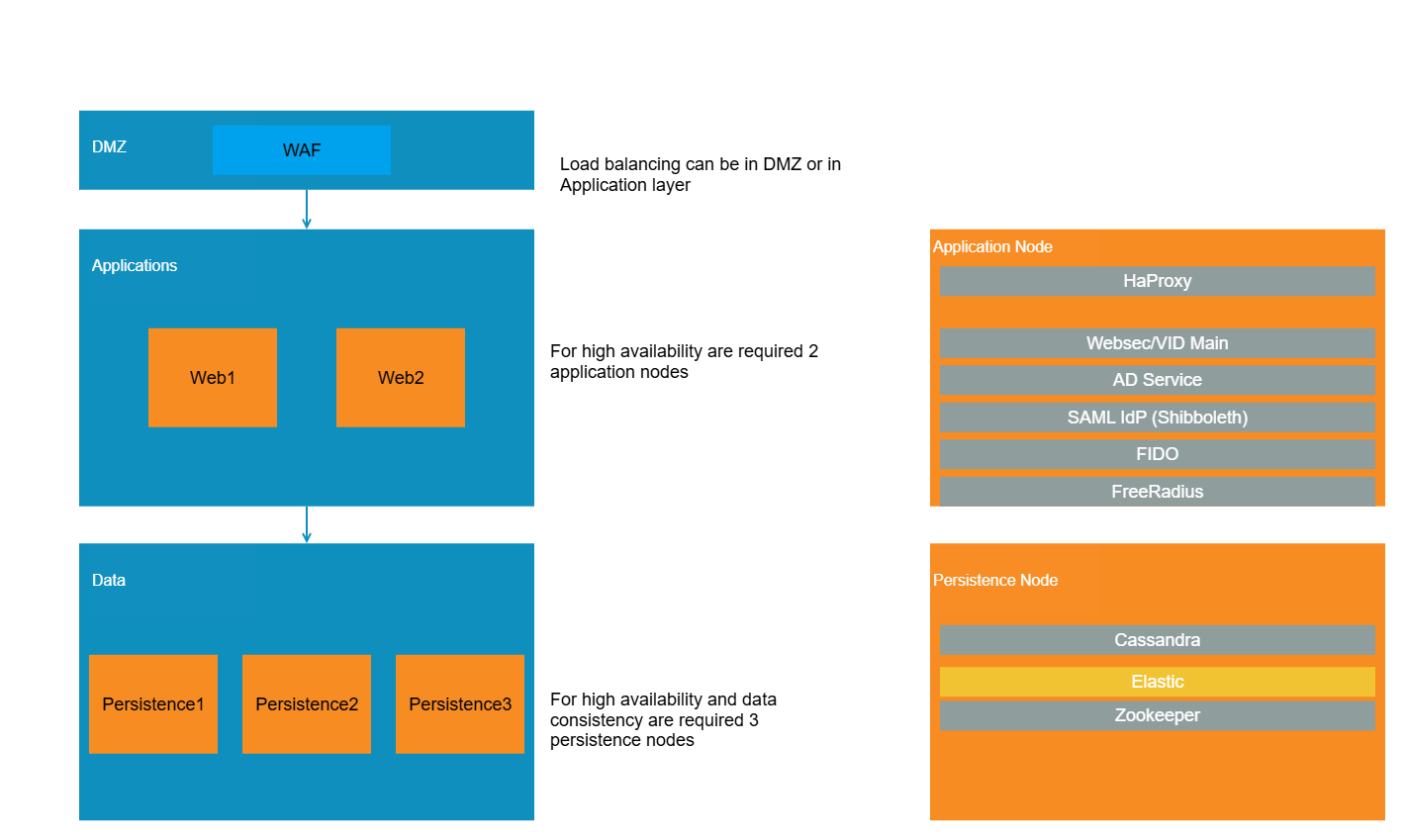
3. Deployment Types
Each of below deployment type can be done in single datacenter or in multiple datacenters (CDCR - recommended with 2 or 3 DC), assuring high availability and covering data disastery coverage.
|
Requirement - High availability |
Requirement - Multi-datacenter redundancy |
Requirement - Separate VLAN for webapp and persistence |
Suggested deployment type |
Applicability |
|---|---|---|---|---|
|
N |
N |
N |
Single-Nodes |
|
|
N |
N |
Y |
Single-Nodes Layered |
|
|
Y |
Y |
N |
Single-Nodes in 2-3 datacenters |
|
|
Y |
Y |
Y |
Single-Nodes Layered in 2-3 datacenters |
|
|
Y |
N |
N |
Unified Multi-Node |
|
|
Y |
N |
Y |
Layered / Large-Enterprise |
|
|
Y |
Y |
Y |
Layered / Large-Enterprise in 2-3 datacenters |
|
3.1 Single-Nodes
Description:
All VeridiumID components (application + persistence) are installed on a single server or VM.
Use Case:
-
Testing, demos, or functional proof-of-concepts.
-
Non-production environments or production deployemnts where high availability is not critical.
-
Remomended for production only if a second Data Center is added (see CDCR chapter below)
Architecture:
-
Single host running all web and persistence VeridiumID components (websec, dmzwebsec, shibboleth, admin, self-service portal).
-
Single host running for ILP web components.
-
single host for RA/EP components.
-
CP will be installed on each windows station
Requirements (for users with less then 2.5k users):
|
Role |
NoServers |
OS |
CPU |
Memory (Gb) |
Storage (Gb) |
Notes |
|---|---|---|---|---|---|---|
|
VeridiumID Webapp+Persistence |
1 |
RHEL8/9, Rocky8/9 |
4 |
24 |
100 |
|
|
ILP Webapp |
1 |
RHEL8/9, Rocky8/9 |
4 |
16 |
100 |
|
|
RA/EP |
1 |
Windows 2022 |
4 |
16 |
100 |
|
|
|
|
|
|
|
|
|
|
TOTAL |
3 |
|
12 |
56 |
300 |
|
Requirements (for users with less then 5k users):
|
Role |
NoServers |
OS |
CPU |
Memory (Gb) |
Storage (Gb) |
Notes |
|---|---|---|---|---|---|---|
|
VeridiumID Webapp+Persistence |
1 |
RHEL8/9, Rocky8/9 |
8 |
32 |
400 |
|
|
ILP Webapp |
1 |
RHEL8/9, Rocky8/9 |
8 |
16 |
100 |
|
|
RA/EP |
1 |
Windows 2022 |
4 |
16 |
100 |
|
|
|
|
|
|
|
|
|
|
TOTAL |
3 |
|
20 |
64 |
600 |
|
3.2 Single-Nodes Layered
Description:
Each VeridiumID components has it’s own dedicated server.
Use Case:
-
Testing, demos, or functional proof-of-concepts.
-
Non-production environments or production deployemnts where high availability is not critical.
-
Remomended for production only if a second Data Center is added (see CDCR chapter below)
Architecture:
-
Single host running web components (websec, dmzwebsec, shibboleth, admin, self-service portal)
-
Single host running persistence VeridiumID components (elastic, cassandra, zookeeper)
-
Single host running for ILP web components.
-
single host for RA/EP components.
-
CP will be installed on each windows station
Requirements (for users with less then 5k users):
|
Role |
NoServers |
OS |
CPU |
Memory (Gb) |
Storage (Gb) |
Notes |
|---|---|---|---|---|---|---|
|
VeridiumID Webapp |
1 |
RHEL8/9, Rocky8/9 |
4 |
16 |
100 |
|
|
VeridiumID Persistence |
1 |
RHEL8/9, Rocky8/9 |
4 |
16 |
200 |
|
|
ILP Webapp |
1 |
RHEL8/9, Rocky8/9 |
4 |
16 |
100 |
|
|
RA/EP |
1 |
Windows 2022 |
4 |
16 |
100 |
|
|
|
|
|
|
|
|
|
|
TOTAL |
4 |
|
16 |
64 |
500 |
|
Requirements (for users with less then 15k users):
|
Role |
NoServers |
OS |
CPU |
Memory (Gb) |
Storage (Gb) |
Notes |
|---|---|---|---|---|---|---|
|
VeridiumID Webapp |
1 |
RHEL8/9, Rocky8/9 |
8 |
24 |
100 |
|
|
VeridiumID Persistence |
1 |
RHEL8/9, Rocky8/9 |
8 |
24 |
500 |
|
|
ILP Webapp |
1 |
RHEL8/9, Rocky8/9 |
8 |
24 |
100 |
|
|
RA/EP |
1 |
Windows 2022 |
8 |
24 |
100 |
|
|
|
|
|
|
|
|
|
|
TOTAL |
4 |
|
32 |
96 |
900 |
|
3.3 Unified Multi-Node Deployment
Description:
Multiple identical nodes are deployed, each running both the Application Layer and Persistence Layer. Nodes are load-balanced to distribute traffic.
Use Case:
-
Small to medium-scale production environments.
-
Organisations seeking moderate availability without full tier separation.
Architecture:
-
Each VeridiumiD node hosts Veridium web services and local persistence (Cassandra, ZooKeeper, Elasticsearch).
-
ILP hosts only webapp services
-
Load balancer distributes incoming authentication requests.
-
Each persistence service forms a cluster (Cassandra ring, ZooKeeper ensemble, Elasticsearch cluster).
-
High Availability:
-
Load balancing for application layer.
-
Cluster quorum for persistence layer.
-
One node of each type can be lost with no impact on functionaliy
-
Requirements for companies with less 20k users:
|
Role |
NoServers |
OS |
CPU |
Memory (Gb) |
Storage (Gb) |
Notes |
|---|---|---|---|---|---|---|
|
VeridiumID Webapp+Persistence |
3 |
RHEL8/9, Rocky8/9 |
4 |
24 |
200 |
|
|
ILP Webapp |
2 |
RHEL8/9, Rocky8/9 |
4 |
16 |
200 |
|
|
RA/EP |
2 |
Windows 2022 |
4 |
16 |
200 |
|
|
|
|
|
|
|
|
|
|
TOTAL |
7 |
|
28 |
136 |
1400 |
|
3.4 Layered / Large-Enterprise Deployment
Description:
A fully tiered architecture separating Application and Persistence layers across dedicated nodes or clusters. Designed for scalability, resilience, and high availability.
Use Case:
-
Enterprise production environments.
-
Environments requiring horizontal scaling, high concurrency, or multi-data-center replication.
Architecture:
-
Application Layer:
-
Web portals and APIs: websec, dmzwebsec, shibboleth, admin, self-service portal.
-
Typically behind a reverse proxy or load balancer.
-
-
Persistence Layer:
-
Cassandra (user and device data)
-
ZooKeeper (configuration management)
-
Elasticsearch (logs, audit data)
-
-
Network Segmentation:
-
DMZ for web components.
-
Internal network for persistence clusters.
-
-
High Availability:
-
Load balancing for application layer.
-
Cluster quorum for persistence layer.
-
One node of each type can be lost with no impact on functionaliy
-
Requirements for companies with less 50k users:
|
Role |
NoServers |
OS |
CPU |
Memory (Gb) |
Storage (Gb) |
Notes |
|---|---|---|---|---|---|---|
|
VeridiumID Webapp |
2 |
RHEL8/9, Rocky8/9 |
4 |
16 |
200 |
|
|
VeridiumID Persistence |
3 |
RHEL8/9, Rocky8/9 |
4 |
16 |
500 |
|
|
ILP Webapp |
2 |
RHEL8/9, Rocky8/9 |
4 |
16 |
200 |
|
|
RA/EP |
2 |
Windows 2022 |
4 |
16 |
200 |
|
|
|
|
|
|
|
|
|
|
TOTAL |
9 |
|
36 |
144 |
2700 |
|
Requirements for companies with more 50k users:
|
Role |
NoServers |
OS |
CPU |
Memory (Gb) |
Storage (Gb) |
Notes |
|---|---|---|---|---|---|---|
|
VeridiumID Webapp |
2 |
RHEL8/9, Rocky8/9 |
8 |
24 |
200 |
|
|
VeridiumID Persistence |
3 |
RHEL8/9, Rocky8/9 |
8 |
24 |
1000 |
|
|
ILP Webapp |
2 |
RHEL8/9, Rocky8/9 |
8 |
24 |
200 |
|
|
RA/EP |
2 |
Windows 2022 |
8 |
24 |
200 |
|
|
|
|
|
|
|
|
|
|
TOTAL |
9 |
|
72 |
216 |
4200 |
|
3.5 Cross-Data-Center (CDCR) / Geo-Redundant Deployment
Description:
A geographically distributed architecture ensuring business continuity during datacenter outages.
CDCR can be aplied to any of the presented deployements presented until now.
Use Case:
-
Enterprises requiring resilience and low-latency access in multiple regions.
Architecture Highlights:
-
Two or more datacenters each running a full layered deployment.
-
Cross-replication for all persitence components.
-
Synchronous or asynchronous data replication.
-
Global load balancer for traffic routing.
Requirements:
-
Low-latency inter-DC link (< 100 ms preferred).
-
Sufficient bandwidth for replication traffic.
-
Time synchronisation via NTP.
4 Deployment Models: Ports vs FQDN
VeridiumID supports two primary methods for exposing its web services: Port-based and Fully Qualified Domain Name (FQDN)-based deployments.
Both models serve the same functional purpose but differ in how clients reach individual components (e.g., websec, dmzwebsec, admin, ssp, shibboleth).
4.1 Port-Based Deployment
Overview:
In this model, a single hostname (or IP) is used for all Veridium web components, with each component accessed via a distinct TCP port.
This is the simplest configuration and is often used in controlled or internal environments.
In case there is a WAF in front of veridium services, all ports can be hidden.
Example:
https://internal.veridium.company.com:443      → websec (authentication)
https://internal.veridium.company.com:9444     → admin portal
https://internal.veridium.company.com:9987     → self-service portal
https://internal.veridium.company.com:8945     → shibboleth (federation)
https://external.veridium.local:443      → websec (authentication)
https://external.veridium.local:8544     → dmzwebsec (registration)
https://external.veridium.local:9987     → self-service portal
https://external.veridium.local:8944     → shibboleth (federation)
Advantages:
-
Easier initial setup — single DNS entry.
-
Suitable for small or test environments.
-
Reduced certificate management (one wildcard or single cert).
-
recommended in cases there is a WAF in front of veridium services.
-
All the ports can be overridden in WAF, so in extern will be exposed only one FQDN.
Disadvantages:
-
Ports must be opened and managed individually through firewalls.
-
Users may find non-standard port URLs less intuitive.
4.2 FQDN-Based Deployment
Overview:
Each Veridium service is assigned a unique DNS hostname (Fully Qualified Domain Name), all resolving to the same or different IPs.
This model is recommended for production and enterprise environments, particularly when using SSL/TLS with Server Name Indication (SNI).
Example:
https://external.veridium.company.com        → websec (authentication)
https://dmz-external.veridium.company.com    → dmzwebsec (registration)
https://shib-external.veridium.company.com   → shibboleth (federation)
https://ssp-external.veridium.company.com    → ssp (self-service portal)
https://internal.veridium.local        → websec (authentication)
https://admin-internal.veridium.local  → admin portal
https://shib-internal.veridium.local   → shibboleth (federation)
https://ssp-internal.veridium.local    → ssp (self-service portal)
Advantages:
-
Simplifies user access with friendly URLs.
-
Works seamlessly with SNI and enterprise PKI certificate policies.
-
Easier to apply different firewall and routing rules per service.
-
Better suited to load-balanced and containerised environments.
-
Aligns with standard web application practices.
Disadvantages:
-
Requires multiple DNS entries and certificates.
4.3 Choosing Between Models
|
Environment Type |
Recommended Approach |
Rationale |
|---|---|---|
|
Proof-of-Concept / Lab |
FQDN-based |
Simpler network setup |
|
Small Production / Pilot |
FQDN-based |
Simpler network setup |
|
Large-Scale / Enterprise |
Port-based |
It is easier to send traffic to different applications in case a WAF is defined. |
4.4 Hybrid Approach
In some mixed environments, a hybrid configuration may be used — for example, multiple services exposed via FQDN internally, while test or admin interfaces remain on alternate ports.
This can simplify gradual migration from a PoC to production topology without full DNS reconfiguration.
In case there is a WAF in front of veridium services, all ports can be hidden.
4.5 Summary
-
FQDN-based deployments are simple; best for test or isolated environments.
-
Port-based deployments offer scalability, usability and are easier to configure in case of WAF.
-
For production systems, hybrid approaches are strongly recommended.
5. Deployment Considerations & Best Practices
-
Choose deployment type matching the user-volume and business continuity needs (PoC vs production).
-
For production, isolate persistence layer from application layer for better scalability and resilience.
-
Ensure network segmentation, firewall rules, DNS entries and certificate configurations are aligned as per the deployment model.
-
For Kubernetes/Containerised deployment, ensure Service discovery, namespace isolation, Ingress rules, and stateful sets are configured correctly.
-
For cross-data-center deployments: ensure that Cassandra, Zookeeper (and optionally Elasticsearch) are configured in CDCR mode.
-
Consider logging and monitoring early: event logs, metrics, user behaviour analytics (context, motion), and anomaly detection.
-
Plan for certificate management, disaster recovery, high availability and scaling up as user loads increase.
6. Summary
VeridiumID provides multiple flexible on-prem deployment options—from single-node testing environments to fully distributed enterprise clusters with cross-datacenter replication.
Selecting the right model depends on your scale, redundancy, and compliance needs.
Proper sizing, security hardening, and network configuration are critical to ensuring reliable and performant authentication services.