

1. Overview
-
Define how to recover the system in case of disasters (hardware failure, data corruption, etc.)
-
there are described different methods to restore data.
-
in case of a full rollback to a previous veridium version, VM snapshots should be used.
-
In case that some specific application is not able to recover, there are described different methods to restore data/application from backup.
-
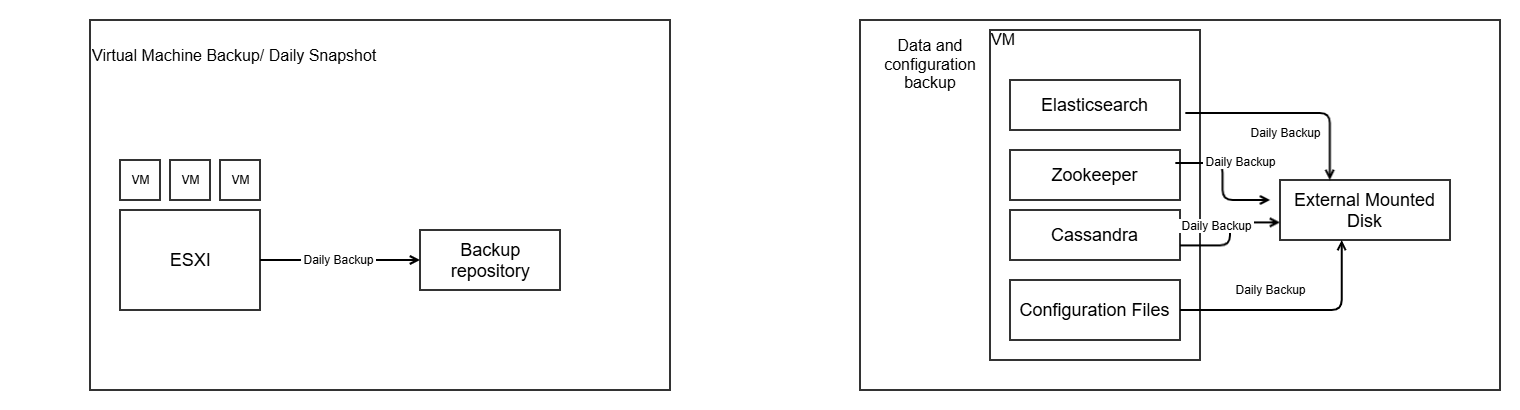
2. VM Protection Strategy
Configure VM snapshots and backups for all servers (persistence and webapp) per the client's backup policy. Store backups on distinct storage to ensure recoverability. Use snapshots sparingly for short-term needs like pre-change rollbacks.
Backup Schedule
Run daily backups for all servers. Retain at least the last 2 restore points, with longer retention recommended (e.g., 7-10 daily points plus weekly/monthly).
Snapshot Usage
Create snapshots before changes like patches or upgrades. Delete them promptly after verification to avoid performance issues and storage bloat. Avoid relying on snapshots for long-term data protection.
Restore from Backup (Primary Method)
Stop all servers (persistence and webapp). Restore VMs from the backup tool to the production environment. Start persistence servers first, confirm health, then launch webapp servers.
Restore from Snapshot (Emergency Only)
-
Gracefully shut down all persistence and webapp servers.
-
Revert each affected VM to the target snapshot via the hypervisor console.
-
Start persistence servers, validate data services, then bring up webapp servers.
-
Clean up unused snapshots post-recovery.
3. Data & Configuration Backups
3.1. What components are backed up
-
Cassandra (keyspaces + configuration)
-
ElasticSearch (data + index settings)
-
Zookeeper
-
Configuration data (certificates, service config files, etc.)
3.2. General guidance
-
Backup destination should be on a different disk/machine, not same machine’s disk.
-
Default path:
/opt/veridiumid/backup/(can be changed in config files). -
Restores can be done from the individual backup sets.
4. Backup & Restore Procedures per Component
4.1. Zookeeper
-
Script location:
/etc/veridiumid/scripts/zookeeper_backup.sh -
Schedule (cronjob):
0 2 * * 6(Saturdays, 02:00) -
Log file:
/var/log/veridiumid/ops/zookeeper_backup.log -
Backup location:
/opt/veridiumid/backup/zookeeper -
Backup naming:
zookeeper_backup_YYYY-MM-DD-HH-mm-ss -
Number of backups kept: 5 by default (can be changed via
sed -i "s|LIMIT=.*|LIMIT=<NEW_LIMIT>|g"in the backup script) -
Performing a backup:
bash /etc/veridiumid/scripts/zookeeper_backup.sh -
Restore procedure:
bash /opt/veridiumid/migration/bin/migration.sh -u PATH_TO_BACKUPwhere
PATH_TO_BACKUP= full path to the Zookeeper backup directory (e.g./opt/veridiumid/backup/zookeeper/zookeeper_backup_2023-06-17-02-00-01)
4.2. Cassandra
-
Script:
/opt/veridiumid/backup/cassandra/cassandra_backup.sh -
Config file:
/opt/veridiumid/backup/cassandra/cassandra_backup.conf -
Cronjob:
0 4 * * 6(Saturdays, 04:00) -
Log file:
/var/log/veridiumid/cassandra/backup.log -
Backup location:
/opt/veridiumid/backup/cassandra -
Number of backups kept: default = 1
-
Config file details (example):
CASSANDRA_HOME="/opt/veridiumid/cassandra" CASSANDRA_KEYSPACE="veridium" SNAPSHOT_RETENTION="1" BACKUP_LOCATION="/opt/veridiumid/backup/cassandra" LOG_DIRECTORY="/var/log/veridiumid/cassandra" USER="veridiumid" GROUP="veridiumid" -
Changing the number of backups: modify
SNAPSHOT_RETENTIONin the config file. -
Performing a backup:
bash /opt/veridiumid/backup/cassandra/cassandra_backup.sh -c=/opt/veridiumid/backup/cassandra/cassandra_backup.conf
Observations:
-
it is very important that the ver_cassandra user full access to the location from where files are imported
-
this procedure was tested with veridiumid USER; if it is tested with another user, then privileges should be changed on backup folder to 777 instead of 770
-
Restore just a specific table - recover data from backup
-
Check existence of backup
## check last backup and set from where you want to restore. ## the backup should be in this format YYYY-MM-DD_HH24-MI; ## if there is no backup, create one ls -lrt /opt/veridiumid/backup/cassandra/ -
simulate lost of data on a table
## Stop web applications on all webapp nodes bash /etc/veridiumid/scripts/veridium_services.sh stop ## Run on persistence node: ## list all non system schemas, to get SCHEMANAME cqlsh -e "SELECT keyspace_name FROM system_schema.keyspaces;" | grep -vE '(keyspace_name|system$|system_|systemauth|systemviews|systemvirtual_schema|------|\(|rows\))' | awk 'NF {gsub(/^[ \t]+|[ \t]+$/, ""); print}' SCHEMANAME=veridium ## set what table needs to be restored TABLENAME=device_models_brands ## temporary location, where backup files will be copied TMPLOCATION=/tmp/importedTable mkdir -p $TMPLOCATION ## this is just for demonstration purpouse. DO NOT APPLY IN PRODCUTION DIRECTLY! ## check number of events cqlsh -e "select count(1) from ${SCHEMANAME}.${TABLENAME};" cqlsh --request-timeout=1200 -e "truncate table ${SCHEMANAME}.${TABLENAME};" cqlsh -e "select count(1) from ${SCHEMANAME}.${TABLENAME};" -
apply restore procedure
SCHEMANAME=veridium
TABLENAME=device_models_brands
TMPLOCATION=/tmp/importedTable

## check last backup and set from where you want to restore.
ls -lrt /opt/veridiumid/backup/cassandra/

## if you want to use the last backup:
BACKUPPATH=/opt/veridiumid/backup/cassandra/$(ls -lrt /opt/veridiumid/backup/cassandra/ | tail -n 1 | awk -F' ' '{print $NF}')

sudo chown veridiumid.veridiumid ${BACKUPPATH}

## copy data from backup
cp ${BACKUPPATH}/*/${SCHEMANAME}/${TABLENAME}-*/snapshots/*/*db $TMPLOCATION
chmod -R 770 $TMPLOCATION
## import the data and replicate to all nodes.
nodetool import $SCHEMANAME $TABLENAME $TMPLOCATION
nodetool repair --full $SCHEMANAME $TABLENAME

## check number of events
cqlsh -e "select count(1) from ${SCHEMANAME}.${TABLENAME};"

## Start web applications on all webapp nodes
bash /etc/veridiumid/scripts/veridium_services.sh start
-
-
Restore the full schema and all the data - recover data from backup
-
Check existence of backup
## check last backup and set from where you want to restore. ## the backup should be in this format YYYY-MM-DD_HH24-MI; ## if there is no backup, create one ls -lrt /opt/veridiumid/backup/cassandra/ -
simulate lost of data on a table
## Stop web applications on all webapp nodes bash /etc/veridiumid/scripts/veridium_services.sh stop ## Run on persistence node, with veridiumid user: ## list all non system schemas, to get SCHEMANAME nodetool describecluster cqlsh -e "SELECT keyspace_name FROM system_schema.keyspaces;" | grep -vE '(keyspace_name|system$|system_|systemauth|systemviews|systemvirtual_schema|------|\(|rows\))' | awk 'NF {gsub(/^[ \t]+|[ \t]+$/, ""); print}' SCHEMANAME=veridium ## this is just for demonstration purpouse. DO NOT APPLY IN PRODCUTION DIRECTLY! cqlsh --request-timeout=1200 -e "drop keyspace ${SCHEMANAME};" ## this is how to check if the keyspace was dropped cqlsh --request-timeout=600 -e "desc keyspaces;" nodetool describecluster -
apply restore procedure
SCHEMANAME=veridium
## recreate schema:
BACKUPPATH=/opt/veridiumid/backup/cassandra/$(ls -lrt /opt/veridiumid/backup/cassandra/ | tail -n 1 | awk -F' ' '{print $NF}')
cqlsh --request-timeout=1800 -f ${BACKUPPATH}/keyspaces_definition.txt

##copy the old backup:
TMPLOCATION=/tmp/importedSchema
mkdir -p $TMPLOCATION

## check last backup and set from where you want to restore.
## the backup should be in this format YYYY-MM-DD_HH24-MI
ls -lrt /opt/veridiumid/backup/cassandra/
## if you want to use the last backup:
BACKUPPATH=/opt/veridiumid/backup/cassandra/$(ls -lrt /opt/veridiumid/backup/cassandra/ | tail -n 1 | awk -F' ' '{print $NF}')
sudo chown veridiumid.veridiumid ${BACKUPPATH}

##copy backup to temporary location
cp -R ${BACKUPPATH}/*/${SCHEMANAME} $TMPLOCATION
chmod -R 770 $TMPLOCATION

## import files from backup location
## after the import, the files are automatically removed.
for var in `ls -1 $TMPLOCATION/${SCHEMANAME}`; do
   table=`echo ${var%-*}`
  echo "Importing table" $table
  files=($TMPLOCATION/${SCHEMANAME}/${var}/snapshots/*/*db)
  if (( ${#files[@]} )); then
      \cp $TMPLOCATION/${SCHEMANAME}/${var}/snapshots/*/*db $TMPLOCATION/${SCHEMANAME}/${var}/ 2>/dev/null || true
       nodetool import ${SCHEMANAME} ${table} $TMPLOCATION/${SCHEMANAME}/${table}-*/
       if [ $? -eq 0 ]; then
          echo "=== Table '$table' imported successfully! ==="
       else
	     echo "=== Table '$table' failed to import! ==="
	  fi
  else
  	  echo "=== Table '$table' is empty - nothing to import! ==="
   fi
done

## propagate the data to all nodes:

nodetool repair --full $SCHEMANAME

## Start web applications on all webapp nodes
bash /etc/veridiumid/scripts/veridium_services.sh start


## after the import, remove temporary snapshots, that are taken automatically by cassandra
nodetool listsnapshots
nodetool clearsnapshot --all
-
-
One cassandra node is corrupted and is not starting - recover data from other nodes.
## check the overall status of the cluster
nodetool status
nodetool describecluster

## stop the problematic node
systemctl stop ver_cassandra

## on a working node, remove the Node id from cluster; the NodeID can be taken using command nodetool status
nodetool removenode 2f24b6d0-002b-4775-b399-b162ac895486 ## remove node from cluster.

## delete all the data from the problematic node, where service was stopped
rm -rf /opt/veridiumid/cassandra/data

##start the problematic node.
systemctl start ver_cassandra

## if the node is not seeder, than data will be automatically be updated from other 2 nodes
## the node will stay in status UJ, until the data is replicated.
## a node is seeder if is defined in /opt/veridiumid/cassandra/conf/cassandra.yaml -> seeder list
## check the size by runnning
nodetool status

## run repair in each DC, just to ensure that all the data is correctly propagated
nodetool repair --full
## run compact on each node:
nodetool compact
4.3. ElasticSearch
-
Script:
/opt/veridiumid/elasticsearch/bin/elasticsearch_backup.sh -
Config file:
/opt/veridiumid/elasticsearch/bin/elasticsearch_backup.conf -
Cronjob:
15 0 * * *(Every day at 00:15) -
Log file:
/var/log/veridiumid/elasticsearch/backup.log -
Backup location:
-
Data:
/opt/veridiumid/backup/elasticsearch/data -
Settings:
/opt/veridiumid/backup/elasticsearch/settings
-
-
Number of settings backups kept: 10
-
Backup naming convention:
-
Settings:
YYYY-MM-DD_HH-mm -
Data:
INDEX_NAME-YYYY-MM_DDHHmmss.esdb.tar.gz
-
-
Config parameters (example):
DEBUG=0 BKP_DATA_DIR=/opt/veridiumid/backup/elasticsearch/data BKP_SETTINGS_DIR=/opt/veridiumid/backup/elasticsearch/settings LIMIT=10 EXPORT_PAGE_SIZE=5000 # Request timeout in minutes REQUEST_TIMEOUT=5 CONNECTION_TIMEOUT=3 PARALLEL_TASKS=2 -
Changing number of settings backups: adjust
LIMITin config file. -
Performing a backup:
bash /opt/veridiumid/elasticsearch/bin/elasticsearch_backup.sh /opt/veridiumid/elasticsearch/bin/elasticsearch_backup.conf -
Restore procedure:
-
Check existence of backup
## check on persistance node existance of this folder and data. ## this folder exists in each datacenter, on one persiscence node ls -lrt /opt/veridiumid/backup/elasticsearch/data/veridium/ ## in this location there should be a lot of files ## here is the date of last successfull backup cat /opt/veridiumid/backup/elasticsearch/data/last_backup.txt ## on persistence ## list all indices; see SCHEMANAME for those indices. eops -l-
simulate lost of data
## OPTION 1 ## apply index deletion just for testing poposes; SCHEMANAME=veridium for ind in $(bash /opt/veridiumid/elasticsearch/bin/elasticsearch_ops.sh -l | awk -F' ' {'print $3'} | grep ${SCHEMANAME}); do /opt/veridiumid/elasticsearch/bin/elasticsearch_ops.sh -x=DELETE -p=/${ind} done ## OPTION 2 ## another option to test restore is to remove the all the data (including internal data) ## run this on all 3 nodes systemctl stop ver_elasticsearch rm -rf /opt/veridiumid/elasticsearch/data/* ##on all persistence nodes: systemctl start ver_elasticsearch -
apply restore procedure
-
==============================================================
## in case that the full data was removed (OPTION 2) the following needs to apply:

1.  Edit file on all persistence nodes:
vim /opt/veridiumid/elasticsearch/config/elasticsearch.yml
uncomment line: cluster.initial_master_nodes:

2. on all persistence nodes:
systemctl start ver_elasticsearch

3. Go to websecadmin -> advanced -> elasticsearch.json and set "apiKey": ""
     Do the same for websecadmin -> advanced -> kibana.json
4. On one webapp, take the password for kibana:
    grep elasticsearch.password /etc/veridiumid/kibana/kibana.yml
5. on persistence, run below command, setting in KIBANA_PASSWORD the one taken from command 5:
  eops -x=POST -p="/_security/user/kibana_system/_password" -d='{"password":"KIBANA_PASSWORD"}'

==============================================================
## restore the data for both OPTION 1 and OPTION 2

## there are 2 types of indices monthly indices (sessions) and full indices (accounts, devices, etc).
## some of them are restored from cassandra, some from backup.

## on webapp start kibana:
systemctl ver_kibana start
## and perform init for elastic and kibana
/opt/veridiumid/migration/bin/elk_ops.sh --update-settings

## on persistance migrate data from cassandra to Elastic
##  Migrate accounts from Cassandra to ElasticSearch
/opt/veridiumid/migration/bin/migrate_to_elk.sh -a
## Migrate devices from Cassandra to ElasticSearch
/opt/veridiumid/migration/bin/migrate_to_elk.sh -d
## Migrate identities from Cassandra to ElasticSearch
/opt/veridiumid/migration/bin/migrate_to_elk.sh -p
## Migrate Fido devices from Cassandra to ElasticSearch
/opt/veridiumid/migration/bin/migrate_to_elk.sh -f

/opt/veridiumid/migration/bin/migrate_to_elk.sh -r account
/opt/veridiumid/migration/bin/migrate_to_elk.sh -r device

## restore history indices from backup -sessions and history data
bash /opt/veridiumid/migration/bin/elk_ops.sh --restore --dir=/opt/veridiumid/backup/elasticsearch/data/veridium/
4.4. Configuration Files Backup
-
Script location:
/etc/veridiumid/scripts/backup_configs.sh -
Config file:
/etc/veridiumid/scripts/backup_configs.conf -
Cronjob:
0 2 * * 6(Saturdays, 02:00) -
Log file:
/var/log/veridiumid/ops/backup_configs.log -
Backup location:
/opt/veridiumid/backup/all_configs -
Backup naming:
IP_ADDR_YYYYMMDDHHmmss.tar.gz -
List of files to backup: service_name:full_path:user:group (a detailed list provided in config)
-
Changing retention: edit script line (find
-mtime +31) to new number of days. -
Perform a backup:
bash /etc/veridiumid/scripts/backup_configs.sh /etc/veridiumid/scripts/backup_configs.conf -
Restore procedure:
-
Stop all VeridiumID services (webapps first then persistence):
bash /etc/veridiumid/scripts/veridium_services.sh stop -
Revert configuration from backup:
bash /etc/veridiumid/scripts/config_revert.sh -c /etc/veridiumid/scripts/backup_configs.conf -b /opt/veridiumid/backup/all_configs/IP_ADDR_YYYYMMDDHHmmss.tar.gz -
Start services (persistence first then webapps):
bash /etc/veridiumid/scripts/veridium_services.sh start
-
5. Summary Table of Backups
|
Component |
Default Script / Location |
Schedule |
Retention |
Notes |
|---|---|---|---|---|
|
VM Snapshots |
VM platform (client side) |
Daily |
Last 2 snapshots |
Separate storage recommended |
|
Zookeeper |
|
Weekly (Sat 2:00) |
5 backups |
Backup/directory name pattern provided |
|
Cassandra |
|
Weekly (Sat 4:00) |
3 backups |
Includes restore & index rebuild instructions |
|
ElasticSearch |
|
Daily (00:15) |
10 (settings) |
Data & settings separated; full restore steps |
|
Configuration files |
|
Weekly (Sat 2:00) |
31 days default |
Comprehensive list of config files to archive |
6. Best-Practice Tips
-
Always store backups (snapshots + data + configs) on separate physical disks or off-site storage to mitigate disk/host failure.
-
Periodically test restores to confirm your backup procedures and restore procedures work as expected.
-
Monitor logs of backup scripts (e.g.,
/var/log/veridiumid/…) for failures or warnings and configure alerting if backups do not complete successfully.