

Click on Edit icon to continue.
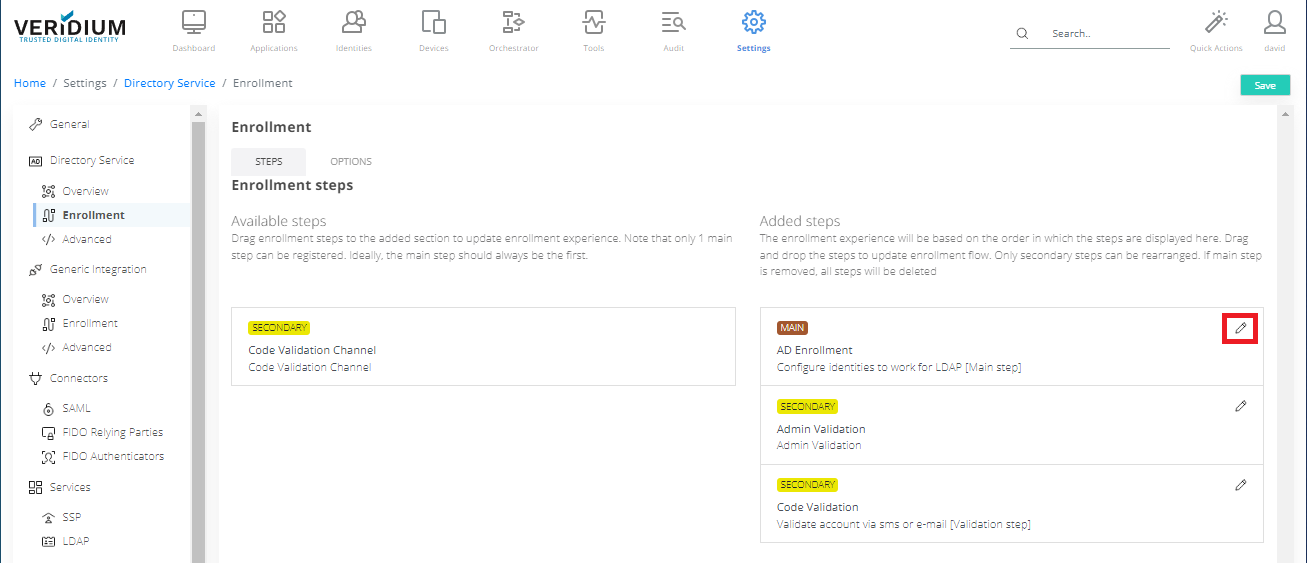
Basic configuration values:
|
Name |
Basic Description |
Default Value |
|---|---|---|
|
Input Status |
Input status(es) for state machine |
. |
|
Output Status |
Output status(es) for state machine |
Active |
|
Identifier |
Identifier that connects to the backend logic |
ADEnrollmentStep |
|
Title |
Step Title |
AD Enrollment |
|
Description |
Step Description |
Configure identities to work for LDAP [Main step] |
Configuration parameters for generic functionalities:
|
Name |
Basic Description |
Default Value |
|---|---|---|
|
Allowed Groups |
User groups allowed for enrollment, Leave empty to allow all |
n/a |
|
Allow users with no groups |
Allow enrollment for users with no group membership |
OFF |
|
User enrollment via invitation code |
Restrict users to enroll only using invitation codes |
ON |
|
Allow user enrollment with PIN validation |
Allows enrollment with PIN validation for existing users as an alternative to invitation code |
ON |
Mobile GUI:
|
Name |
Basic Description |
Default Value |
|---|---|---|
|
Page Description |
Page Description |
Please enter your directory service credentials. |
|
Enrollment Step Action Name |
Enrollment Step Action Name |
NEXT |
|
Enrollment Step Type |
Defines the type of enrolment step, i.e. “Form” defines a screen where user input is expected |
Form |
|
Enrollment Step Title |
Enrollment Step Title |
Form registration |
|
Enrollment Step Version |
Enrollment Step Version |
1.0 |
|
Enrollment Step Parameters |
Defines name & type of input on that step, i.e. a field named “Username” which accepts a string value such as “x@x.com” |
|
|
Restart Enrollment Step Action Name |
Allow defining the name for the enrolment restart step. |
|
|
Name |
Basic Description |
Default Value |
|---|---|---|
|
Enrollment Metadata Options |
Custom Disclaimer text shown to users upon enrollment. |
Welcome to VeridiumID! A custom disclaimer can be added here... |
|
iOS |
iOS minimum version accepted for devices attempting enrollments |
|
|
Android |
Android minimum version accepted for devices attempting enrollments |
|