

1. Introduction
In some customer environments, an existing Web Application Firewall (WAF) or reverse proxy is already used for:
-
SSL termination
-
Client certificate authentication
-
Traffic filtering in the DMZ
Why Customers Prefer Their Existing WAF
-
Security Compliance
SSL termination and client authentication typically occur in a DMZ (untrusted network zone). Existing WAF solutions have already undergone:
-
security reviews
-
compliance validation
-
integration with HSM-backed private keys
-
Feature Capability
Enterprise WAF platforms (for example):
-
Citrix NetScaler
-
F5 APM
-
FortiGate
offer capabilities beyond HAProxy and are often already standardized within the customer infrastructure.
Therefore, the architecture may require integrating VeridiumID with an existing WAF rather than using HAProxy for SSL termination.
2. Scope
This document describes two supported integration models.
Option 1 — Service Separation by Port
Each service is exposed on a different port.
Example services:
-
SAML
-
DMZ WebSec
-
WebSec
Option 2 — Single/Multiple FQDN with Path-Based Routing
There are 2 types of services
-
with no authentication
-
with certificate based authentication
It is recommended to use one FQDN for cert base auth and one for non cert base auth.
Below are all services and paths and how to configure them.
|
service |
short description |
Requires certificate Auth |
Exposed Internally |
Exposed Externally |
PATH |
Sticky session |
If port implementation |
If FQDN implementation |
|---|---|---|---|---|---|---|---|---|
|
WEBSEC |
Used for authentication |
Y |
Y |
Y |
/websec |
N |
HOST.DOMAIN.INTERNAL:443 HOST.DOMAIN.EXTERNAL:443 |
HOST.DOMAIN.INTERNAL:443 HOST.DOMAIN.EXTERNAL:443 |
|
DMZWEBSEC |
Used for registration |
N |
N (if not extern, then must be internal) |
Y |
/dmzwebsec |
N |
HOST.DOMAIN.EXTERNAL:8544 |
dmz-HOST.DOMAIN.EXTERNAL:443 |
|
SHIBBOLETH |
Identity provider |
N |
Y |
Y |
/idp |
Y |
HOST.DOMAIN.INTERNAL:8945 HOST.DOMAIN.EXTERNAL:8944 |
shib-HOST.DOMAIN.INTERNAL:443 shib-HOST.DOMAIN.EXTERNAL:443 |
|
SHIBBOLETH CBA |
Identity provider |
N |
Y |
Y |
/idp |
Y |
HOST.DOMAIN.INTERNAL:8947 HOST.DOMAIN.EXTERNAL:8946 |
shib-cert-HOST.DOMAIN.INTERNAL:443 shib-cert-HOST.DOMAIN.EXTERNAL:443 |
|
WEBSECADMIN |
Veridium configuration manager |
Y |
Y |
N |
|
N |
HOST.DOMAIN.INTERNAL:9444 |
admin-HOST.DOMAIN.INTERNAL:443 |
|
SSP |
Veridium Self service portal |
N |
Y |
Y (only registration) |
/ssp
/ssp/..html
|
N |
HOST.DOMAIN.INTERNAL:9987 HOST.DOMAIN.EXTERNAL:9987 |
ssp-HOST.DOMAIN.INTERNAL:443 ssp-HOST.DOMAIN.EXTERNAL:443 |
|
GENERAL |
|
N |
Y |
Y |
/.well-known |
N |
HOST.DOMAIN.INTERNAL:8945 HOST.DOMAIN.EXTERNAL:8944 |
shib-HOST.DOMAIN.INTERNAL:443 shib-HOST.DOMAIN.EXTERNAL:443 |
3. Objectives
The WAF must replicate the functionality normally performed by HAProxy in a default Veridium deployment.
Required capabilities:
1. SSL Termination
The WAF terminates the HTTPS connection from clients.
2. Client Certificate Authentication
When API access requires authentication:
-
The client must present a certificate
-
The certificate must be issued by the VeridiumID CA
-
The WAF must trust this CA
3. Header Forwarding
After client authentication, the WAF must forward information from the certificate to VeridiumID.
The most important header is:
X-SSL-Client-DN
This contains the Distinguished Name (DN) from the client certificate.
If this header is missing, WebSec authentication will fail.
It can be used any other header or even cookie, but in order to adjust this, it needs to be done configuration at veridium haproxy level.
5. Sample Architectures
Architecture A — Different Ports
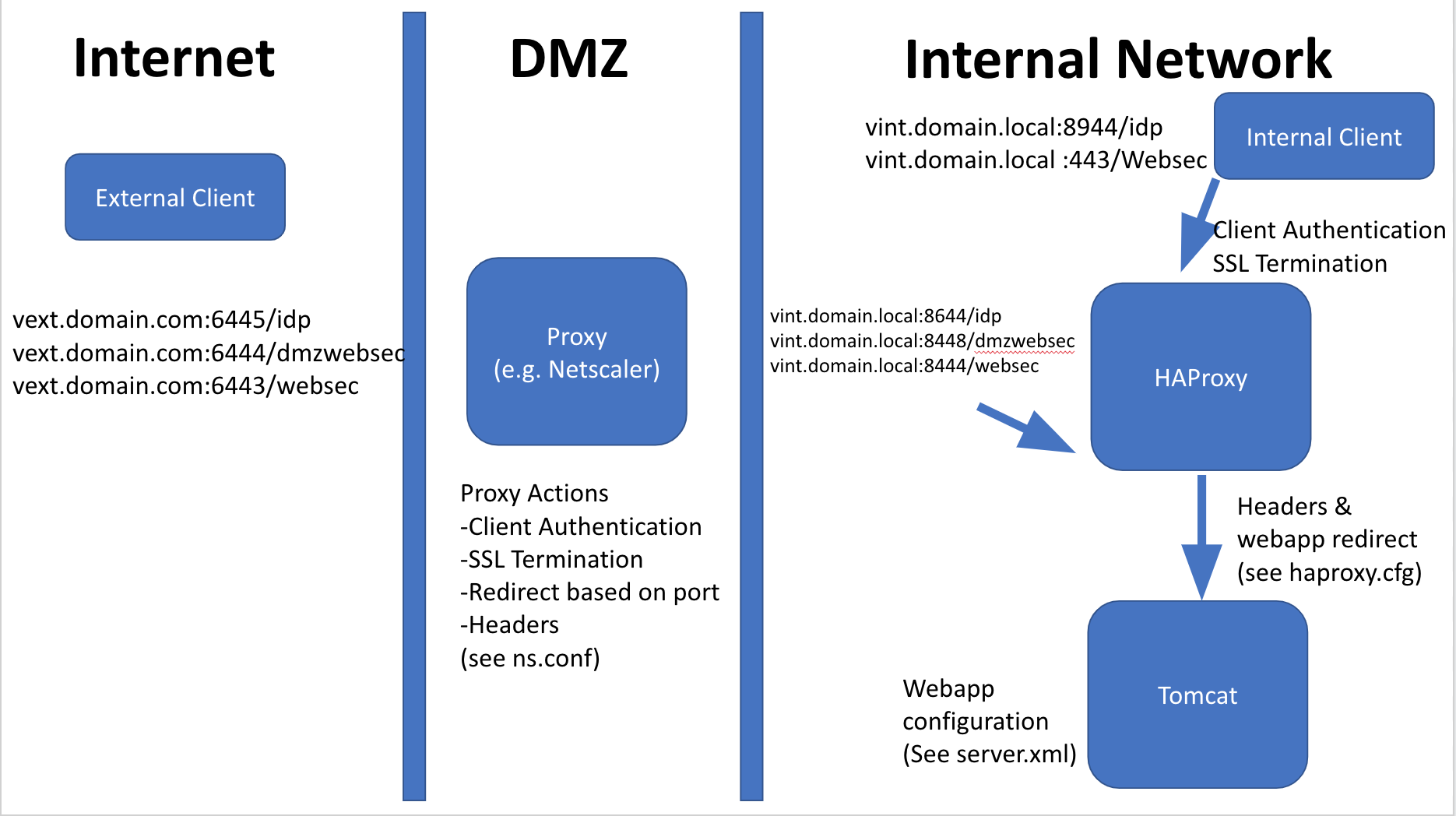
Architecture B — Content Switching (Single FQDN)
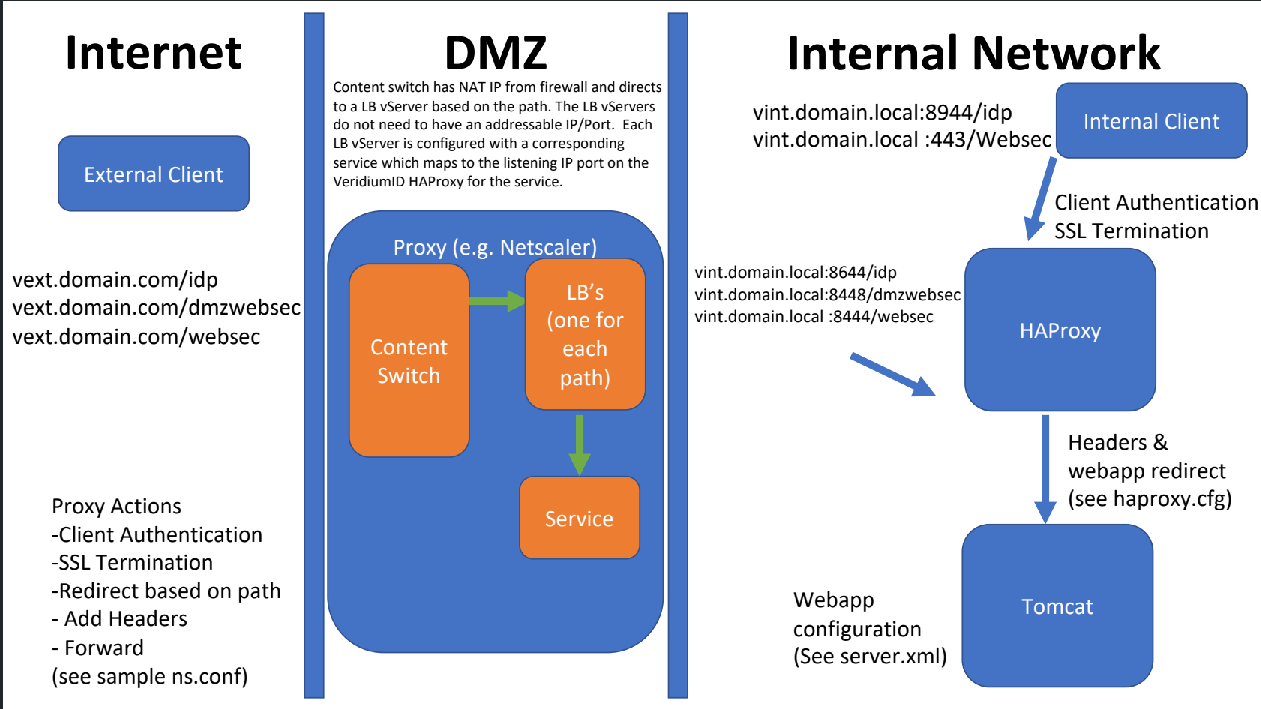
6. General Configuration Requirements
The third-party proxy must perform the following steps.
Step 1 — SSL Termination
The WAF terminates the HTTPS connection.
Step 2 — Client Certificate Validation
The WAF validates the client certificate against the Veridium client CA.
You can retrieve the CA from a Veridium server:
/etc/veridiumid/haproxy/client-ca.pem
Step 3 — Extract Client Certificate DN
The WAF must extract the Distinguished Name from the client certificate and forward it as a header:
X-SSL-Client-DN
Step 4 — Add Proxy Secret Header
The WAF must include a shared secret header. The value can be taken webapp server by running below commad:
grep x-ssl-termination-proxy-secret /opt/veridiumid/haproxy/conf/haproxy.cfg | sort -u
Example value:
x-ssl-termination-proxy-secret: 11111111111111
If the WAF cannot add this header, it can be injected later in HAProxy.
7. HAProxy WAF Example Configuration
Example listener used when traffic arrives from a WAF.
frontend frontend-https-waf
        log-format %ci:%cp\ [%t]\ %ft\ %b/%s\ %Tq/%Tw/%Tc/%Tr/%Tt\ %ST\ %B\ %CC\ %CS\ %tsc\ %ac/%fc/%bc/%sc/%rc\ %sq/%bq\ %hr\ %hs\ %{+Q}[ssl_c_s_dn]\ %{+Q}r\ %sslc\ %sslv
        option tcplog
        bind *:8444 ssl crt /etc/veridiumid/haproxy/server.pem

        mode http
        option socket-stats
        maxconn 300

        http-request set-var(txn.request_host_header) req.hdr(x-tls-clientcert-dn)

        tcp-request inspect-delay 5s
        tcp-request content accept if { req_ssl_hello_type 1 }

        default_backend backend-bops-https-waf
Backend mapping:
backend backend-bops-https-waf
        balance roundrobin
        mode http

        http-request set-header x-ssl-termination-proxy-secret 11111111111111
        http-request set-header X-SSL-Client-DN %[var(txn.request_host_header)]

        rspadd Strict-Transport-Security:\ max-age=31536000;\ includeSubDomains
        rspirep ^(set-cookie:.*)  \1;\ Secure

        server server-127.0.0.1 127.0.0.1:8083 check
8. NGINX WAF Example
Example nginx.conf demonstrating:
-
SSL termination
-
client certificate validation
-
path-based routing
Mandatory configuration changes:
-
update
server_name -
configure certificate paths
-
add Veridium CA certificate
-
update Veridium server IP addresses
NGINX Configuration
events {
  worker_connections 1000;
}
http {
    log_format  main  '$remote_addr - $remote_user [$time_local] "$request" '
                      '$status $body_bytes_sent "$http_referer" '
                      '"$http_user_agent" "$http_x_forwarded_for"';
    access_log  /var/log/nginx/access.log  main;
    sendfile            on;
    tcp_nopush          on;
    tcp_nodelay         on;
    keepalive_timeout   65;
    types_hash_max_size 2048;
    include             /etc/nginx/mime.types;
    default_type        application/octet-stream;
    # Load modular configuration files from the /etc/nginx/conf.d directory.
    # See http://nginx.org/en/docs/ngx_core_module.html#include
    # for more information.
    include /etc/nginx/conf.d/*.conf;
## HTTPS Public Listener
  server {
    listen 443 ssl;
	# Add your public DNS name
    server_name vid.rdemo.co;
    ssl_protocols TLSv1.1 TLSv1.2;
    # Your SSL Certificate
    ssl_certificate /etc/nginx/cert.crt;
    ssl_certificate_key /etc/nginx/key.key;
    # Client Certificate Authentication - Add the VeridiumID CA  (/etc/veridiumid/haproxy/client-ca.pem on VID server if you need it)
    ssl_client_certificate /etc/nginx/clientca.pem;
    ssl_verify_client optional;
## Add VeridiumID (HAProxy Listeners)
## Websec
    location /websec {
      # If client auth fails, return an error
      if ($ssl_client_verify != SUCCESS) {
        return 403;
      }
      proxy_set_header        X-SSL-Client-DN $ssl_client_s_dn;
      proxy_set_header        x-ssl-termination-proxy-secret 11111111111111111111;
      # Add the VeridiumID IP and Proxy Listener Port for Websec
      proxy_pass          https://<<VERIDIUMID-IP>>:8444;
      proxy_set_header Host $http_host;
      proxy_read_timeout  90;
    }
## Websecadmin (Optional - Typically Used for Labs/Non Prod where admin could be internet exposed)
    location /websecadmin {
      # If client auth fails, return an error
      if ($ssl_client_verify != SUCCESS) {
        return 403;
      }
      proxy_set_header        X-SSL-Client-DN $ssl_client_s_dn;
      proxy_set_header        x-ssl-termination-proxy-secret 11111111111111111111;
      # Add the VeridiumID IP and Proxy Listener Port for Websecadmin
      proxy_pass          https://<<VERIDIUMID-IP>>:8449;
      proxy_set_header Host $http_host;
      proxy_read_timeout  90;
    }
## DMZWebsec
    location /dmzwebsec {
      # Add the VeridiumID IP and Proxy Listener Port for DMZWebsec
      proxy_pass          https://<<VERIDIUMID-IP>>:8448;
      proxy_set_header Host $http_host;
      proxy_read_timeout  90;
    }
## Shibboleth
    location /idp {
      # Add the VeridiumID IP and Proxy Listener Port for Shibboleth
      proxy_pass          https://<<VERIDIUMID-IP>>:8644;
      proxy_set_header Host $http_host;
    proxy_read_timeout  90;
    }
  }

  server {
    # Required for CBA authentication
    listen 443 ssl;
	# Add your public DNS name
    server_name cert-vid.rdemo.co;
    ssl_protocols TLSv1.1 TLSv1.2;
    # Your SSL Certificate
    ssl_certificate /etc/nginx/cert.crt;
    ssl_certificate_key /etc/nginx/key.key;
    # Client Certificate Authentication - Add the VeridiumID CA  (/etc/veridiumid/haproxy/client-cba.pem on VID server if you need it)
    ssl_client_certificate /etc/nginx/clientcba.pem;
    ssl_verify_client on;
    ssl_verify_depth 2;
    ## Shibboleth
    location /idp {
      # Add the VeridiumID IP and Proxy Listener Port for Shibboleth
      proxy_set_header X-Forwarded-For "$proxy_add_x_forwarded_for";
      proxy_set_header X-SSL-Client-Der-Escaped $ssl_client_escaped_cert;
      proxy_set_header Host $http_host;
      proxy_set_header X-Forwarded-Proto https;
      proxy_ssl_server_name on;
      proxy_ssl_name $http_host;
      proxy_pass          https://<<VERIDIUMID-IP>>:8946;
      proxy_read_timeout  90;
    }
  }
}
If CBA is configured at Nginx level the following must be added in HaProxy:
# In the Shibboleth certificate frontend comment the CA configuration
bind *:8946 ssl crt /etc/veridiumid/haproxy/server.pem #ca-file /etc/veridiumid/haproxy/client-cba.pem verify required
# In the backend the following must be done:
# Comment the current X-SSL-Client-Der header configuration
http-request set-header  X-SSL-Client-Der %{+Q}[ssl_c_der,base64]
# Add the following to use the certificate delivered from Nginx:
# Check if Nginx sent the certificate header
acl nginx req.hdr(X-SSL-Client-Der-Escaped) -m found
# Populate variable with url decoded version of the header
http-request set-var(txn.client_cert) req.hdr(X-SSL-Client-Der-Escaped),url_dec if nginx
# Remove certificate beginning
http-request set-var(txn.client_cert) var(txn.client_cert),regsub("-----BEGIN CERTIFICATE-----","",g) if nginx
# Remove certificate ending
http-request set-var(txn.client_cert) var(txn.client_cert),regsub("-----END CERTIFICATE-----","",g) if nginx
# Remove new lines from certificate
http-request set-var(txn.client_cert) var(txn.client_cert),regsub("[\r\n]","",g) if nginx
# Populate correct certificate header
http-request set-header X-SSL-Client-Der %[var(txn.client_cert)] if nginx
10. NEVIS WAF Integration
Infrastructure configuration:
On the SSL connector (port 443):
Set the Client CA Truststore to the Veridium client CA.
. Infrastructure:
On the SSL connector (port 443) set the Client CA Truststore to the veridium client CA
. Configuration:
The veridium application needs the following mappings:
/dmzwebsec/
/idp/
/websec/

On /websec/ add two extra filters:

- a delegation filter for the headers
  Parameter Delegate Settings:

  ENV:SSL_CLIENT_S_DN:X-SSL-Client-DN
  CONST:@VER_PROXY_SECRET@:x-ssl-termination-proxy-secret


- a Lua filter to check the client certificate
  Script.InputHeaderFunctionName = InputHeader
  Script:
      function InputHeader(req, resp)
            -- Check Client DN
            -- Check Issuer
            -- Check Validity
      end
11. F5 APM Integration
F5 APM uses iRules to manipulate headers.
Example iRule:
when CLIENTSSL_CLIENTCERT {
    if {[SSL::cert count] > 0} {
        set dist_name [X509::subject [SSL::cert 0]]
    }
}

when HTTP_REQUEST {
    HTTP::header insert "x-ssl-termination-proxy-secret" "11111111111111111111"
    if { $dist_name != ""} {
        HTTP::header insert "X-SSL-Client-DN" $dist_name
    }
}
12. Airlock WAF Integration
Airlock sends certificate data as cookies rather than headers.
Therefore HAProxy must convert the cookie into a header.
The Airlock WAF has one primary difference in that once client certificate authentication is configured, assuming you set "Send Environment Variables" in the virtualID configuration, all client certificate properties are sent to the VeridiumID (configured as a backend). However these are sent as cookies NOT as custom headers. Therefore, what you have to do is convert the cookie into a header in HAProxy. It looks something like this:
Adding the proxy secret is straightforward in Airlock as with other proxies.
Airlock configuration location:
Expert Settings → Security Gate → Apache
Additional configuration:
EnvVarCookiePlainChars "!#$&\*-./0123456789ABCDEFGHIJKLMNOPQRSTUVWXYZ^_`abcdefghijklmnopqrstuvwxyz|~="