

1. Testing the Websec Service (Client Certificate Required)
Endpoint
https://WEBSEC_URL/websec/rest/health/metrics/status
Expected Behavior
-
The browser or client should be prompted for a client certificate.
-
The request should only succeed when a valid admin certificate is presented.
Test Procedure
Test 1 — Without Client Certificate
Access the endpoint without presenting a certificate.
Expected result:
-
The WAF should reject the request.
This confirms that the WAF is enforcing client certificate authentication.
Test 2 — With Client Certificate
Access the endpoint from a machine where a valid admin certificate is installed.
Expected result:
-
Request succeeds
-
Response status should be 200 OK
2. Validate Headers in Websec Access Logs
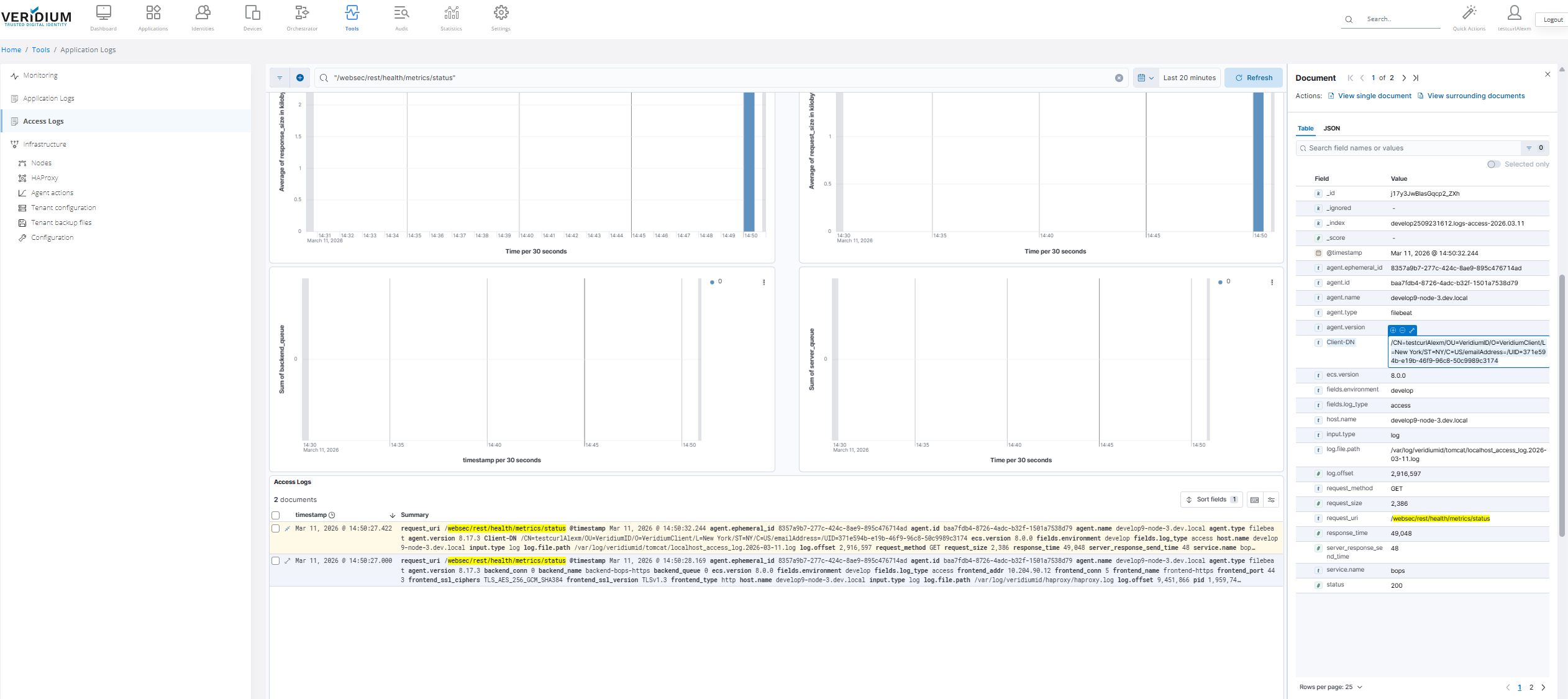
Once a request succeeds, verify that the WAF forwarded the client certificate information to Websec.
Steps
-
Login to Websecadmin
-
Navigate to:
Tools → Access Logs
-
Search for the endpoint:
/websec/rest/health/metrics/status
-
Check the log entry and confirm that the field is populated.
Client-DN
This field is populated from the X-SSL-Client-DN header sent by the WAF (logged as Client-DN in the logs).
If it is empty, the WAF is not forwarding the certificate DN correctly.
3. Troubleshooting Header Forwarding
You can verify whether the WAF is correctly forwarding headers by inspecting network traffic.
Tcpdump Command
tcpdump -nn -A -s0 -l -i any | egrep -i 'x-ssl-termination-proxy-secret|X-SSL-Client-DN'
What This Shows
This command captures incoming requests and displays the following headers:
-
X-SSL-Client-DN -
x-ssl-termination-proxy-secret
Important Notes
-
Tcpdump displays all internal and external requests
-
You must pay attention to the values of:
X-SSL-Client-DN
to identify the correct client certificate being used.
Correct Behavior
You should see entries similar to:
X-SSL-Client-DN: CN=Admin User,OU=Security,O=Company
If the header is missing, check the WAF configuration responsible for extracting the DN from the certificate.
4. Testing Other Veridium Services (No Certificate Required)
For all other endpoints, the client must NOT be asked for a certificate.
These services should return HTTP 200 OK without requiring client authentication.
Endpoints to Test
https://DMZWEBSEC_URL/dmzwebsec/help
https://SHIB_EXT_URL/idp/profile/health/ready
https://SHIB_EXT_URL/.well-known/webauthn
https://SHIB_EXT_URL/.well-known/openid-configuration
https://SSP_URL/ssp/#/enrollment
Expected Behavior
-
No client certificate prompt
-
Response status 200 OK
If a certificate is requested, the WAF rules are incorrectly applied.
5. Negative Test
Test an invalid endpoint:
https://WEBSEC/wrongurl
Expected result:
ideally the URL should be blocked by WAF. Also 404 response is acceptable.
This confirms the request reached the Veridium service through the WAF.