

Please check in websecadmin → LDAP → TestConnection. If the connection fails, these are possible issues.
This section presents the most common errors that VeridiumID can give during the LDAP configuration step.
1. Unknown host exception
Create LDAP Connection for ldaps://myldap.server.net:636 failed.javax.naming.CommunicationException:
myldap.server.net:636 [Root exception is java.net.UnknownHostException: myldap.server.net]
Cause:
-
The LDAP URL is not defined in the DNS
-
VeridiumID server does not have the DNS server configuration
-
The LDAP URL is incorrect
Resolution:
Verify if the URL is written correctly and defined in the local DNS.
Make sure that VeridiumID server has the correct DNS server configured (at OS level) or configure the URL in the /etc/hosts file.
2. LDAP Server communication issue
Create LDAP Connection for ldaps://myldap.server.net:636 failed.javax.naming.CommunicationException: myldap.server.net:636
[Root exception is javax.net.ssl.SSLHandshakeException: PKIX path building failed: java.security.cert.CertPathBuilderException:
No issuer certificate for certificate in certification path found.]
Cause:
-
The public part of the domain certificate is missing from VeridiumID’s server internal truststore
Resolution:
Add the public certificate of the domain in VeridiumID’s internal truststore
Connect to the Administration Dashboard and navigate to Settings → Certificates → Truststore and click on Add truststore from the right side of the screen.
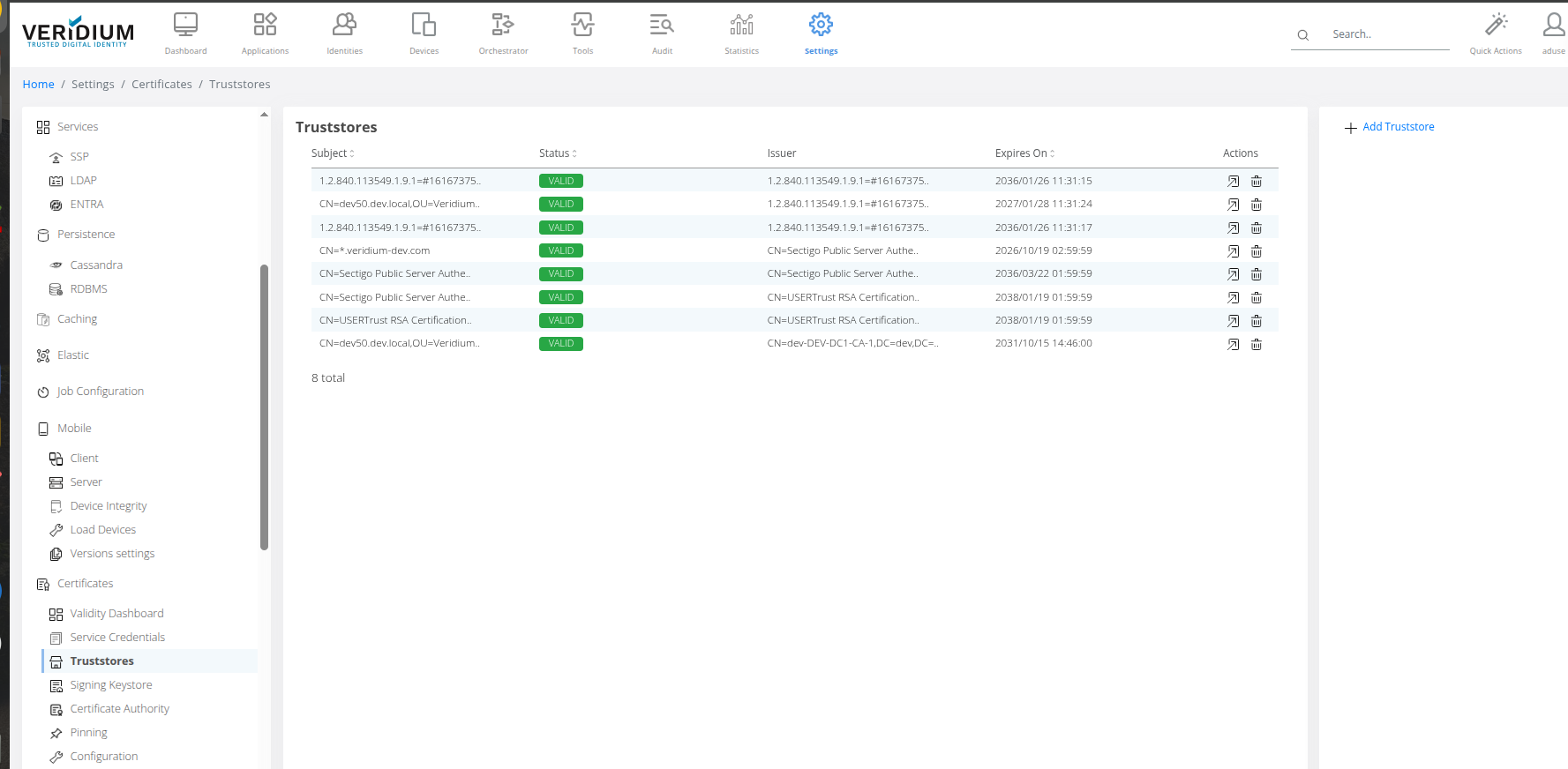
3. Incorrect credentials
Create LDAP Connection for ldaps://myldap.server.net:636 failed.javax.naming.AuthenticationException:
[LDAP: error code 49 - 80090308: LdapErr: DSID-0C09052B, comment: AcceptSecurityContext error, data 52e, v4f7c]
Cause:
-
incorrect Username or Password
Resolution:
Make sure that the correct username and password are configured for the LDAP connection.
4. Invalid certificate added to truststore
Create LDAP Connection for ldaps://myldap.server:636 failed.javax.naming.CommunicationException: myldap.server:636
[Root exception is javax.net.ssl.SSLHandshakeException: Hostname '[myldap.server]' does not match the hostname in the server's certificate
'CN=myldap.server.net']
Cause:
-
The certificate added to the truststore does not validate the LDAP URL
Resolution:
Make sure that the correct certificate (the one that validates the LDAP URL) has been added in VeridiumID server’s internal truststore.
5. Connection timeout
Create LDAP Connection for ldaps://myldap.server.net:636 failed.javax.naming.CommunicationException: myldap.server.net:636
[Root exception is java.net.SocketTimeoutException: Connect timed out]
Cause:
-
slow network connection to the LDAP server
-
missing network connectivity
-
DNS issue
Resolution:
Discuss with network or with AD admins to investigate why AD is not reachable from veridium.
usefull commands to test connectivity. On webapp server run:
nc -zv myldap.server.net 636
nslookup myldap.server.net
## see to what IPs the LDAP is resolved and test connection for eahc of it.
nc -zv IP1 636
nc -zv IP2 636
6. Read timeout
LDAP checkSearch error for connection default: javax.naming.NamingException: LDAP response read timed out, timeout used: 5000 ms.;
remaining name 'DC=dev,DC=local'
Cause:
-
The LDAP connection takes longer than the configured Read Timeout value
Resolution:
There might be multiplecauses, for example:
-
slow Active Directory
-
multiple search attributes configured in LDAP connector.
7. Connection refused
Create LDAP Connection for ldaps://myldap.server.net:636 failed.javax.naming.CommunicationException: myldap.server.net:636
[Root exception is java.net.ConnectException: Connection refused]
Cause:
-
network connectivity issue to Active Directory
-
Active Directory is not started
Resolution:
Make sure that the DNS has the correct IP address of the LDAP node configured.
Make sure that the port is accessible from the VeridiumID Webapp nodes.
nc -zv myldap.server.net 636
nslookup myldap.server.net
## see to what IPs the LDAP is resolved and test connection for eahc of it.
nc -zv IP1 636
nc -zv IP2 636
8. Socket Timeout
ErrCode=2000, ErrMsg=java.net.SocketTimeoutException: timeout
Cause:
-
VeridiumID server is unable to connect to the LDAP server (either IP address or port is being blocked)
Resolution:
Make sure that the VeridiumID server is able to connect the the LDAP server.
The following command can be used to validate the connectivity:
nc -zv myldap.server.net 636
nslookup myldap.server.net
## see to what IPs the LDAP is resolved and test connection for eahc of it.
nc -zv IP1 636
nc -zv IP2 636
9. Failed LDAP search
LDAP checkSearch error for connection default: javax.naming.NamingException: [LDAP: error code 1 - 000004DC: LdapErr: DSID-0C090D10,
comment: In order to perform this operation a successful bind must be completed on the connection., data 0, v4f7c]; remaining name 'DC=dev,DC=local'
Cause:
-
using a blocked/disabled user to connect to the LDAP server
-
LDAP is not started yet
Resolution:
Connect the the LDAP server/Active directory and unblock/enable the user.
Check if LDAP server is running properly.
10. Failed user authentication due to requirement to change password at next logon
Create LDAP Connection for ldaps://myldap.server.net:636 failed.javax.naming.AuthenticationException: [LDAP: error code 49 - 80090308:
LdapErr: DSID-0C09052B, comment: AcceptSecurityContext error, data 773, v4f7c]
Cause:
-
the user configured is not a service account and requires a password change at next logon
Resolution:
Use a service account for the LDAP connection. A service account will have the ‘password never expires’ configured.
11. Failed user authentication due to expired password
Create LDAP Connection for ldaps://myldap.server.net:636 failed.javax.naming.AuthenticationException: [LDAP: error code 49 - 80090308:
LdapErr: DSID-0C09052B, comment: AcceptSecurityContext error, data 701, v4f7c]
Cause:
-
the user configured is not a service account and has the password expired
Resolution:
Use a service account for the LDAP connection (a service account will have the ‘password never expires’ configured) or renew the password for the current account.