

Using the push notification mechanisms offered by Apple and Google, a device can receive requests to authenticate.
The picture bellow describes the sequence of calls between 3rd Party Service and Veridium. All calls requires Friend Service Certificate authorisation.
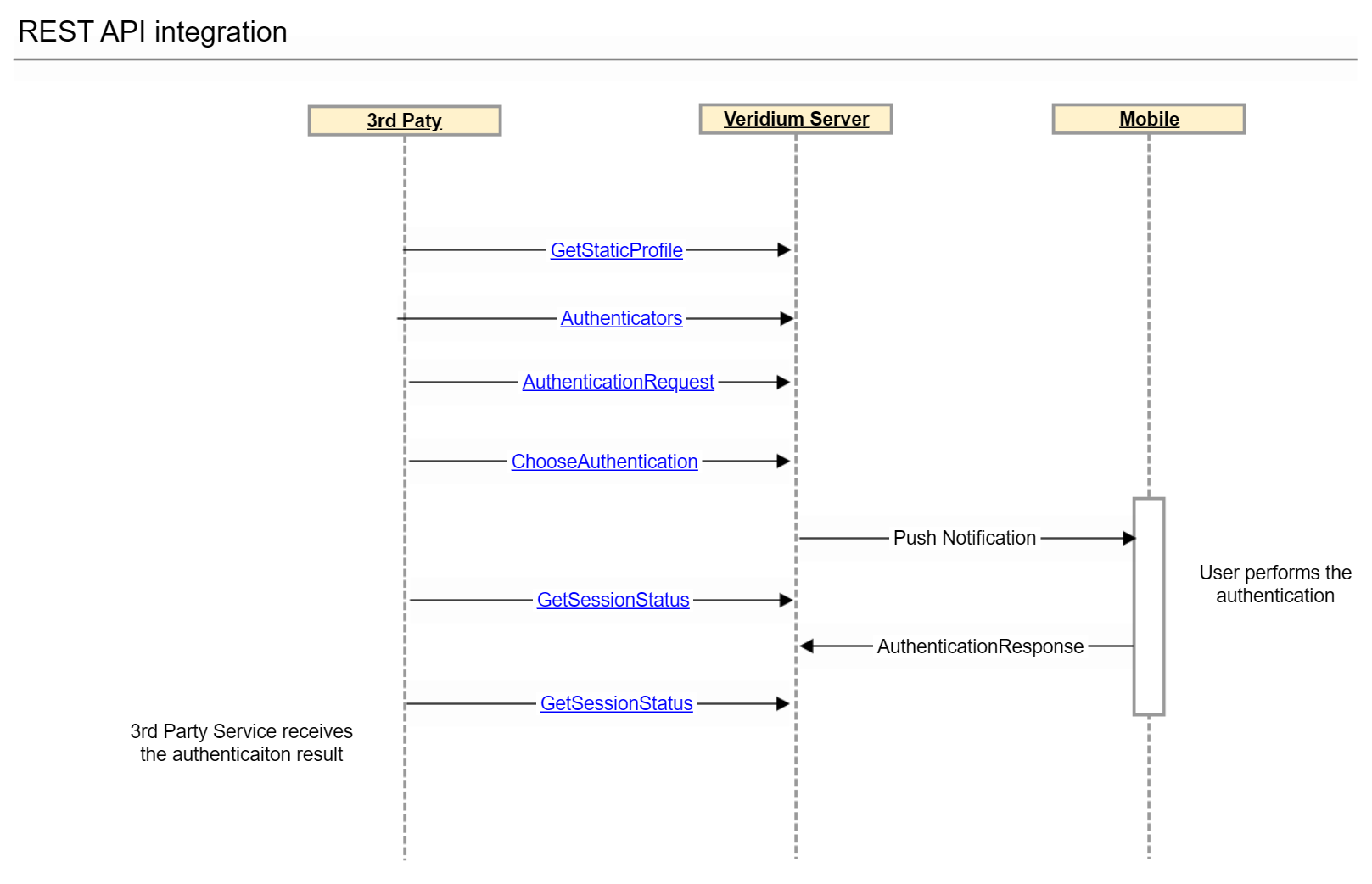
When the session exploiter (such as a webservice) knows the identity of the user who should authenticate, VeridiumID can create a session immediately. A session opportunity (QR code) is not needed. The exploiter can trigger an APNS or FCM push notification from the VeridiumID server to the expected authenticator (typically a phone) to complete an authentication session.
GetStaticProfile
https://<veridium server>/websec/rest/enterprise/friend/GetStaticProfile
Method POST
curl -X POST "https://<veridium server>/websec/rest/enterprise/friend/GetStaticProfile" \
-H "accept: application/json" \
-H "Content-Type: application/vnd.veridiumid.profilesrequest-v3+json" \
-d "{ \"principal\": \"<user>@domain\", \"adaptorId\": \"ADv2MultiStepEnrollment\"}"
Request
{
  "principal": "principal name / unique identifier of the user -- UPN/email",
  "adaptorId": "ADv2MultiStepEnrollment"
}
Response
{
  "id": "veridium internal id",
  "profileExternalId": "<Directory Service user identifier>",
  "displayName": "User display name",
  "biometricMethods": null,
  "requiredBiometricMethods": null,
  "availableBiometricMethods": null,
  "externalValues": {
    <extra values configured in LDAP connection -- Extended Attributes>
  },
  "memberExternalId": "ADv2MultiStepEnrollment",
  "status": "ACTIVE"
}
Authenticators
https://<veridium server>/websec/rest/enterprise/friend/Authenticators/<internal user identifier>
where <internal user identifier> was read from previous method in response \ id field.
Method GET
curl -X GET "https://<veridium server>/websec/rest/enterprise/friend/Authenticators/<internal user identifier>" \
-H "accept: application/json"
Response
It contains a list of authenticators device and each device contains type field which describes it.
Possible values are
-
PHONE
-
OTHERS (for non-smart phone authenticators supported by Veridium)
{
  "deviceAuthenticators": [
    {
      "id": "ce7ced9d-aef0-4bb4-979a-147ef4a2f0af",
      "name": "iPhone",
      "commercialName": "iPhone12"
      "type": "PHONE",
      "description": "iPhone12,3 ' 15.3.1",
      "os": "iOS",
      "status": "ACTIVATED",
      "registrationDate": 1646744601731,
      "bundleID": "com.veridiumid.authenticator",
      "authenticators": [
        {
          "id": "f6a68aea-5329-4e26-9f91-28d6e5155b0e",
          "name": null,
          "type": "PIN",
          "status": "DISABLED",
          "option": "",
          "presentationMethod": "",
          "registrationDate": 1647607749854,
          "details": null
        },
        {
          "id": "2ba59ab5-25e9-4638-8535-f178c28ed3f5",
          "name": null,
          "type": "TOUCHID",
          "status": "ACTIVATED",
          "option": "",
          "presentationMethod": "",
          "registrationDate": 1647607750234,
          "details": null
        },
        {
          "id": "adba46ad-a840-482a-a8c8-dd5411145cc1",
          "name": null,
          "type": "TOTP",
          "status": "ACTIVATED",
          "option": "",
          "presentationMethod": "",
          "registrationDate": 1647607750062,
          "details": null
        }
      ]
    },
    {
      "id": "",
      "name": "Other Authenticators",
      "type": "OTHERS",
      "description": "",
      "os": "",
      "status": null,
      "registrationDate": 0,
      "bundleID": null,
      "authenticators": [
        {
          "id": "fd427d3f-25c9-4f4b-b9ff-65bfd70c6363",
          "name": null,
          "type": "PIN",
          "status": "ACTIVATED",
          "option": "",
          "presentationMethod": "",
          "registrationDate": 1646744618517,
          "details": null
        },
        {
          "id": "99b4b908-4f3a-49c7-98e9-cad42d9acfb9",
          "name": null,
          "type": "EXTERNAL_PIN",
          "status": "ACTIVATED",
          "option": "",
          "presentationMethod": "",
          "registrationDate": 1647619188256,
          "details": null
        },
        {
          "id": "51166c8d-6903-4b5b-b67d-87fab45c3d0b",
          "name": "Yubico U2F EE Serial 512722740",
          "type": "FIDO",
          "status": "ACTIVATED",
          "option": "",
          "presentationMethod": "",
          "registrationDate": 1647618345837,
          "details": {
            "origin": "https://<server FQDN>"
          }
        }
      ]
    }
  ],
  "error": {
    "errorCode": 0,
    "errorDescription": ""
  }
}
AuthenticationRequest
https://<server name>/websec/rest/enterprise/AuthenticationRequest
Method POST
curl -X POST "https://<server name>/websec/rest/enterprise/AuthenticationRequest" \
-H "accept: application/json" \
-H "Content-Type: application/vnd.veridiumid.authenticationrequest-v2+json" \
-d "{ \"memberExternalId\": \"ADv2MultiStepEnrollment\", \"profileExternalId\": \"<user UPN/Email -- external identifier>\", \"context\": { \"serviceIdentifier\": \"service name\" }, \"origin\": \"<fido_origin>\"}"
Request
{
  "memberExternalId": "ADv2MultiStepEnrollment",
  "profileExternalId": "principal name / unique identifier of the user -- UPN/email ",
  "context": { //here there are many other context variables
     "serviceIdentifier": "service identifier"//for traceability on VeridiumID as well
  },
  "origin": "<fido_origin>" // optional field used for FIDO authentication
}
Response
{
    "deviceStatus": "ACTIVATED",
    "status": "AUTHENTICATING",
    "biometricAuthenticationResult": "NONE",
    "sessionId": "37d4a461-7716-4c24-a73a-1b9dbc631270",
    ...
    "commands": [
        {
            "type": "AUTHENTICATION",
            "id": "548055035",
            "attributes": {
                "id": "548055035",
                "authenticate": {
                    "methods": [
                        {
                            "type": "TOTP",
                            "status": false,
                            "retries": 0,
                            "order": 0,
                            "configuration": null
                        }
                    ],
                    "dispatch": {
                        "method": null
                    },
                    "unifiedAuthenticationView": null
                }
            }
        },
        {
            "type": "AUTHENTICATION",
            "id": "723112483",
            "attributes": {
                "id": "723112483",
                "authenticate": {
                    "methods": [],
                    "dispatch": {
                        "method": "PUSH"
                    },
                    "unifiedAuthenticationView": null
                }
            }
        },
        {
            "type": "AUTHENTICATION",
            "id": "940004968",
            "attributes": {
                "id": "940004968",
                "authenticate": {
                    "methods": [
                        {
                            "type": "FIDO",
                            "status": false,
                            "retries": 0,
                            "order": 0,
                            "configuration": null
                        }
                    ],
                    "dispatch": {
                        "method": null
                    },
                    "unifiedAuthenticationView": null
                }
            }
        },
        {
            "type": "AUTHENTICATION",
            "id": "-2087178585",
            "attributes": {
                "id": "-2087178585",
                "authenticate": {
                    "methods": [
                        {
                            "type": "PIN",
                            "status": false,
                            "retries": 0,
                            "order": 0,
                            "configuration": null
                        }
                    ],
                    "dispatch": {
                        "method": null
                    },
                    "unifiedAuthenticationView": null
                }
            }
        }
    ],
    "transactionText": "",
    "error": {
        "errorCode": 0,
        "errorDescription": ""
    }
}
ChooseAuthentication
This API is used to select an authentication method that will be used. A command identifier should be used from the AuthenticationRequest response.
e.g. Use authentication Mobile Device via Push Notification:
-
Identify
AUTHENTICATIONtype commands -
Identify the command that uses
PUSHdispatch method. -
Select the command
id -
Use the
idinChooseAuthenticationrequest body aschoiceCommandId
Method POST
curl -X POST "https://<server name>/websec/rest/enterprise/ChooseAuthentication" \
-H "accept: application/json" \
-H "Content-Type: application/vnd.veridiumid.chooseauth-v1+json" \
-d "{ \"sessionId\": \"c4d89892-662c-4364-b949-5339b23ec61c\", \"choiceCommandId\": \"<the identifier from command list from AuthenthcationRequest response>\", \"context\": { \"serviceIdentifier\": \"Service Identifier\" }}"
Request
{
  "sessionId": "37d4a461-7716-4c24-a73a-1b9dbc631270",
  "choiceCommandId": "<the identifier from command list from AuthenthcationRequest response>",
  "context": { //here there are many other context variables
    "serviceIdentifier": "service identifier"//for traceability on VeridiumID as well
  }
}
Response
{
    "deviceStatus": "ACTIVATED",
    "status": "AUTHENTICATING",
    "biometricAuthenticationResult": "NONE",
    "sessionId": "37d4a461-7716-4c24-a73a-1b9dbc631270",
    "accountId": "aa39f5c5-5e8a-48ad-864e-1242dda380fb",
    ...
    "identityTokenSignature": null,
    "identityTokenJWT": null,
    "biometricMethods": null,
    "commands": [],
    "transactionText": null,
    "error": {
        "errorCode": 0,
        "errorDescription": ""
    }
}
GetSessionStatus
https://<server name>/websec/rest/enterprise/GetSessionStatus
This API retrieves the session status and should be used by the 3rd party server to monitor the session status changes (responseBody.status). The status of the session will be changed during the authentication workflow. The final session status may be one of the following:
-
COMPLETED
-
FAILED
-
TIMEOUT
-
CANCELED
Method POST
curl -X POST "https://<server name>/websec/rest/enterprise/GetSessionStatus" \
-H "accept: application/json" \
-H "Content-Type: application/vnd.veridiumid.sessionstatus-v2+json" \
-d "{ \"sessionId\": \"c4d89892-662c-4364-b949-5339b23ec61c\", \"context\": { \"serviceIdentifier\": \"Service Identifier\" }}"
Request
{
  "sessionId": "session identifier read in AuthenticationRequest response",
  "context": {
    "serviceIdentifier": "Service name"
  }
}
Response
{
  "deviceStatus": "ACTIVATED",
  "status": "COMPLETED",
  "biometricAuthenticationResult": "AUTHENTICATED",
  "sessionId": "37d4a461-7716-4c24-a73a-1b9dbc631270",
  "expiration": 69628,
  "data": {
    "firstname": "John",
    "upn": "user@domain",
    "implicitUpn": "user@domain",
    "displayname": "John Doe",
    "profileData": null,
    "email": "user@veridiumid.com",
    "phoneno": "...",
    "lastname": "Doe"
  },
  "identityData": {
    "upn": "user@domain",
    "firstname": "John",
    "implicitUpn": "user@domain",
    "displayname": "John Doe",
    "phoneno": "....",
    "email": "user@veridiumid.com",
    "lastname": "Doe"
  },
  "identityToken": {
     ...
  },
  "identityTokenSignature": "....",
  "identityTokenJWT": ".....",
  "mandatoryBiometrics": [
    {
      "type": "TOUCHID",
      "status": true,
      "retries": 0,
      "enrollmentTrackerId": null
    }
  ],
  "commands": [],
  "error": {
    "errorDescription": "",
    "errorCode": 0
  }
}