Important:
-
use a friend certificate in testing, not an admin certificate.
-
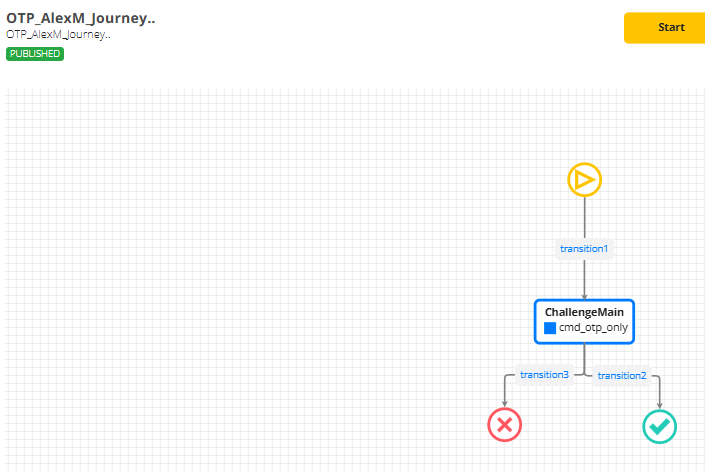
create a journey only with cmd_otp_only auth command
-
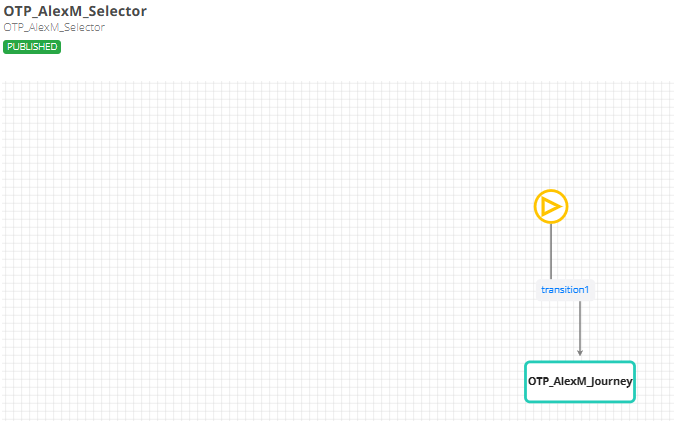
create a selector for it
-
create a group and a custom app in webasecadmin and select the journey for it
-
in the body, it should be used this serviceIdentifier, in order to be chosen this selector. There are printscreens at the end of documentation for the flow.
Using a Time-based One-Time Password (TOTP) authenticator, a 3rd Party Service can complete an authentication session without requiring mobile biometric verification. The OTP code is generated and submitted by the 3rd Party Service to VeridiumID for validation.
The picture below describes the sequence of calls between 3rd Party Service and Veridium. All calls require Friend Service Certificate authorisation.

1. GetStaticProfile
https://<veridium server>/websec/rest/enterprise/friend/GetStaticProfile
Method POST:
curl -X POST "https://<veridium server>/websec/rest/enterprise/friend/GetStaticProfile" \
-H "accept: application/json" \
-H "Content-Type: application/vnd.veridiumid.profilesrequest-v3+json" \
-d "{ \"principal\": \"<user>@domain\", \"adaptorId\": \"ADv2MultiStepEnrollment\"}"
Request:
{
  "principal": "principal name / unique identifier of the user -- UPN/email",
  "adaptorId": "ADv2MultiStepEnrollment"
}
Response:
{
  "id": "veridium internal id",
  "profileExternalId": "<Directory Service user identifier>",
  "displayName": "User display name",
  "biometricMethods": null,
  "requiredBiometricMethods": null,
  "availableBiometricMethods": null,
  "externalValues": {
    "<extra values configured in LDAP connection -- Extended Attributes>"
  },
  "memberExternalId": "ADv2MultiStepEnrollment",
  "status": "ACTIVE"
}
2. Authenticators:
https://<veridium server>/websec/rest/enterprise/friend/Authenticators/<internal user identifier>
where <internal user identifier> was read from previous method in response \ id field.
Method GET:
curl -X GET "https://<veridium server>/websec/rest/enterprise/friend/Authenticators/<internal user identifier>" \
-H "accept: application/json"
Response:
It contains a list of authenticator devices and each device contains a type field which describes it. Look for an authenticator with "type": "TOTP" and "status": "ACTIVATED" to confirm that the user has an active TOTP authenticator enrolled.
{
  "deviceAuthenticators": [
    {
      "id": "ce7ced9d-aef0-4bb4-979a-147ef4a2f0af",
      "name": "iPhone",
      "commercialName": "iPhone12",
      "type": "PHONE",
      "description": "iPhone12,3 ' 15.3.1",
      "os": "iOS",
      "status": "ACTIVATED",
      "registrationDate": 1646744601731,
      "bundleID": "com.veridiumid.authenticator",
      "authenticators": [
        {
          "id": "adba46ad-a840-482a-a8c8-dd5411145cc1",
          "name": null,
          "type": "TOTP",
          "status": "ACTIVATED",
          "option": "",
          "presentationMethod": "",
          "registrationDate": 1647607750062,
          "details": null
        }
      ]
    },
    {
      "id": "",
      "name": "Other Authenticators",
      "type": "OTHERS",
      "description": "",
      "os": "",
      "status": null,
      "registrationDate": 0,
      "bundleID": null,
      "authenticators": [
        {
          "id": "fd427d3f-25c9-4f4b-b9ff-65bfd70c6363",
          "name": null,
          "type": "PIN",
          "status": "ACTIVATED",
          "option": "",
          "presentationMethod": "",
          "registrationDate": 1646744618517,
          "details": null
        }
      ]
    }
  ],
  "error": {
    "errorCode": 0,
    "errorDescription": ""
  }
}
3. AuthenticationRequest
https://<server name>/websec/rest/enterprise/AuthenticationRequest
Method POST:
curl -X POST "https://<server name>/websec/rest/enterprise/AuthenticationRequest" \
-H "accept: application/json" \
-H "Content-Type: application/vnd.veridiumid.authenticationrequest-v2+json" \
-d "{ \"memberExternalId\": \"ADv2MultiStepEnrollment\", \"profileExternalId\": \"<user UPN/Email -- external identifier>\", \"context\": { \"serviceIdentifier\": \"service name\" }}"
Request:
{
  "memberExternalId": "ADv2MultiStepEnrollment",
  "profileExternalId": "principal name / unique identifier of the user -- UPN/email",
  "context": {
    "serviceIdentifier": "service identifier"
  }
}
Response:
The response contains a sessionId and a list of commands. Each command represents an available authentication method. Identify the command that contains "type": "OTP" in its methods list -- this is the command to use for OTP authentication.
{
  "deviceStatus": "ACTIVATED",
  "status": "AUTHENTICATING",
  "biometricAuthenticationResult": "NONE",
  "sessionId": "37d4a461-7716-4c24-a73a-1b9dbc631270",
  "commands": [
    {
      "type": "AUTHENTICATION",
      "id": "548055035",
      "attributes": {
        "id": "548055035",
        "authenticate": {
          "methods": [
            {
              "type": "OTP",
              "status": false,
              "retries": 0,
              "order": 0,
              "configuration": null
            }
          ],
          "dispatch": {
            "method": null
          },
          "unifiedAuthenticationView": null
        }
      }
    },
    {
      "type": "AUTHENTICATION",
      "id": "723112483",
      "attributes": {
        "id": "723112483",
        "authenticate": {
          "methods": [],
          "dispatch": {
            "method": "PUSH"
          },
          "unifiedAuthenticationView": null
        }
      }
    }
  ],
  "transactionText": "",
  "error": {
    "errorCode": 0,
    "errorDescription": ""
  }
}
4. ChooseAuthentication
https://<server name>/websec/rest/enterprise/ChooseAuthentication
This API is used to select the OTP authentication method. From the AuthenticationRequest response:
-
Identify
AUTHENTICATIONtype commands -
Identify the command that contains
"type": "OTP"in its methods list -
Select the command
id -
Use the
idinChooseAuthenticationrequest body aschoiceCommandId
Method POST:
curl -X POST "https://<server name>/websec/rest/enterprise/ChooseAuthentication" \
-H "accept: application/json" \
-H "Content-Type: application/vnd.veridiumid.chooseauth-v1+json" \
-d "{ \"sessionId\": \"<SESSION ID>\", \"choiceCommandId\": \"<OTP COMMAND ID>\", \"context\": { \"serviceIdentifier\": \"Service Identifier\" }}"
Request:
{
  "sessionId": "<SESSION ID>",
  "choiceCommandId": "<OTP COMMAND ID>",
  "context": {
    "serviceIdentifier": "service identifier"
  }
}
Response:
{
  "deviceStatus": "ACTIVATED",
  "status": "AUTHENTICATING",
  "biometricAuthenticationResult": "NONE",
  "sessionId": "37d4a461-7716-4c24-a73a-1b9dbc631270",
  "accountId": "aa39f5c5-5e8a-48ad-864e-1242dda380fb",
  "identityTokenSignature": null,
  "identityTokenJWT": null,
  "biometricMethods": null,
  "commands": [],
  "transactionText": null,
  "error": {
    "errorCode": 0,
    "errorDescription": ""
  }
}
5. ExternalAuthenticationResponse
https://<server name>/websec/rest/enterprise/ExternalAuthenticationResponse
This is the key step for OTP authentication. The 3rd Party Service submits the OTP code entered by the user. The verification code must be hashed before sending using SHA-512 of the concatenation of sessionId and the raw OTP code.
Method POST:
curl -X POST "https://<server name>/websec/rest/enterprise/ExternalAuthenticationResponse" \
-H "accept: application/json" \
-H "Content-Type: application/vnd.veridiumid.externalauthenticationreq-v1+json" \
-d "{ \"sessionId\": \"<SESSION ID>", \"verificationCode\": \"<SHA512Hex(sessionId + otpCode)>\", \"context\": { \"serviceIdentifier\": \"Service Identifier\" }}"
Request:
{
  "sessionId": "<SESSION ID>",
  "verificationCode": "SHA-512 hex digest of sessionId concatenated with the raw OTP code (128-char hex string)",
  "context": {
    "serviceIdentifier": "service identifier"
  }
}
Response:
On success, the session transitions to COMPLETED status. On failure (wrong OTP, expired OTP), the session status will be FAILED.
{
  "deviceStatus": "ACTIVATED",
  "status": "COMPLETED",
  "biometricAuthenticationResult": "AUTHENTICATED",
  "sessionId": "37d4a461-7716-4c24-a73a-1b9dbc631270",
  "commands": [],
  "error": {
    "errorCode": 0,
    "errorDescription": ""
  }
}
Verification Code Computation
The verificationCode field must contain a SHA-512 hex digest computed as follows:
verificationCode = SHA-512( sessionId + otpCode )
Example:
sessionId    = "37d4a461-7716-4c24-a73a-1b9dbc631270"
otpCode      = "485923"
input        = "37d4a461-7716-4c24-a73a-1b9dbc631270485923"
verificationCode = SHA512Hex(input)
             = "a1b2c3d4e5f6..."  (128-character hex string)
6. GetSessionStatus
https://<server name>/websec/rest/enterprise/GetSessionStatus
This API retrieves the session status and can be used by the 3rd Party Service to confirm the final authentication result. The final session status may be one of the following:
-
COMPLETED -- authentication succeeded
-
FAILED -- authentication failed (wrong OTP, expired code, account issues)
-
TIMEOUT -- session expired before authentication was completed
-
CANCELED -- session was canceled
Method POST:
curl -X POST "https://<server name>/websec/rest/enterprise/GetSessionStatus" \
-H "accept: application/json" \
-H "Content-Type: application/vnd.veridiumid.sessionstatus-v2+json" \
-d "{ \"sessionId\": \"<SESSIONID>\", \"context\": { \"serviceIdentifier\": \"Service Identifier\" }}"
Request:
{
  "sessionId": "SESSIONID",
  "context": {
    "serviceIdentifier": "Service name"
  }
}
Response:
{
  "deviceStatus": "ACTIVATED",
  "status": "COMPLETED",
  "biometricAuthenticationResult": "AUTHENTICATED",
  "sessionId": "37d4a461-7716-4c24-a73a-1b9dbc631270",
  "expiration": 69628,
  "data": {
    "firstname": "John",
    "upn": "user@domain",
    "implicitUpn": "user@domain",
    "displayname": "John Doe",
    "profileData": null,
    "email": "user@veridiumid.com",
    "phoneno": "...",
    "lastname": "Doe"
  },
  "identityData": {
    "upn": "user@domain",
    "firstname": "John",
    "implicitUpn": "user@domain",
    "displayname": "John Doe",
    "phoneno": "...",
    "email": "user@veridiumid.com",
    "lastname": "Doe"
  },
  "identityToken": {
    "..."
  },
  "identityTokenSignature": "...",
  "identityTokenJWT": "...",
  "mandatoryBiometrics": [
    {
      "type": "OTP",
      "status": true,
      "retries": 0,
      "enrollmentTrackerId": null
    }
  ],
  "commands": [],
  "error": {
    "errorDescription": "",
    "errorCode": 0
  }
}
Workable example directly on webapp server:
WEBSECURL=develop.dev.local
otpCode=133407
userNameUpn=amandici

curl -X POST --cert /opt/veridiumid/opa/certs/opa_friend.cer --key /opt/veridiumid/opa/certs/opa_friend.key "https://${WEBSECURL}/websec/rest/enterprise/AuthenticationRequest" \
-H "accept: application/json" \
-H "Content-Type: application/vnd.veridiumid.authenticationrequest-v2+json" \
-d "{ \"memberExternalId\": \"ADv2MultiStepEnrollment\", \"profileExternalId\": \"$userNameUpn\", \"context\": { \"serviceIdentifier\": \"OTP_AlexMService\" }}" > authreq.json

OTPvar=$(jq -r '.commands[] | select(.attributes.authenticate.methods[]?.type == "OTP") | .id' authreq.json)
sessionID=$(jq -r '.sessionId' authreq.json)

curl -X POST --cert /opt/veridiumid/opa/certs/opa_friend.cer --key /opt/veridiumid/opa/certs/opa_friend.key "https://${WEBSECURL}/websec/rest/enterprise/ChooseAuthentication" \
-H "accept: application/json" \
-H "Content-Type: application/vnd.veridiumid.chooseauth-v1+json" \
-d "{ \"sessionId\": \"$sessionID\", \"choiceCommandId\": \"$OTPvar\", \"context\": { \"serviceIdentifier\": \"OTP_AlexMService\" }}" > chauth.json

#verificationCodeVariable=sha512sum = 37d4a461-7716-4c24-a73a-1b9dbc631270 concatenate with OTP
verificationCodeVariable=$(echo -n ${sessionID}${otpCode} | sha512sum | awk '{print $1}')

curl -X POST --cert /opt/veridiumid/opa/certs/opa_friend.cer --key /opt/veridiumid/opa/certs/opa_friend.key "https://${WEBSECURL}/websec/rest/enterprise/ExternalAuthenticationResponse" \
-H "accept: application/json" \
-H "Content-Type: application/vnd.veridiumid.externalauthenticationreq-v1+json" \
-d "{ \"sessionId\": \"$sessionID\", \"verificationCode\": \"$verificationCodeVariable\", \"context\": { \"serviceIdentifier\": \"OTP_AlexMService\" }}"


curl -X POST --cert /opt/veridiumid/opa/certs/opa_friend.cer --key /opt/veridiumid/opa/certs/opa_friend.key "https://${WEBSECURL}/websec/rest/enterprise/GetSessionStatus" \
-H "accept: application/json" \
-H "Content-Type: application/vnd.veridiumid.sessionstatus-v2+json" \
-d "{ \"sessionId\": \"$sessionID\", \"context\": { \"serviceIdentifier\": \"OTP_AlexMService\" }}"
Applications websecadmin:

Selector:

Journey: