In some environments, the Veridium credential provider must be configured without using a Registration Authority (RA).
This is often required when a client does not have an internal PKI but still needs MFA.
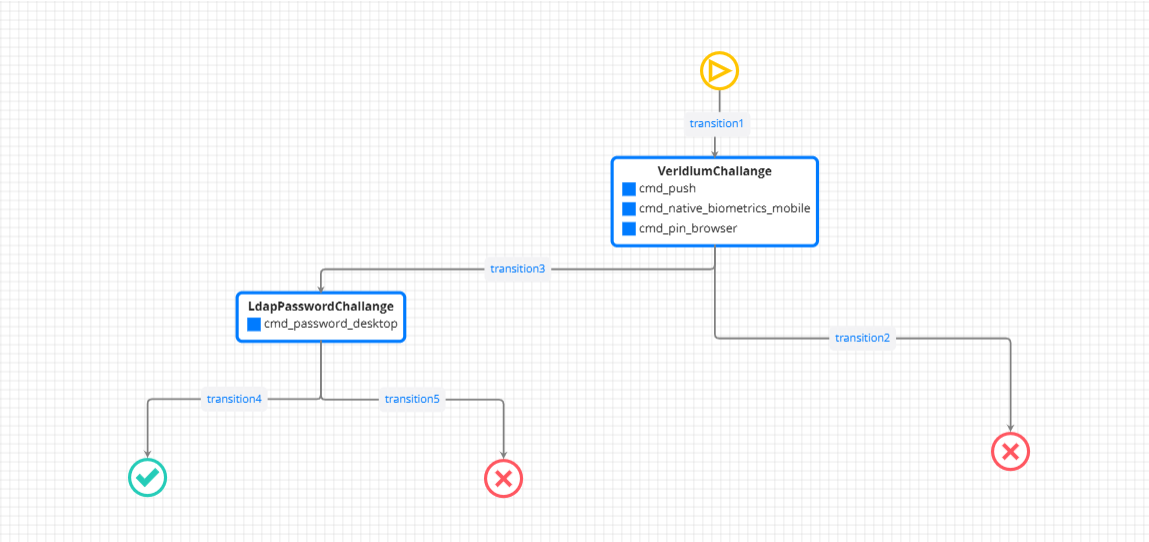
In these cases, the authentication flow should be set up as follows:
-
First authentication factor: a Veridium-specific method
-
Second authentication factor: the user’s LDAP password
The journey must include the cmd_password_desktop command, which is designed specifically for this type of flow. This command should be placed as the second-step challenge.
Control Panel Configuration
In the Windows registry, configure the following keys:
Computer\HKEY_LOCAL_MACHINE\SOFTWARE\VeridiumID\VeridiumAD
    RA_URL = (leave empty)
    WriteCertificateToUserStore = 0
Even with this configuration—without an RA—the offline mode function will still work properly.
Journey example: