

VeridiumID for Active Directory enhances the security of Windows client machines by integrating Multi-Factor Authentication (MFA) methods, such as TouchID (iPhone), Fingerprint (Android), and Veridium 4 Fingers TouchlessID, with primary authentication through Microsoft Active Directory. This solution supports both physical and virtual domain-joined desktops and laptops, providing a robust and user-friendly authentication experience.
The following diagram illustrates the basic architecture of VeridiumID Active Directory Integration:
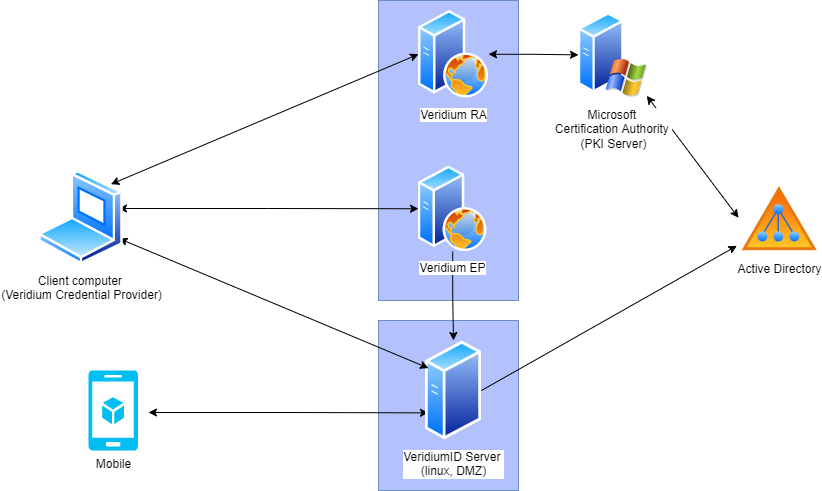
Component Descriptions:
-
Credential Provider (Windows Plugin):
-
This Windows plugin allows users to authenticate using VeridiumID's various authentication methods. It integrates seamlessly with the Windows login process.
-
-
Veridium Mobile App:
-
The mobile application enables authentication through QR code scanning, push notifications, or Time-based One-Time Passwords (TOTP).
-
-
VeridiumID Server:
-
This is the core component of the VeridiumID solution.
-
It manages security configurations, the database, and controls each authentication session.
-
Hosted on Linux and typically placed in a Demilitarized Zone (DMZ), it is accessible both internally and externally.
-
It requires connectivity to Active Directory (LDAP) to retrieve user information.
-
-
Veridium EP (Enrollment Proxy):
-
This component is responsible for enrolling device certificates to domain-joined computers.
-
During startup, the computer requests a device certificate through the
bopslogonservice. -
Veridium EP verifies the request and forwards it to the internal Certificate Authority (CA) on the VeridiumID Server.
-
The resulting certificate is used by the Credential Provider to authenticate calls to the VeridiumID Server.
-
-
Veridium RA (Registration Authority):
-
This component facilitates communication with the Microsoft CA.
-
After successful authentication on the VeridiumID Server, the Credential Provider requests the Veridium RA to enroll a user certificate.
-
The certificate is enrolled by the Microsoft CA.
-
The resulting user certificate is presented to the Domain Controller to authenticate the user.
-
Workflow Summary:
-
User Authentication: Users initiate a login attempt on their Windows client machine.
-
Credential Provider Interaction: The Credential Provider prompts the user for authentication using VeridiumID methods.
-
Mobile App Authentication: Users authenticate using the Veridium mobile app (QR, push, TOTP).
-
VeridiumID Server Validation: The VeridiumID Server validates the authentication.
-
Device Certificate Enrollment (EP): The Veridium EP enrolls a device certificate for the client machine.
-
User Certificate Enrollment (RA): The Veridium RA enrolls a user certificate from the Microsoft CA.
-
Domain Controller Authentication: The user certificate is presented to the Domain Controller for login.
Key Benefits:
-
Enhanced Security: Multi-factor authentication strengthens security by requiring multiple verification methods.
-
Improved User Experience: Passwordless and biometric authentication options simplify the login process.
-
Seamless Integration: VeridiumID integrates smoothly with existing Active Directory infrastructure.
-
Flexible Deployment: Supports both physical and virtual desktop environments.
Important Considerations:
-
Ensure proper network connectivity between all components.
-
Configure appropriate firewall rules to allow necessary communication.
-
Maintain up-to-date versions of all VeridiumID components.