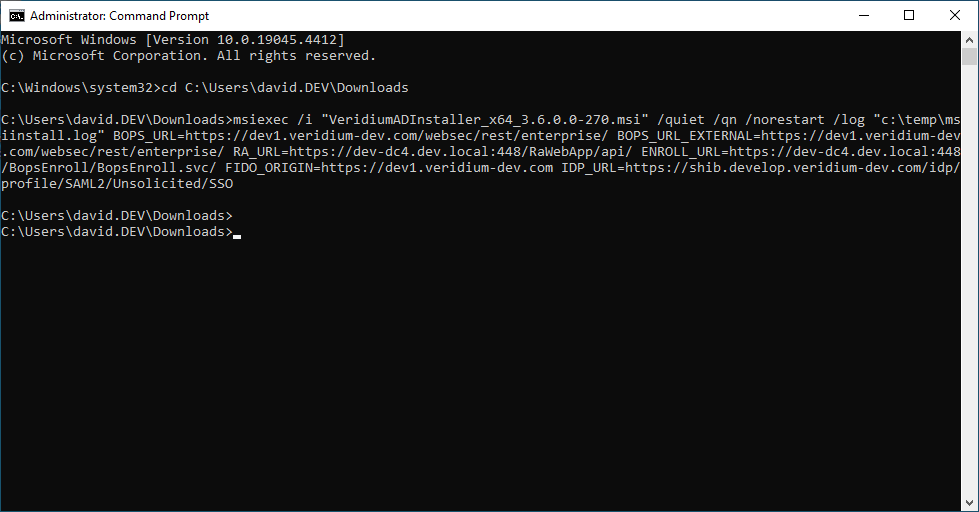
Veridium CP can be installed without user interaction, using the following command:
The following parameters are required:
BOPS_URL=<Veridium Server WebSec URL - Internal>
BOPS_URL_EXTERNAL=<Veridium Server WebSec URL - External>
RA_URL=<Veridium RA Server URL>
ENROLL_URL=<Veridium EP Server URL>
FIDO_ORIGIN=<Veridium FIDO Origin HRL>
IDP_URL=<can stay empty now>
Procedure:
-
Start CMD as Admin and Enter:
msiexec /i "VeridiumADInstaller_x64_3.6.0.0-270.msi" /quiet /qn /norestart /log "c:\temp\msiinstall.log"
BOPS_URL=https://dev1.veridium-dev.com/websec/rest/enterprise/
BOPS_URL_EXTERNAL=https://dev1.veridium-dev.com/websec/rest/enterprise/
RA_URL=https://dev-dc4.dev.local:448/RaWebApp/api/
ENROLL_URL=https://dev-dc4.dev.local:448/BopsEnroll/BopsEnroll.svc/
FIDO_ORIGIN=https://dev1.veridium-dev.com
IDP_URL=https://shib.develop.veridium-dev.com/idp/profile/SAML2/Unsolicited/SSO
All parameters need to be on one line: