

Enabling consists from following steps:
Active Directory
-
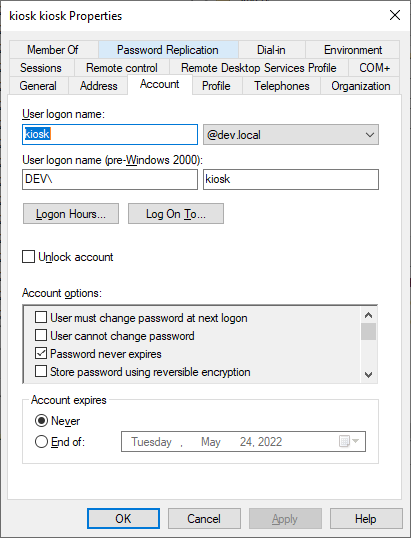
Start Active Directory Users and Computers and create Kiosk account.
-
Set properties, that Kiosk account's password never expires.
VeridiumRA
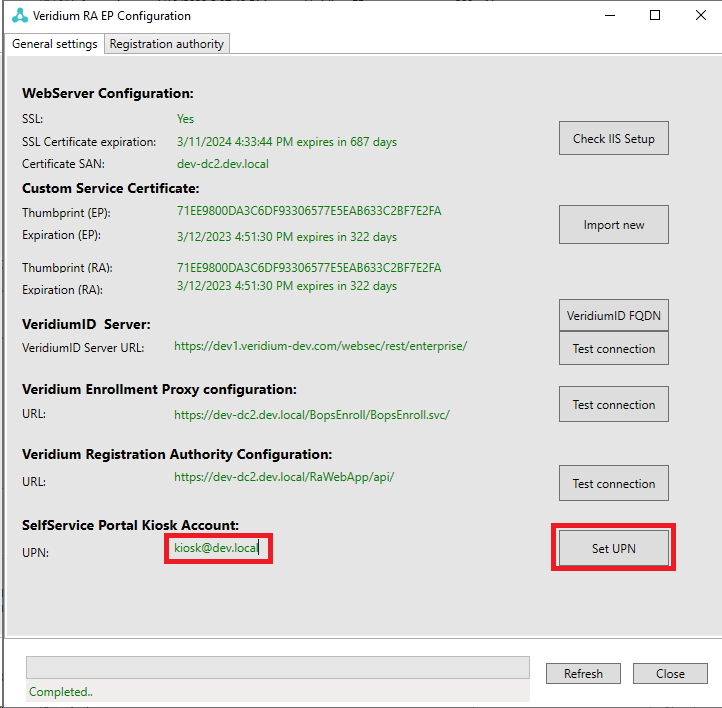
Go to Veridium RA and set userPrincipalName (UPN) of the newly created Kiosk account:
Credential Provider
On a client machine, start regedit.exe and make sure following registry key is set:
[HKEY_LOCAL_MACHINE\SOFTWARE\VeridiumID\VeridiumAD]
"EnableOrchestratorSSP"=dword:00000001
"KIOSK_Account"="kiosk"
than logon as a kiosk account and import following registry key:
[HKEY_CURRENT_USER\Software\Microsoft\Windows NT\CurrentVersion\Winlogon]
"Shell"="\"C:\\Program Files\\VeridiumID\\VeridiumAD\\VLogonBrowser\\VLogonBrowser.exe\" kiosk ssp"
Now you are ready to use Self Service Portal from Credential Provider.