Introduction:
Veridium Manager's User Behavior Analytics (UBA) Context now includes a feature to designate specific countries as "forbidden" for user authentications. This allows administrators to enhance security by flagging authentication attempts originating from potentially high-risk locations. This document explains how to configure forbidden countries and the impact on UBA scoring.
Purpose:
The "List of forbidden countries for a tenant" setting enables administrators to:
-
Identify and monitor authentication attempts from designated high-risk countries.
-
Improve security posture by leveraging UBA to detect potentially suspicious activity.
-
Gain insights into authentication patterns and potential security threats through UBA scoring.
Configuration Location:
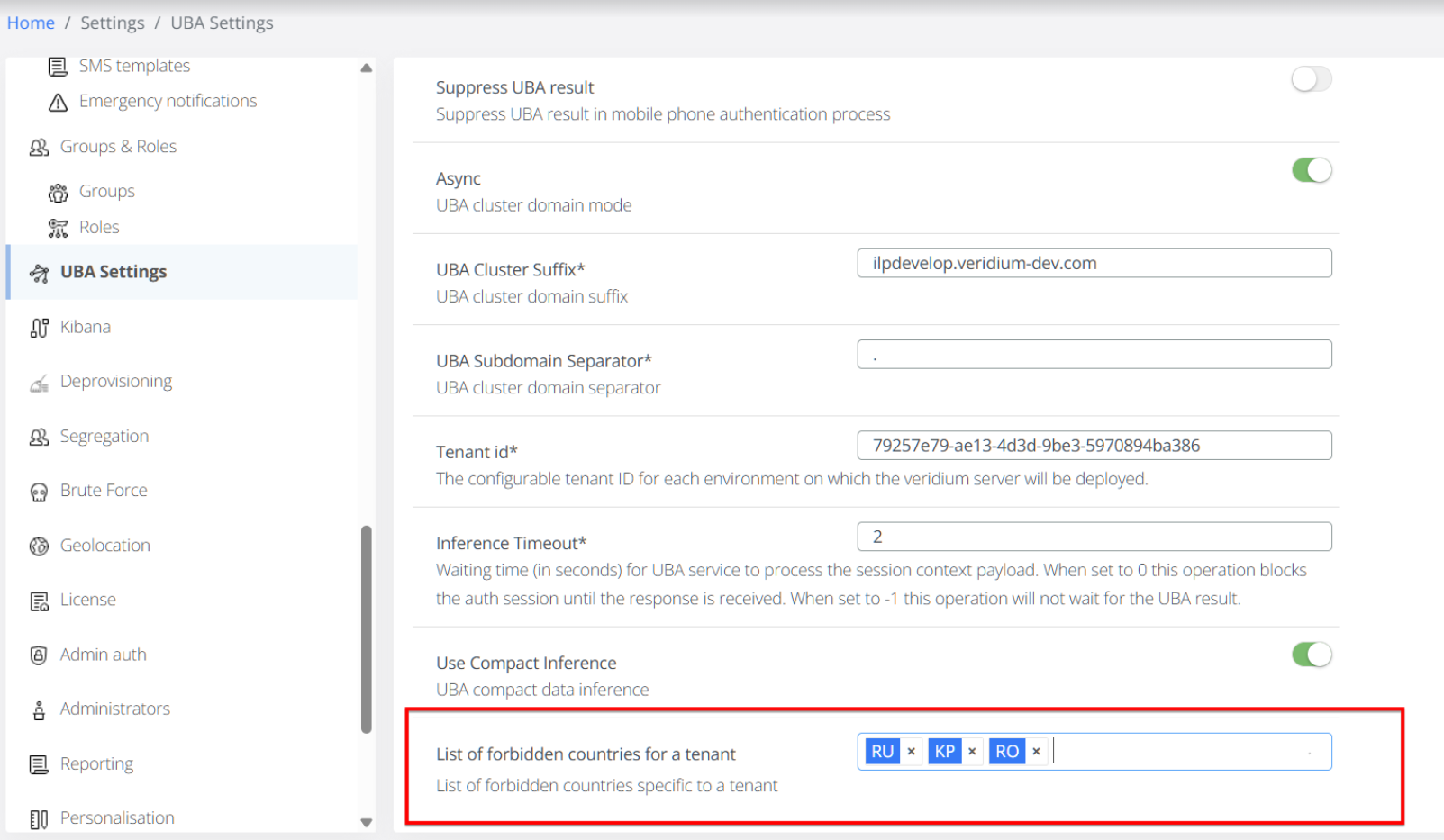
The "List of forbidden countries for a tenant" setting is located Settings / Uba Settings.
Configuration Details:
-
Setting Name: "List of forbidden countries for a tenant"
-
Data Format: The setting uses ISO-3166 standard country codes.
-
Configuration File: The setting is also represented by the parameter
"listOfForbiddenCountries"within theconfig.jsonfile. -
Example:
"listOfForbiddenCountries": [ "RU", "KP", "RO" ]
Configuration Process:
-
Admin UI:
-
Within the "UBA Settings" page, enter the desired ISO-3166 country codes into the provided field.
-
Save the changes.
-
-
config.json (Advanced):
-
Directly edit the Settings / Advanced /
config.jsonfile, updating the"listOfForbiddenCountries"parameter with the desired country codes. -
Save the changes.
-
-
API Update:
-
When the list is updated, the system will automatically call the existing UBA API endpoint
updateTenantPropertieswith the new list of forbidden countries.
-
Functional Impact on UBA:
-
The "List of forbidden countries" acts as a new UBA criteria, similar to other factors used in UBA scoring.
-
Authentication attempts from a forbidden country will negatively impact the user's UBA score.
-
The system will display the reason "ACTIVITY_FROM_FORBIDDEN_COUNTRY" in the session details for those authentications.
-
If a user performs multiple authentications from a forbidden country, the UBA system will learn the users behaviour, and over time will consider it valid, and the UBA score will return to a green score.
-
Administrators can monitor UBA scores and alerts from the dashboard to identify potentially suspicious activity.
Example Scenario:
-
If "RO" (Romania) is included in the list of forbidden countries, and a user attempts to authenticate from Romania, their UBA score will lead to rejection (and as a consequence a second authentication method will be asked from user as a safe measure)
-
The session details will include the "ACTIVITY_FROM_FORBIDDEN_COUNTRY" reason.
Important Considerations:
-
Use accurate ISO-3166 country codes to ensure proper functionality.
-
Regularly review and update the list of forbidden countries based on evolving security threats.
-
Understand that UBA is a learning system, and repeated logins from forbidden countries will eventually be considered normal activity.
Troubleshooting:
-
Forbidden country authentications are not being flagged:
-
Verify that the country codes are entered correctly in the "UBA Settings" or
config.json. -
Ensure that the UBA service is functioning correctly.
-
-
Incorrect UBA scoring:
-
Remember that UBA is a learning system, and repeated activity will adjust the scoring.
-
Review the UBA score reasons in the session details for more information.
-