

Starting in 3.8, users who rely on the Veridium PIN method can now unlock their mobile devices even when no network is available. PIN data is pre-synchronized from the server and stored in hardware-protected storage, removing the previous requirement for constant connectivity.
Previously, Veridium PIN authentication required a constant connection to Veridium services for validation, limiting its use in scenarios without connectivity, such as offline Windows Logon where native biometrics are unavailable. With this update, we've addressed this limitation to provide a more flexible and robust authentication experience.
Key Features & Configuration
-
Opt-in capability – administrators can enable or disable offline PIN use in the PIN authentication policy.
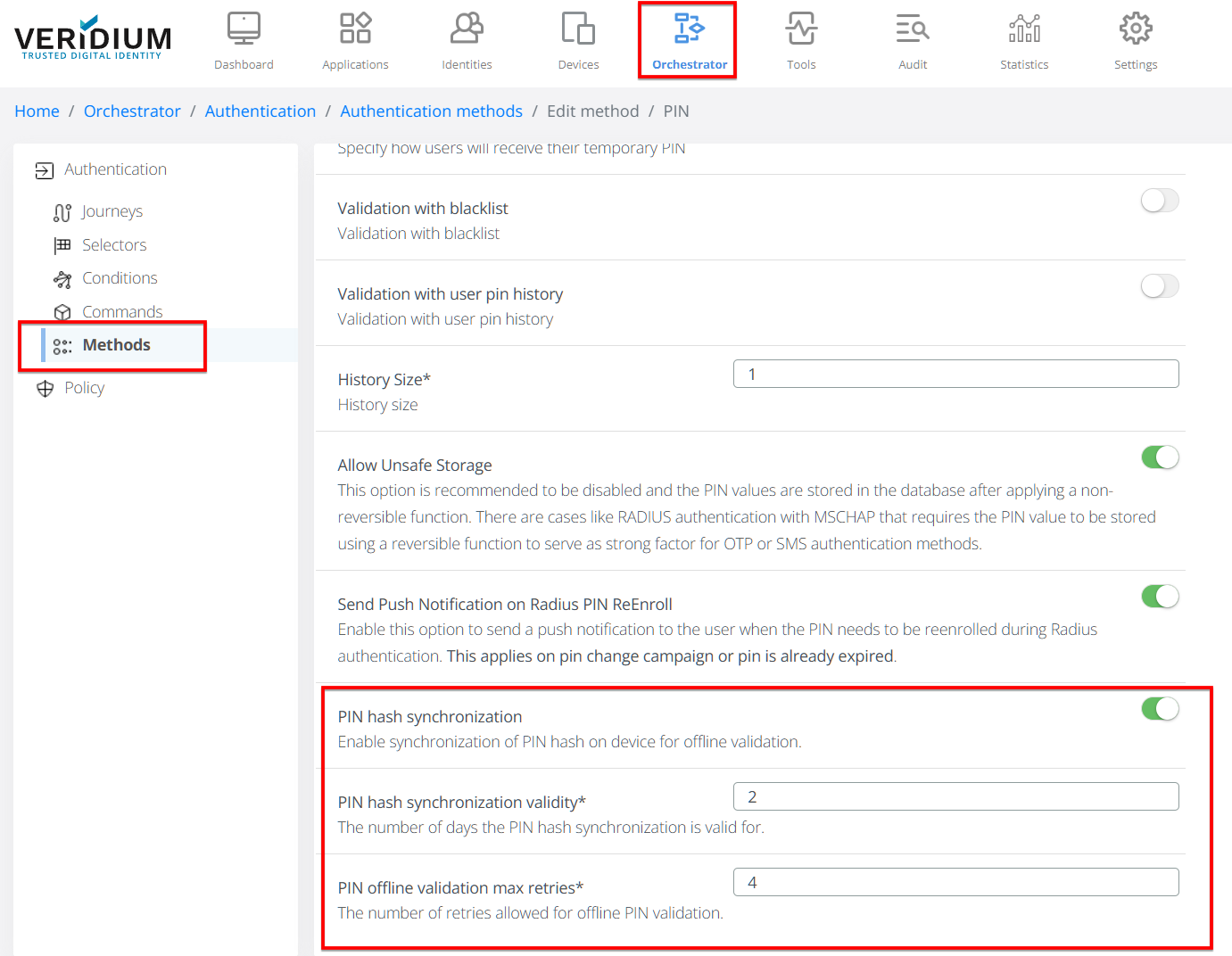
-
Offline method availability – a time-to-live (TTL) value defines how long the cached PIN remains valid. Set PIN hash synchronization validity to 0 to disable offline use.
-
Automatic refresh – the mobile application synchronizes the PIN in the following scenarios:
– the TTL is about to expire (background refresh)
– the user changes the PIN (silent push to all enrolled devices)
– the policy is updated on the server
Usecases
The PIN offline verification may be applied for the following use-cases:
-
Authenticate the session for Windows Logon on VeridiumID Credential Provider while having an offline mobile device - no connection between VeridiumID Mobile application and VeridiumID services.
-
As user verification method for Passkeys.
Security Model
-
Mutual key agreement
• Mobile app and server perform an Elliptic-Curve Diffie–Hellman exchange.
• Each side signs its public key with the credential key created during PIN enrollment. -
Encrypted delivery
• The derived shared secret is stretched with HKDF to an AES-256 key.
• Server encrypts the PIN hash and salt and returns them to the client. -
Secure storage
• The encrypted blob is stored inside the OS keychain (TEE/Secure Element).
• Server stores only a PBKDF2 hash of the PIN; the clear PIN is never retained.
Verification Flow
-
User enters the PIN.
-
App runs PBKDF2-HMAC-SHA256 with the cached salt.
-
Result is compared to the cached hash.
-
If the TTL has expired or the number of failed attempts exceeds the policy limit, offline authentication is rejected and an successful online verification is required. This lockout mechanism protects the PIN against brute force attacks
Account Lockout
For added security, if an incorrect PIN is entered multiple times (configured by server-side settings), the PIN authentication method will lock out indefinitely.
To unlock your PIN:
-
Successfully authenticate online using your PIN.
-
Reset your PIN via the mobile application or self-service portal.
-
Have an administrator reset your PIN.