

PREREQUIREMENTS:
-
It is important to have a separate mounted volume, /vid-app and to have sufficient space -100Gb minimum, in this location on each node.
-
It is necessary to have already deployed the VeridiumID persistence servers.
These packages need to be preinstalled on ILP and VeridiumID persistence machines:
## install on ILP
yum -y install java-17-openjdk bc chrony logrotate libffi-devel bzip2-devel xz-devel openssl-devel pcre-devel systemd-devel zlib-devel dmidecode curl unzip wget rsync net-tools jq rng-tools python3-pip python3-pyyaml python3-jinja2 make gcc

## install on VeridiumID persistence:
yum -y install bc python3-pyyaml python3-jinja2 libffi-devel dmidecode curl unzip wget rsync net-tools jq rng-tools make gcc
1) Download UBA installer on the machine we want to start the installation.
Please check if you have enough space (df -h). The zip file has 5.8GB and uncompressed 7.9GB.
TMP_DEST="/vid-app/install277"
##in case does not exists, please create the folder and assign ownership on this folder to deployment user:
sudo mkdir -p $TMP_DEST && sudo chown $(whoami):$(whoami) $TMP_DEST && sudo chmod 755 $TMP_DEST
## ILP is installed under /vid-app folder, that should be mounted and there should be at lease 100Gb on Webapp and also on persisntence.
wget -P $TMP_DEST --user nexusUser --password nexusPassword https://veridium-repo.veridium-dev.com/repository/UBAInstallerOnPrem/2.7.7/uba-onprem-installer-2.7.7.zip
unzip ${TMP_DEST}/uba-onprem-installer-2.7.7.zip -d ${TMP_DEST}
2) Generate a ssh key to do the installation:
##On the server, where the installation is started, generate a ssh key and copy it to all servers
ssh-keygen
cat ~/.ssh/id_rsa.pub
vi ~/.ssh/authorized_keys
3) Configure variable file (only modified the following values):
vi ${TMP_DEST}/uba-onprem-installer/variables.yaml
SSH_USER: <the user for which you have generated the ssh key>
WEBAPP_CONTACT_POINTS: IP1,IP2
PERSISTENCE_CONTACT_POINTS: IP3,IP4,IP5
# if the certifiate is for domain: *.ilp.veridium-dev.com, this should be the format in the document:
CLUSTERSUFFIX: ilp.veridium-dev.com
DOMAINSEPARATOR: "."
# take the datacenter name from nodetool status, from cassandra
CASSANDRA_DATACENTER: "dc1"
UBA_VERSION: "2.7.7"
4) Start the installation process:
cd ${TMP_DEST}/uba-onprem-installer
# check if the prereq are installed
./check_prereqs.sh
# start the installation process
./uba-installer.sh
## after the installation, please run below command on UBA Webapp and VeridiumId persistence nodes, to be sure that everything is successfully installed:
sudo bash /opt/veridiumid/uba/scripts/uba_check_services.sh
5) Generate a tenant for veridiumid-server, with a random uuid (ONE TIME).
chown veridiumid.veridiumid -R /vid-app/ilpdata/
# connect as veridiumid user:
sudo su - veridiumid
TMP_DEST="/vid-app/install277"
# use the `uuidgen` as parameter for the following script (if case of non-cdcr deployments)
bash ${TMP_DEST}/uba-onprem-installer/generate_tenant_platform.sh `uuidgen`
# use the `uuidgen` as parameter for the following script (if case of cdcr deployments)
bash ${TMP_DEST}/uba-onprem-installer/generate_tenant_platform_cdcr.sh `uuidgen`
If you already have a tenant ID, you can run the script with it directly instead of generating a new one:
# connect as veridiumid user:
sudo su - veridiumid
TMP_DEST="/vid-app/install277"
# use the tenantId as parameter for the following script (if case of non-cdcr deployments)
bash ${TMP_DEST}/uba-onprem-installer/generate_tenant_platform.sh <your-tenant-id>
# use the tenantId as parameter for the following script (if case of cdcr deployments)
bash ${TMP_DEST}/uba-onprem-installer/generate_tenant_platform_cdcr.sh <your-tenant-id>
To test if the initialisation was successfully, go to a persistence-node, in cqlsh and check the following tables if they have data:
use uba;
expand on;
select * from tenants;
# should contain one entry, the tenant we registered
select * from global_model_latest_with_tenant;
# should contain one entry, the global context model
select count(1) from features_ordered_by_time;
# should contain 100+ entries, wait until the count doesn’t change then start doing authentications
-
optional - Configure the integration of veridiumid-server with UBA cluster:
You should configure the following entries in the main load-balancer to balances traffic to the two UBA webapp machines. Example configuration for a HAProxy balancer:
frontend uba_webapp_443
    bind *:443
    mode tcp
    tcp-request inspect-delay 5s
    tcp-request content accept if { req_ssl_hello_type 1 }
    use_backend backend_uba
backend backend_uba
    mode tcp
    balance leastconn
    stick match src
    stick-table type ip size 1m expire 1h
    option ssl-hello-chk
    option tcp-check
    tcp-check connect port 443
    server webappserver1 10.203.90.3:443 check id 1
    server webappserver2 10.203.90.4:443 check id 2
Where 10.203.90.3 is the IP of UBA machine1 and 10.203.90.4 is the IP of UBA machine2.
7) Integration the UBA with VeridiumID application
On the webapp machines of veridiumid-server (on each machine), we need to add the following lines in /etc/hosts file, where the IP is the load balancer IP in front of ILP services or directly one ILP webapp node.
## edit /etc/hosts
10.203.90.3 tenant.ilp.veridium-dev.com
10.203.90.3 ingestion.ilp.veridium-dev.com
10.203.90.3 users.ilp.veridium-dev.com
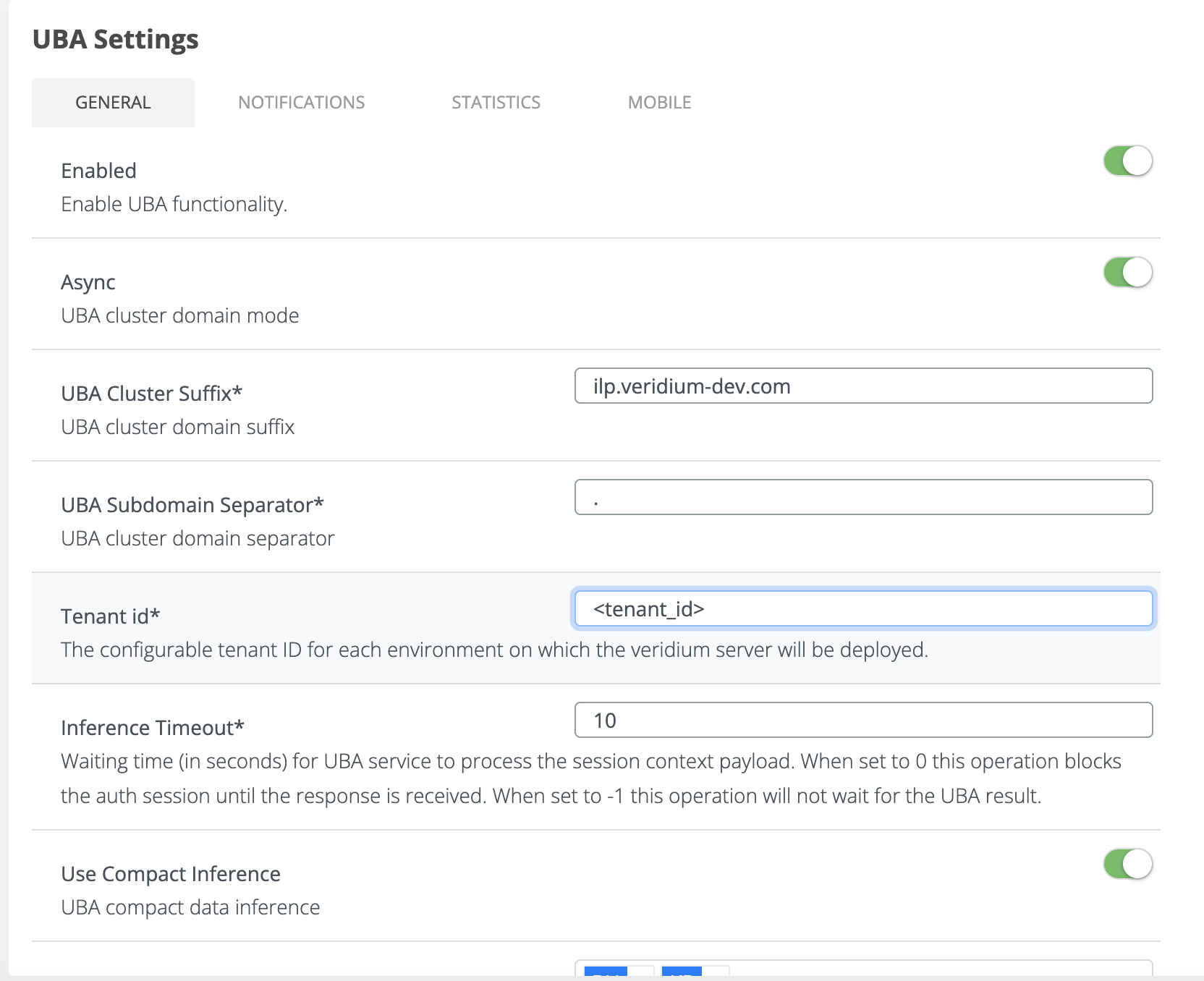
7.1) Login to WebSecAdmin go to Settings → ILP Settings and config as per below example
-
Enabled: (ON)
-
UBA CLUSTER SUFFIX: in our case will be “
CLUSTERSUFFIX" from variables.yaml -
UBA Subdomain Separator: in our case will be “
DOMAINSEPARATOR“ from variables.yaml -
Tenant Id*: in our case will be your tenant id or the uuid you generated in step 5.
-
Use Compact Inference: (ON)
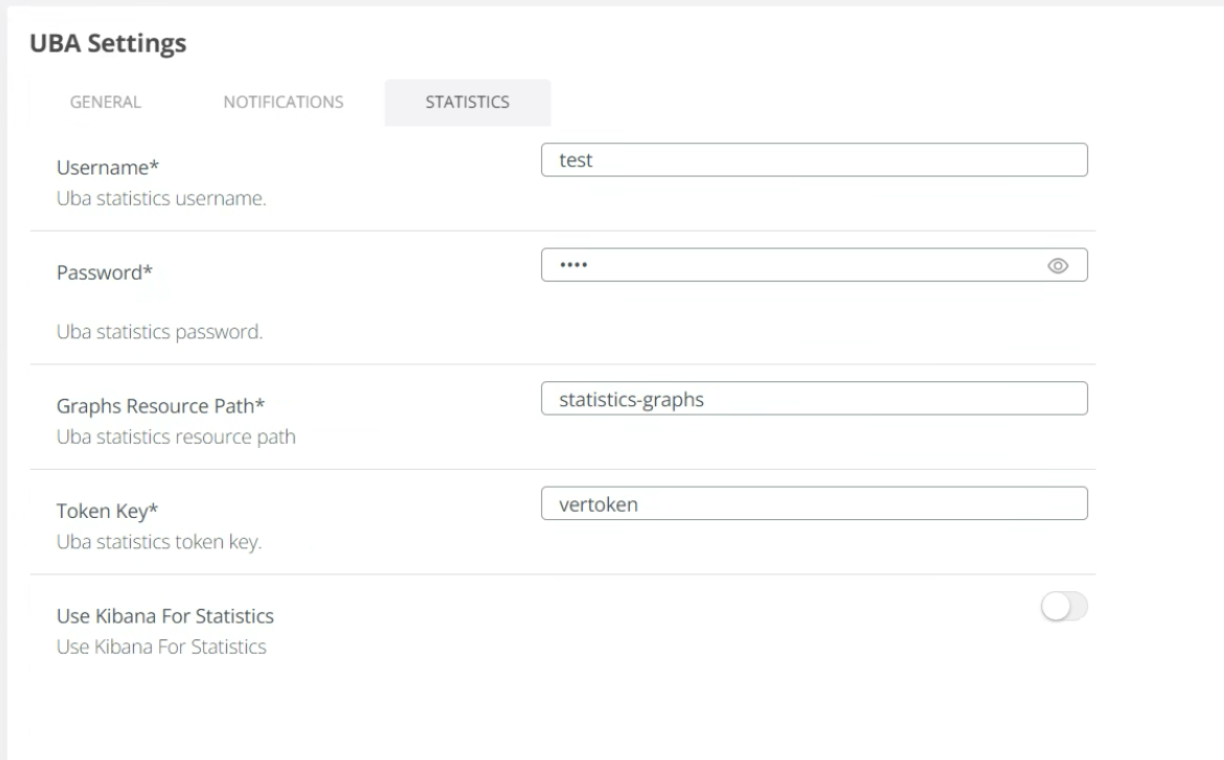
Set an username and a password in Statistics section - this is a bug that this fields are mandatory. Please setup a dummy value, as are not used anymore.
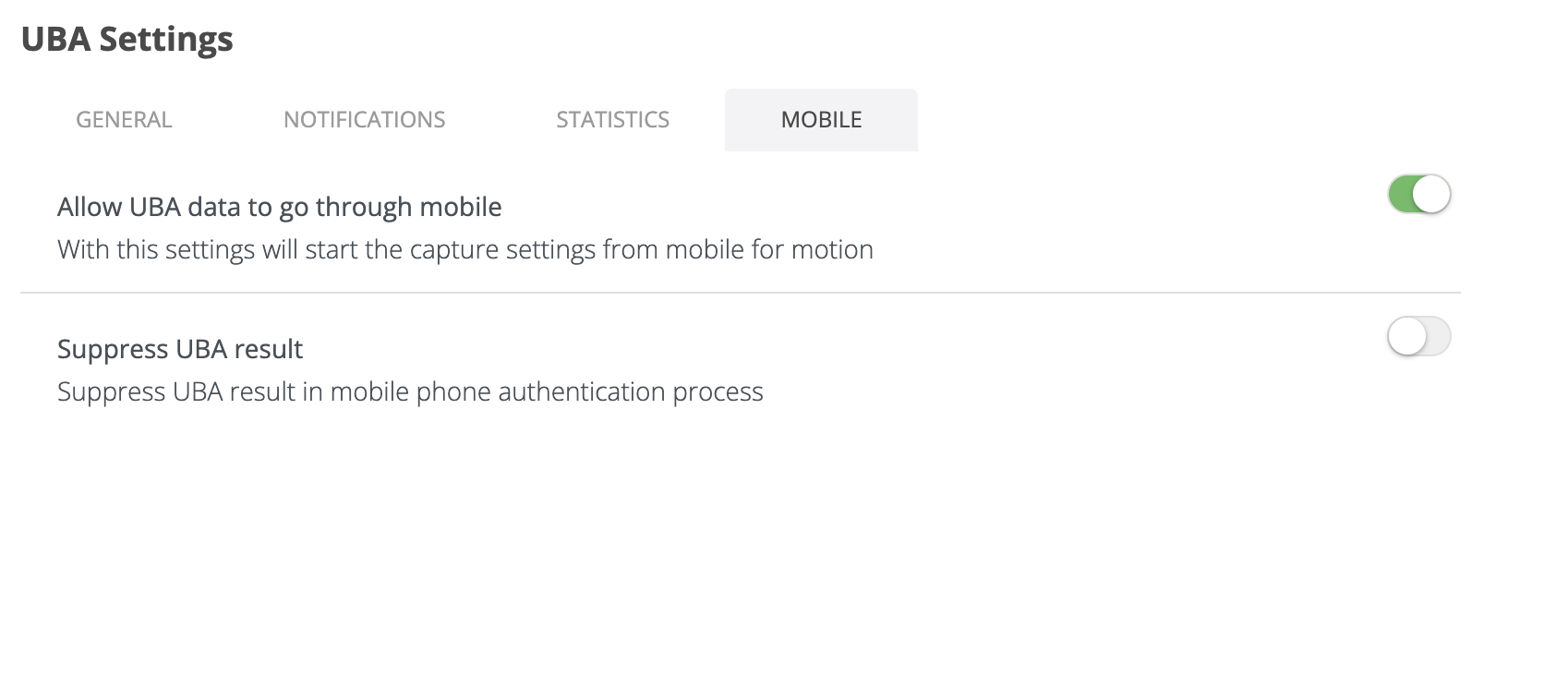
Set Allow UBA data to go through mobile → ON
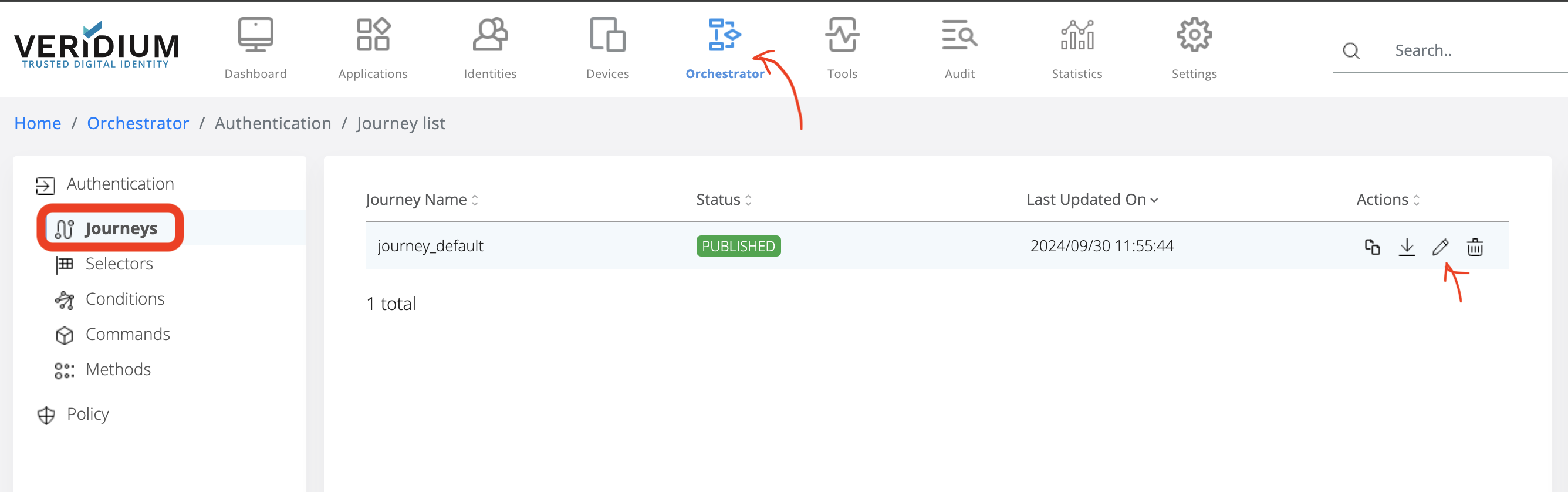
7.2) Check in the journey you are using if uba_command_motion and uba_command_context are enabled.
-
Click on Orchestator
-
Click on Journeys
-
In the Journey Name, select the active one and click on Edit button:
Check if uba_command_motion and uba_command_context are in the Challenge section:
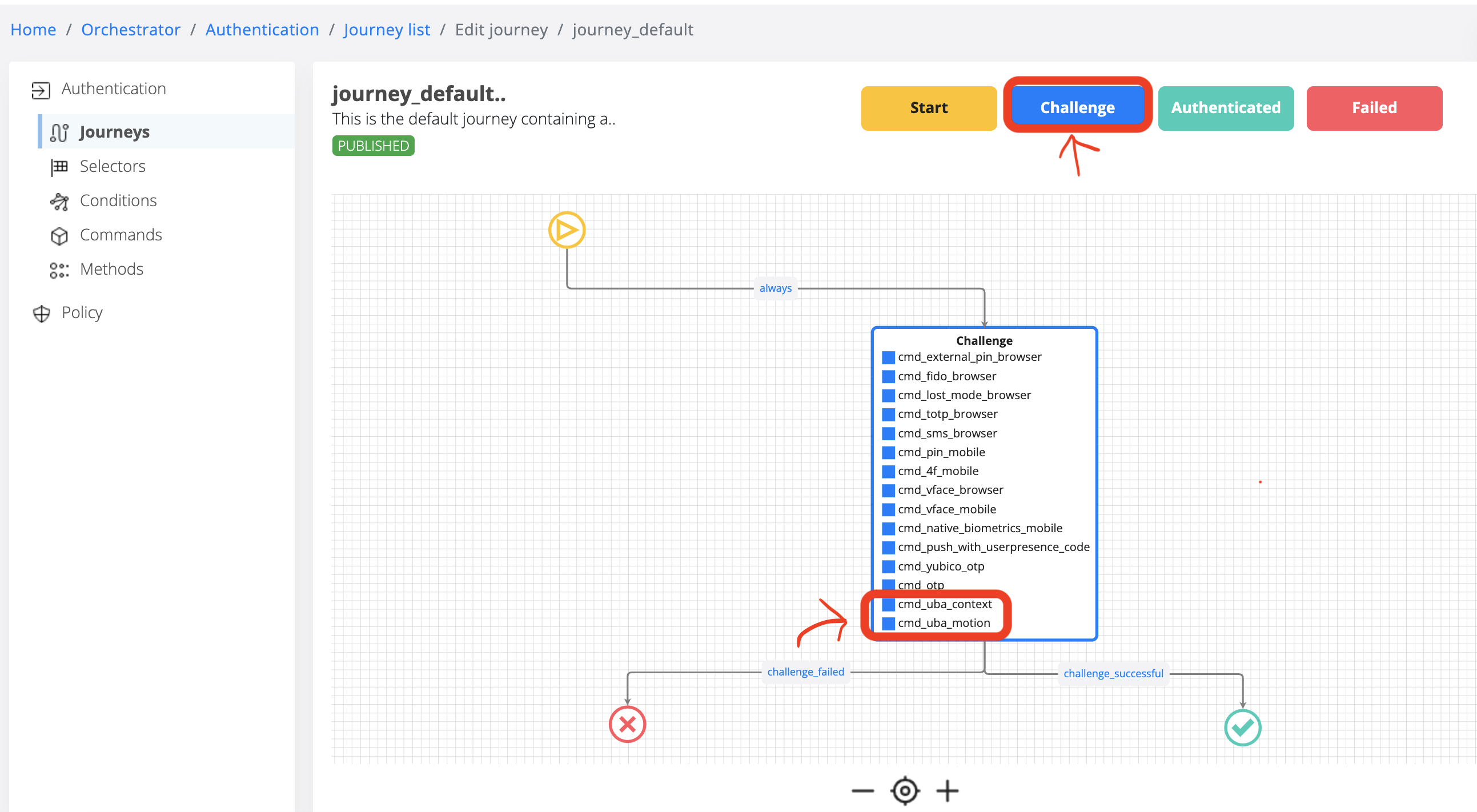
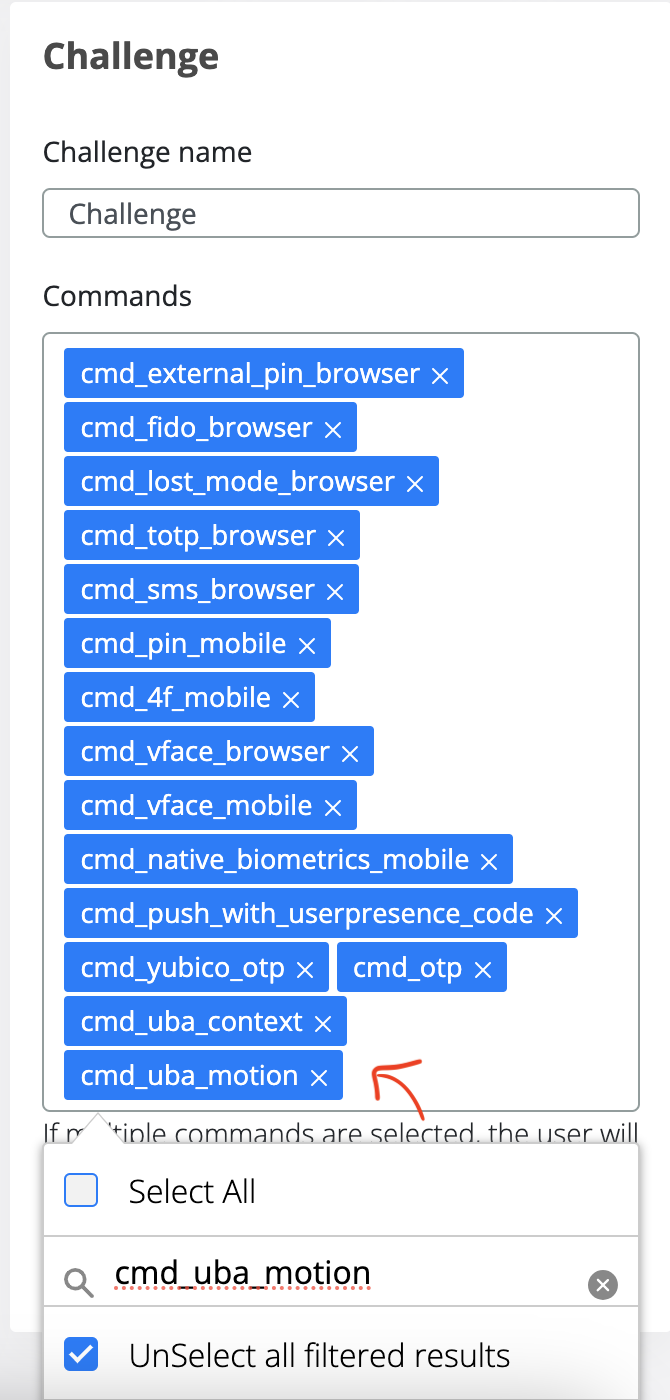
If uba_command_motion and uba_command_context are not enabled, please add in the Commands section and Save.
7.3) Configure proxy (if you are using one - OPTIONAL) in WebsecAdmin (Settings → Advanced → proxy-config.json) to maintain the traffic internally (where ilpdevelop.veridium-dev.com is the domain you are using for UBA)
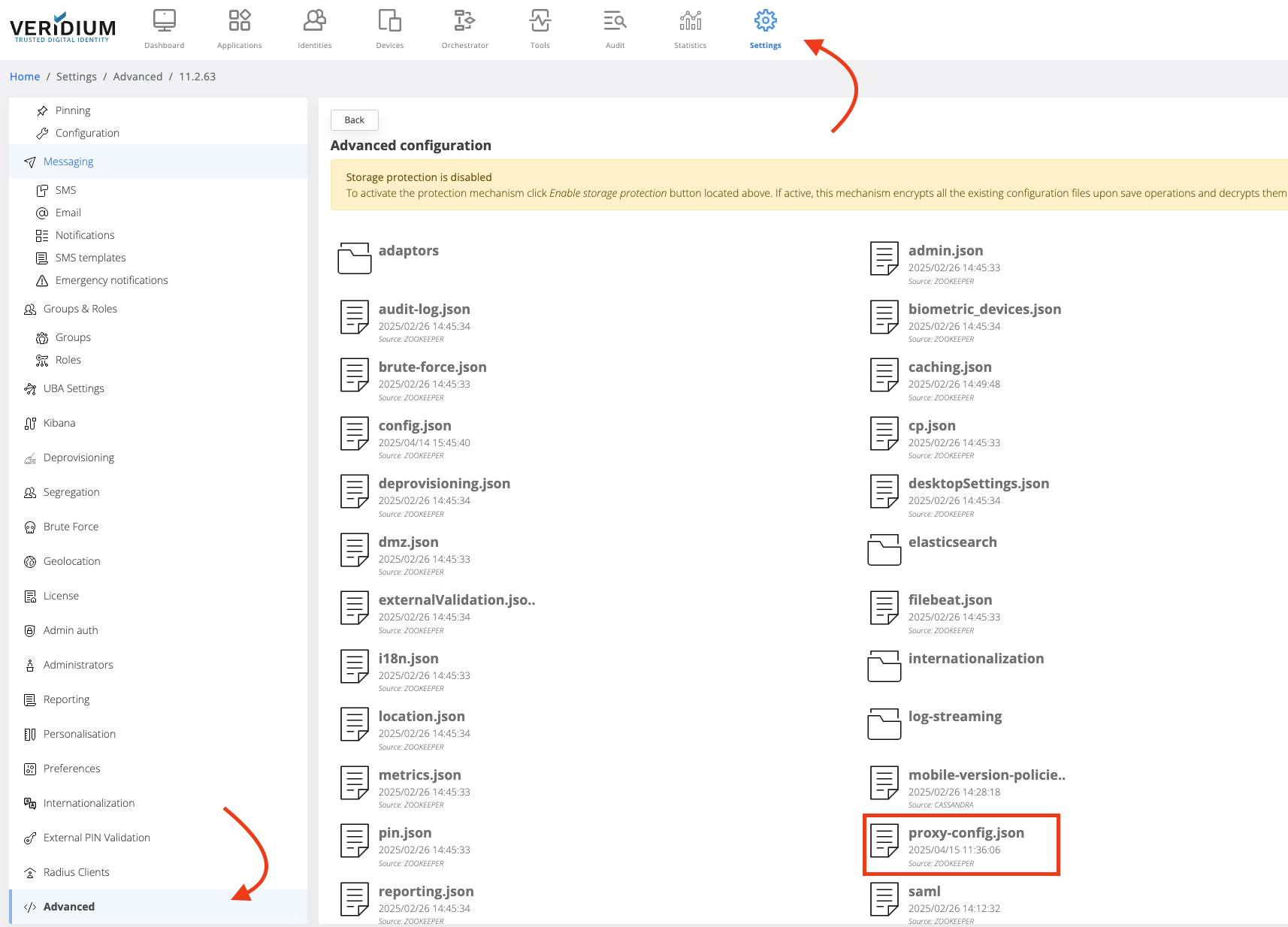
## proxy-config.json, such an entry, to keep the traffic internally
"nonProxyHttpsHosts": "localhost|ilpdevelop.veridium-dev.com|api.twilio.com|*ilpdevelop.veridium-dev.com|*.ilpdevelop.veridium-dev.com"
7.4) restart tomcat:
systemctl restart ver_tomcat
7.5) Go to SSP Login Page and do 11 logins and you will see score for Motion / Content in Activity. After 4 authentications you should receive a context score, and after 11 authentications you should receive a motion score as well.
Useful commands for troubleshooting
Start/stop services:
## run the following command to see if everything is running:
uba_check_services
## check if kafka is running:
uba_check_kafka
## stop/start UBA services:
uba_stop
uba_start
## stop/start a specific service (e.g.: uba-kafka)
systemctl stop uba-kafka
systemctl start uba-kafka
Log location
## veridium logs on Webapp VeridiumId servers
/var/log/veridiumid/tomcat/bops.log
## uba logs location on ILP nodes
/var/log/veridiumid/uba/<service_name>.log
##
grep DURATION /var/log/veridiumid/tomcat/bops.log
grep SESSION_ID /var/log/veridiumid/tomcat/bops.log
Troubleshooting commands:
## run this on Webapp VeridiumId servers
ping tenant.FQDN
## check connectivity
nc -zv tenant.FQDN 443
## curl
export https_proxy=""
curl https://tenant.FQDN:443
If you want to run UBA on the same machine as VeridiumID, you should edit the haproxy config using these commands:
vi /etc/veridiumid/haproxy/haproxy.cfg
frontend frontend-https
        bind *:443
        mode tcp
        ...
        ...
        use_backend backend_uba if { req_ssl_sni -i ingestion.dev58.veridium-dev.com }
        use_backend backend_uba if { req_ssl_sni -i tenant.dev58.veridium-dev.com }
        use_backend backend_uba if { req_ssl_sni -i users.dev58.veridium-dev.com }
backend backend_uba
     mode tcp
     server uba_frontend 127.0.0.1:6443
frontend ingestion
    bind 127.0.0.1:6443 ssl crt /etc/veridiumid/haproxy/server.pem alpn h2,http/1.1
    mode http
    acl uba_ingestion ssl_fc_sni -i ingestion.dev58.veridium-dev.com
    acl uba_tenant ssl_fc_sni -i tenant.dev58.veridium-dev.com
    acl uba_users ssl_fc_sni -i users.dev58.veridium-dev.com
    use_backend backend_uba_web_ingestion if uba_ingestion
    use_backend backend_uba_web_tenant if uba_tenant
    use_backend backend_uba_web_users if uba_users
backend backend_uba_web_ingestion
    balance roundrobin
    server server1 127.0.0.1:8220 check id 1 proto h2
backend backend_uba_web_tenant
    balance roundrobin
    server server1 127.0.0.1:8120 check id 1 proto h2
backend backend_uba_web_users
    balance roundrobin
    server server1 127.0.0.1:8200 check id 1 proto h2
sudo systemctl restart ver_haproxy