Veridium RA allows integration with EJBCA since version 3.6.1.
EJBCA integration configuration consists from following components:
-
EJBCA Certification authority configuration
-
EJBCA Certificate profile configuration
-
EJBCA End Entity profile configuration
Configuration on Veridium RA needs to be done manually on
C:\Program Files\VeridiumID\RAEPServer\RaWebApp\web.config
The following custom attributes are required to integrate with EJBCA:
|
Key |
Description |
|---|---|
|
bopsRootURL |
VeridiumID server base root URL |
|
friendCertificateThumbprint |
Thumbprint of VeridiumID Friend certificate |
|
CAType |
for EJBCA needs to be set to "KeyFactor" |
|
KeyFactorCAURL |
Base URL of EJBCA. |
|
KeyFactorAuthenticationThumbprint |
Certificate thumbprint of KeyFactor CA. Certificate needs to be available in Local Computer context. |
|
KeyFactorCertificateProfileName |
EJBCA Certificate Profile name |
|
KeyFactorEndEntityProfileName |
EJBCA End Entity Profile name |
|
UserCertKeyName |
Friendly name of resulting User cert |
|
KeyFactorCAName |
EJBCA Certification Authority name |
|
KeyFactor_Subject_O |
Organization of resulting user certificate DN |
|
KeyFactor_Subject_C |
Country of resulting user certificate DN |
|
jwtSigningKey |
Base64 Signing certificate.. |
Example of the values:
<add key="bopsRootURL" value="https://dev1.veridium-dev.com/websec" />
<add key="friendCertificateThumbprint" value="3AADD530CCBB14B258F9AD204E96DE4D547F595" />
<add key="CAType" value="KeyFactor" />
<add key="KeyFactorCAURL" value="https://ejbca.dev.local:8443" />
<add key="KeyFactorAuthenticationThumbprint" value="3fc34dd3413006bde2c5bb5fdc2814e42fbdb2a7" />
<add key="KeyFactorCertificateProfileName" value="VERIDIUMMS" />
<add key="KeyFactorEndEntityProfileName" value="MSSmartCardLogon" />
<add key="UserCertKeyName" value="VeridiumUser" />
<add key="KeyFactorCAName" value="MSVeridiumCA" />
<add key="KeyFactor_Subject_O" value="Veridium" />
<add key="KeyFactor_Subject_C" value="COM" />
Configuration verification
For testing set valid UPN of user to the follwing key:
<add key="SelfServiceUPN" value="username@dev.local" />
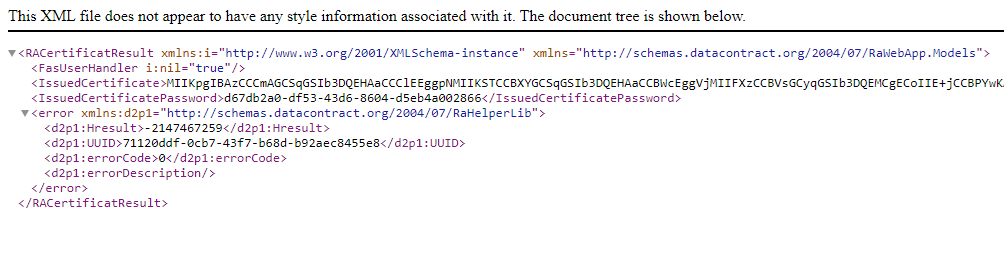
and call following URL in the browser: https://<RA server FQDN>/RaWebApp/api/BopsCertificate/
and the following answer is expected: